Automation • Professional
How Do I Keep Customers Informed Without Ringing Them?
The on-the-way text. The running-late message. The new time after a reschedule. The welcome email. Four messages every customer wants and no busy business reliably sends — unless software sends them. AxiomBlue does, triggered by the job events themselves.
Quick answerAutomated customer notifications send the messages customers actually want — on our way, running late, your new booking time — triggered by real job events instead of someone remembering to ring. AxiomBlue ships them as ready-made templates (Job On-the-Way SMS, running-late and reschedule notices, and a new-customer welcome email) on the Professional plan, $59 AUD per seat per month, with a free plan that has no time limit.
Nobody rings customers with updates on a busy day — not because they don't care, but because the phone call is a task and the day is full of tasks that bill. The fix is not more discipline; it is removing the task. When the message is wired to the event — travel starts, the booking moves, the customer is created — the update happens because the work happened, every single time.
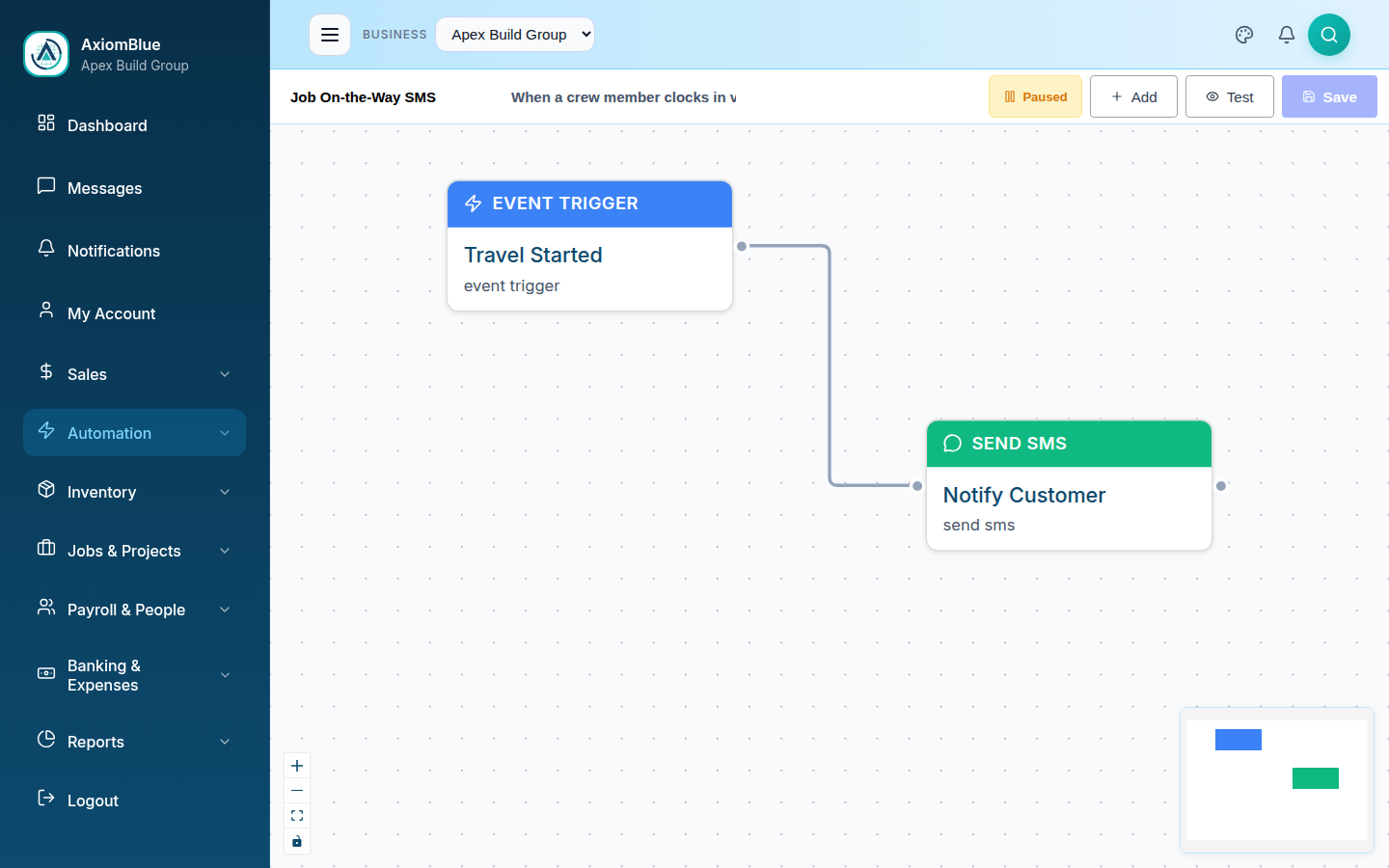
- On-the-way SMS fires when the crew starts travelling — and marks them travelling on the schedule
- Running-late SMS goes out without anyone making an awkward call
- Reschedules send the new time by email and SMS, automatically
- Every new customer gets a welcome email the moment they are created
- Customers need nothing installed — plain SMS and email on their own phone
| Key facts — automated customer notifications in AxiomBlue | |
|---|---|
| On the way | Job On-the-Way SMS — fires on travel start; also marks the worker travelling |
| Running late | Job Running Late — Notify Customer — SMS to the customer |
| Rescheduled | Job Rescheduled — Notify Customer — new time by email and SMS |
| New customer | New Customer Welcome Pack — welcome email on creation |
| What customers need | Nothing — ordinary SMS and email, no app, no account |
| Editing | Visual drag-and-drop canvas, no code; test-run mode; execution history |
| Plan | Professional, $59 AUD per seat per month (platform from $29) |
| Free plan | No time limit, no credit card |
How do I keep customers informed without ringing them?
By wiring each update to the job event that makes it true. In AxiomBlue, the on-the-way text sends because travel to the job started; the reschedule notice sends because the booking moved; the welcome email sends because the customer record was created. Four shipped automation templates cover the four updates customers most want, and none of them adds a task to anyone's day — the work itself is the trigger.
That framing matters because "keep customers informed" fails as a policy and succeeds as plumbing. Every service business intends to communicate; the intention dissolves under a full schedule, because each update is a small interruption competing with billable work. Event-triggered messages remove the competition entirely. The crew does exactly what they already do — start travelling, adjust the schedule — and the customer communication is a side effect that cannot be skipped, forgotten, or postponed.
The result, from the customer's side, is a business that seems almost eerily well-run: a text when the ute leaves, a heads-up when things run behind, the new time in writing when a booking moves, a proper welcome when they first come on board. From your side, it is four workflows you configured once. That asymmetry — enormous perceived care for zero ongoing effort — is the whole case for this page.
How does the on-the-way text work, step by step?
The Job On-the-Way SMS is the flagship of the set, and its whole run is three plain steps triggered by one real-world action:
1. Travel to the job starts
The worker starts travel to the job — that single event is the trigger. No separate "send the text" step exists anywhere in anyone's day.
2. The worker is marked travelling
The automation updates the worker's status to travelling, so the schedule tells the office the same story the customer is about to hear.
3. The customer gets the SMS
The customer receives a text that the crew is on the way — on their own phone, as an ordinary SMS, with your wording.
Notice that the template does two jobs with one event: it informs the customer and keeps the internal schedule truthful. That is the difference between automation bolted onto a job system and automation built into one — the message and the status change come from the same source of truth, so they can never disagree. Every run is logged in the execution history, so "did Mrs Chen get her text?" is a lookup, not a debate.
What should you send when the crew is running late?
A short, honest SMS, sent early — and AxiomBlue's Job Running Late — Notify Customer template exists because this is the message humans avoid sending most. Ringing someone to say you're late is mildly unpleasant, so it gets deferred, and deferred, until the customer rings you — at which point the same information lands as an apology extracted under pressure instead of a courtesy freely given.
The wording that works is specific and brief: "Running about 30 minutes behind this morning — sorry for the hold-up, we'll text again when we're on the way." Name the delay, own it in one clause, say what happens next. Skip the excuses; the customer with a free morning does not need the story of your previous job's switchboard, they need to know whether they can duck to the shops. Because it is a template, your best version of that message gets written once, calmly, and sent every time — not improvised in traffic.
The deeper point: lateness rarely costs the relationship — silence does. A customer told at 8:40 that you'll be there at 10:30 has been respected; a customer discovering it at 10:15 by staring out the window has not. The template converts the exact same delay from the second experience into the first.
What happens when a job is rescheduled?
The customer gets the new time in writing, twice, automatically: AxiomBlue's Job Rescheduled — Notify Customer template fires on the reschedule event itself and sends both an email and an SMS carrying the new booking time. Moving the job in the schedule is the notification — there is no second step where a person must remember to pass it on.
Reschedules are where manual communication fails worst, because the failure is invisible until it detonates. The office moves Thursday's job to Friday to absorb an emergency, fully intending to ring the customer, and the intention drowns in the same chaos that caused the move. The customer takes Thursday off work, waits, and fumes — and no apology fully repairs "you didn't even tell me". The automated version makes that failure structurally impossible: if the booking moved, the message went.
Sending it on both channels is deliberate, not redundancy for its own sake. The SMS gets seen within minutes; the email survives as the written record the customer scrolls back to on the morning of the job. A changed booking is precisely the message you want both immediately noticed and permanently findable.
How do you welcome a new customer automatically?
With an email that sends itself the moment the customer exists: AxiomBlue's New Customer Welcome Pack template fires when a customer record is created and sends your welcome email — who you are, how booking and billing work, who to contact, whatever a first-timer should know. It is the one message on this page tied to the relationship rather than a job, and it sets the tone for every notification that follows.
A good welcome email is short and quietly practical: confirm they're on the books, tell them how the process works from here, and — usefully, given the rest of this page — mention that they'll get a text when the crew is on the way. That single line converts your later automated messages from mild surprises into kept promises, which is exactly the impression a new customer should form in week one.
It also closes a gap nobody staffs. The first job gets attention because it is work; the first impression between "customer created" and "crew arrives" belongs to no one. The template owns it permanently, for every customer, including the ones added at 7pm from the ute in the free iPhone or Android app.
When should each notification fire?
At the moment its event happens — which is what separates everything on this page from scheduled reminders. These four templates are event-triggered: travel starting, a status update, a reschedule, a customer creation. The message is only ever sent because the thing it describes just became true, so it can never be stale, premature, or sent to the wrong situation. There are no timing decisions to make, because the event carries its own timing.
Scheduled messages are the complementary category: the reminder the night before the job, and the follow-up when someone doesn't show. Those run on the clock rather than on events, involve different templates (Job Tomorrow Reminder and No-Show Job Follow-Up), and have their own dedicated walkthrough in the SMS job reminders guide. If your problem is customers forgetting appointments, start there; if your problem is customers left in the dark while work is happening and moving, you are on the right page.
The two categories compose neatly into a full customer-communication arc: welcome email when they join, reminder text the night before, on-the-way text as the crew rolls, a heads-up if things slip, the new time if anything moves. Each message is a separate small workflow, so you can adopt them one at a time and in any order.
How does automation compare with ringing or texting yourself?
The honest comparison is with the two things businesses actually do today: phone calls when there's time, and texts from someone's personal mobile. Both work — when they happen. The comparison is about what happens on the days they don't.
| Ringing customers | Texting from a personal mobile | AxiomBlue automation Event-triggered | |
|---|---|---|---|
| Happens on the busiest days | Rarely — first task dropped | Sometimes, if someone thinks of it | ✓ Every time — the event is the trigger |
| Effort per update | A call, plus phone tag | A minute, plus finding the number | ✓ Zero — configured once |
| Reschedule coverage | Depends on memory in a crisis | Depends on memory in a crisis | ✓ Moving the booking sends the new time |
| Record of what was sent | None | Scattered across personal phones | ✓ Execution history on every run |
| Keeps the schedule updated too | No — separate job | No — separate job | ✓ On-the-way SMS also marks the worker travelling |
| Wording quality under pressure | Improvised | Improvised | ✓ Written once, calmly, sent every time |
Can I change the messages and channels?
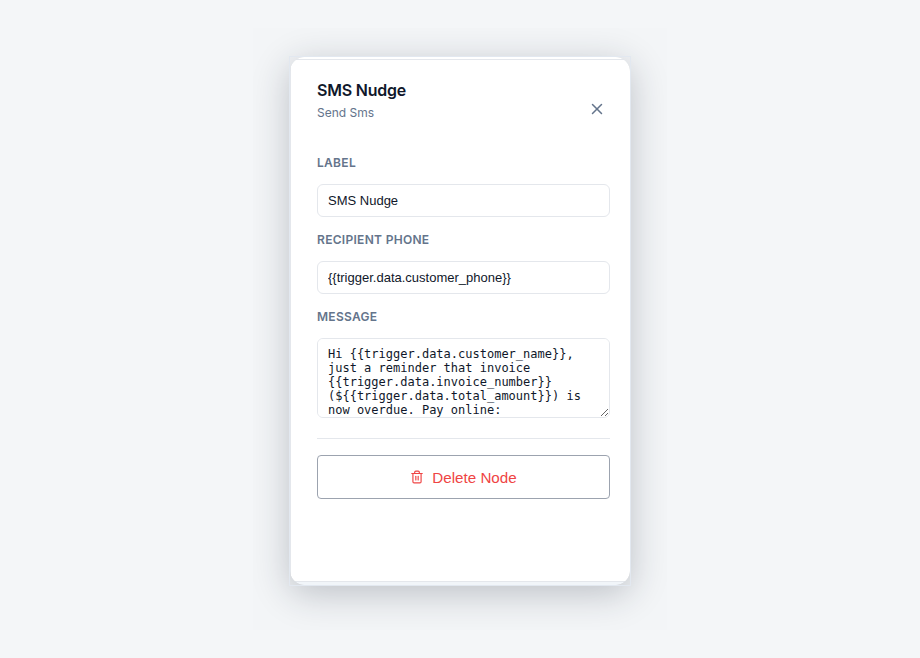
Yes — every message body on this page is a text box in a node on AxiomBlue's visual canvas, and every workflow is editable end to end without code. Reword the on-the-way text to sound like your business, add an email alongside a lone SMS or the reverse, or add steps — an in-app notification to the office when the running-late text goes out, say, so your team always knows what customers have been told. Drag, connect, configure, done. The test-run mode simulates a workflow against a real record before it goes live, so your first draft of the running-late message is not field-tested on a real customer, and the execution history records every live send afterwards.
What do automated customer notifications cost?
Automation is part of AxiomBlue's Professional plan at $59 AUD per seat per month — that covers all four templates on this page, the rest of the 30+ template library, the visual builder, and the execution history, alongside two-way Xero sync and the full CRM. The platform starts at $29 AUD per seat per month on Basic, without automation. Every plan opens with a free plan that has no time limit and no credit card — switch on the on-the-way SMS in your first session and your very next travelling crew sends its first one.
Automated Customer Notifications — Common Questions
Automated customer notifications are the texts and emails a customer actually wants - on our way, running late, here is your new time - sent by software when the real job event happens, instead of by a person remembering to ring. AxiomBlue ships them as ready-made templates: Job On-the-Way SMS, Job Running Late - Notify Customer, Job Rescheduled - Notify Customer, and New Customer Welcome Pack.
Yes. AxiomBlue's Job On-the-Way SMS template fires when travel to the job starts. It marks the worker as travelling on the schedule, then sends the customer an SMS that the crew is on the way. One event drives both - the office sees the crew's status change and the customer gets the text, without either being a separate task.
No. Every customer-facing message in these AxiomBlue templates arrives as a normal SMS or email on the customer's own phone - nothing to install, no account to create. The apps are for your team: AxiomBlue's free native iPhone and Android apps cover the field workflow, and the full platform runs in any web browser.
AxiomBlue's Job Rescheduled - Notify Customer template fires on the reschedule itself and sends the customer both an email and an SMS with the new time. Changing the booking in the schedule is the act that notifies the customer - there is no separate step to forget, which is exactly how double-bookings of the customer's patience happen.
Yes, but that is a different template to the ones on this page. The Job Tomorrow Reminder runs on an evening schedule and texts every customer with a job booked for the next day. It is covered in detail, along with the no-show follow-up workflow, in the AxiomBlue guide to SMS job reminders.
No - customers receive ordinary SMS and email, which need no app and no permission prompt. Internal alerts to your own team, where templates use them, arrive as in-app notifications inside AxiomBlue. There are no push notifications involved, and customers never need to install anything.
Minutes per template. Each one ships ready-made in AxiomBlue - open it on the visual canvas, put your own wording in the SMS and email steps, run it through test-run mode against a real record, and switch it on. There is no code, and the four templates on this page can realistically all be live in one sitting.
Automation is part of AxiomBlue's Professional plan at $59 AUD per seat per month, which includes all four templates on this page plus the rest of the 30+ template library and the visual builder. The platform starts at $29 AUD per seat per month on Basic, without automation. There is a free plan with no time limit, and no credit card is required to start.
Be the Business That Always Texts First
Switch on the on-the-way SMS today and your next travelling crew sends its first one — then add the running-late, reschedule, and welcome messages when you're ready. Your customers will notice. Your team won't have to.
No credit card required • Free plan, no time limit • Cancel anytime