
Scheduling a team of tradies used to mean whiteboards, phone calls, and hoping everyone got the memo. AxiomBlue replaces all of that with a single visual calendar where you can see your whole crew, drag jobs into open slots, and send instant notifications to field staff — all from your desktop or phone. Whether you're planning the week ahead or reacting to a last-minute call-out, the scheduling board gives you the visibility and control to keep work moving.

  • Month, week, and day calendar views with drag-and-drop assignment
  • Colour-coded crew identification so you can read the board at a glance
  • Bulk assignment to schedule the same job across multiple crew members
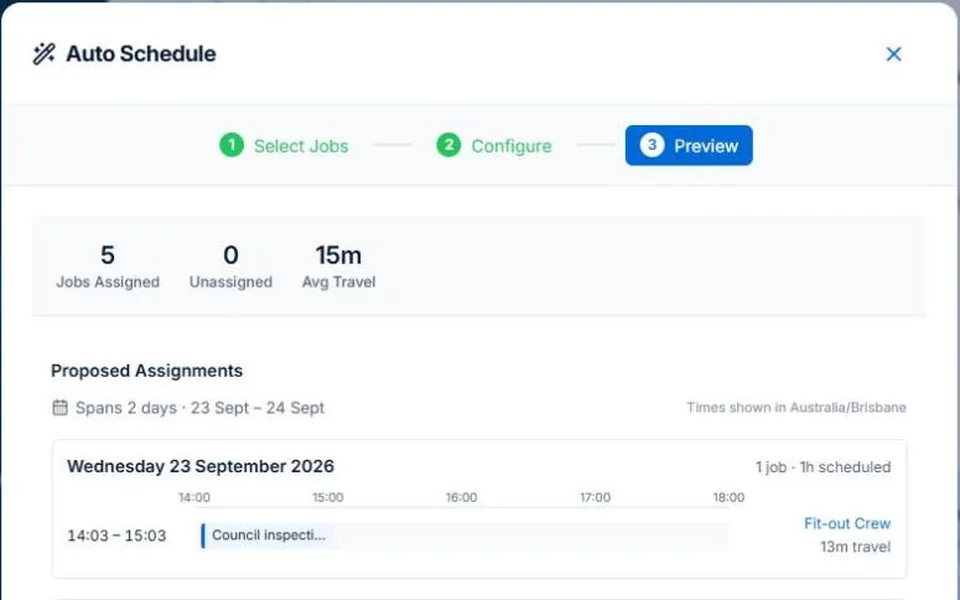
  • Auto-schedule matching crew skills, availability, and travel distance
  • Map view showing all scheduled jobs by location for smarter routing
AxiomBlue crew scheduling calendar showing colour-coded job assignments across multiple technicians

How does crew scheduling software work for trade businesses?

AxiomBlue gives you a real-time view of your whole team's workload in a single calendar. Jobs appear as blocks that you drag onto the right crew member and time slot. Each assignment triggers a notification to the technician with the job address, details, and any notes from the office. The calendar updates instantly for everyone, so there's no version control problem — your crew always see the current plan.

📅

Multiple Calendar Views

Switch between month, week, and day views to see the big picture or drill into a single day's run sheet. The day view is particularly useful for high-volume service businesses managing many short jobs.

🎨

Colour-Coded Crew

Each crew member has a unique colour so you can read the schedule board at a glance without hunting for names. Colour coding also makes it immediately obvious which crew members have open capacity.

Instant Status Updates

Update job status directly from the calendar view without opening the full job record. When a technician marks a job in progress or completed, the calendar reflects it in real time for the whole office team.

Can you schedule multiple crews and handle last-minute call-outs?

AxiomBlue is built for businesses running multiple crews across multiple sites simultaneously. The bulk assignment modal lets you schedule a single job to several crew members at once — useful for large installs or jobs that require a full team. Conflict detection flags any overlap automatically so you never accidentally double-book a technician. When a call-out comes in, the map view helps you identify which crew member is closest to the site so you can minimise travel time and get someone there fast.

👥

Bulk Crew Assignment

Use the bulk assignment modal to schedule multiple technicians to the same job in one action. Ideal for large installations, complex jobs requiring multiple trades, or any work that needs a full crew on site together.

🚨

Conflict Detection

AxiomBlue checks a crew member's existing schedule before confirming an assignment and flags any overlap. Availability warnings give your schedulers the information they need to make fast decisions without creating problems in the field.

🗺️

Map View for Routing

Switch to the map view to see all scheduled jobs plotted geographically. Spot job clusters to minimise driving between sites, and quickly identify which available crew member is already closest to an urgent call-out address.

📍

Geofencing Check-In

Geofencing automatically checks technicians in when they arrive at a job site and out when they leave — no manual time entries required. This keeps your timesheets accurate even on hectic days when crew are too busy to remember to tap the button.

🔔

Push Notifications

Field staff receive instant push notifications when their schedule changes — whether a new job is added, an existing job is rescheduled, or a job is cancelled. No more calling the crew one by one to relay the day's changes.

🏷️

Assignment Status Tracking

Every crew assignment progresses through its own status — invited, assigned, scheduled, in progress, and completed. This gives office staff a granular view of how each technician's day is tracking without having to ring around for updates.

How does AxiomBlue's auto-scheduling feature work?

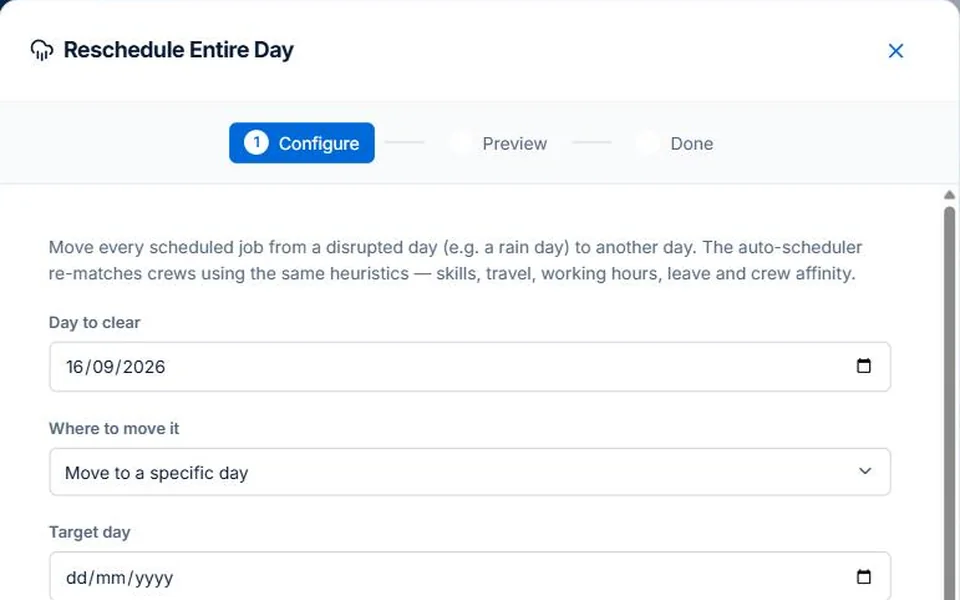
The auto-scheduler takes the guesswork out of assigning jobs when you're busy. Tell it which jobs need to be scheduled and it analyses your crew's skills, current workload, working hours, and geographic location relative to each job site. It then suggests the optimal assignments to minimise total travel time, avoid overtime, and match the right skills to each job — taking crew affinity (preferred working relationships) into account where relevant.

You stay in control — the auto-scheduler presents its recommendations and you confirm or override them. Think of it as having a scheduling coordinator who's already done the legwork before you even open the calendar in the morning. For businesses running a high volume of similar jobs like routine maintenance rounds, the auto-scheduler alone can save an hour or more of admin per day.

How do field staff know their schedule?

When you assign a job to a crew member, they receive a push notification on their phone straight away. The notification includes the job address, scheduled time, and any notes from the office. Opening the notification takes them directly to the job detail in the AxiomBlue mobile web app — there's nothing to install and the app works on any smartphone browser. Technicians can view their full schedule for the day, see upcoming jobs for the rest of the week, and check in or update job status from the same screen.

If the schedule changes — a job gets rescheduled, cancelled, or a new urgent job is added — field staff get notified immediately. The days of texting job addresses one by one or relying on crew to remember verbal instructions are over. Your tradies always have the current plan in their pocket, which means fewer "where am I going again?" phone calls to the office and more time actually on the tools.

Common Questions About Crew Scheduling

Yes. Set up a job series with the recurrence pattern you need — weekly, fortnightly, monthly, or custom — and AxiomBlue creates and places each job in the crew calendar automatically. This is ideal for regular maintenance contracts and service agreements where the same crew visit the same sites on a predictable cycle, saving you from recreating the same jobs manually every time.

Field staff receive instant push notifications when they're assigned to a job or when their schedule changes. The AxiomBlue mobile web app gives each technician a clear view of their current and upcoming jobs, including the site address, job details, and office notes. There's nothing to install — it runs in any mobile browser on iPhone or Android.

All assigned crew members receive an instant push notification the moment a job is cancelled or rescheduled. The crew calendar updates in real time for everyone — office and field — so there's no confusion about who is meant to be where. Any newly freed-up time slot is immediately visible in the scheduling board, making it easy to backfill with other work.

Yes. The map view plots all scheduled jobs by location so you can see where your crew are working on any given day. This makes it easy to spot geographic clusters, plan efficient routes between jobs, and quickly identify which technician is closest to an urgent call-out site. It's especially useful for businesses running call-out work across a large metro area.

Yes. AxiomBlue flags scheduling conflicts automatically when you attempt to assign a crew member to an overlapping time slot. The system checks existing assignments and working hours before confirming a booking. The auto-schedule feature goes further — it matches job skill requirements against each crew member's skills, checks availability across the team, and minimises travel time before suggesting the best assignment.

Stop Running Your Schedule From a Whiteboard

Give your whole team a live view of the day's work. Assign jobs in seconds, notify crew instantly, and spend less time on the phone managing logistics.

Explore Live Demo

No credit card required • 14-day free trial • Cancel anytime