Software for Plumbing businesses

Plumbing jobs from urgent call-out to planned install.

AxiomBlue gives plumbing call-outs and planned installations a connected customer, job and billing record. Review visit timing and locations, record labour and parts on the job and prepare the invoice from reviewed work. Professional adds crew skills and leave, recurring maintenance series and approvals for changes to a quoted scope.

Web, iOS & Android · Free, Basic and Professional plans

A practical example / Plumbing

A repair needs a return visit and another part.

  1. 01

    Capture the request

    Create the customer and job record with the site details.

  2. 02

    Assign the visit

    Review the schedule and location before assigning a plumber.

  3. 03

    Keep the detail

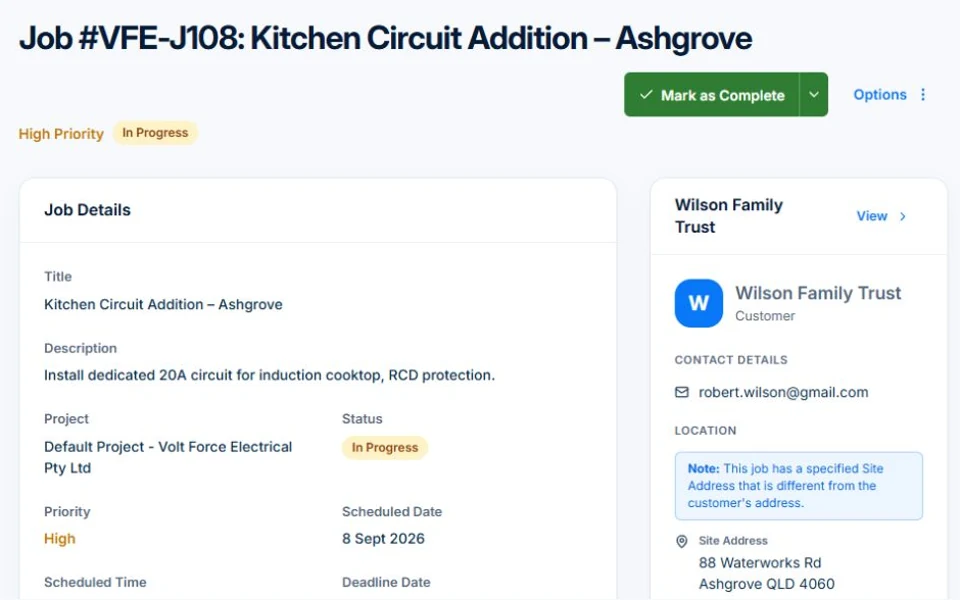
    Record the labour and parts used, with notes for the return visit.

  4. 04

    Review the bill

    Use the recorded work to prepare the invoice and follow its balance.

Illustrative workflow. Review your setup, permissions and plan inclusions.

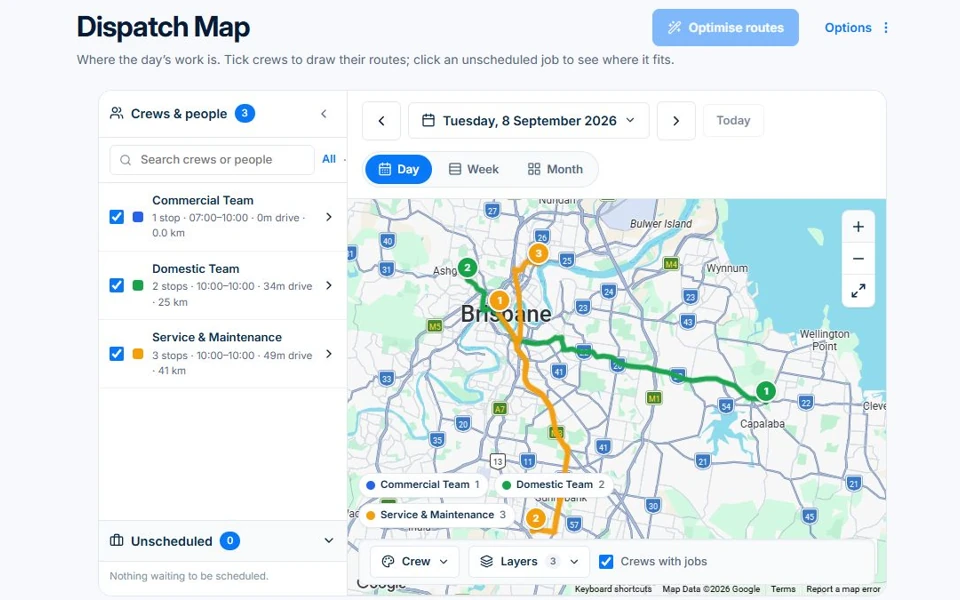
AxiomBlue · Dispatch Map
Review job locations and crew routes when deciding where the next call-out fits.
Review job locations and crew routes when deciding where the next call-out fits. Public demo · sample data

Screens are from the public demo and may show another trade’s sample business.

The tools behind the working day

Start with the part
you usually have to chase.

01 / Changing plans

Know what is already booked before adding the next call-out.

Use the crew calendar for timing and Dispatch Map for location. Keep customer and site details with the job so a change in the day’s plan has a shared record.

Explore dispatch map →

The map and route optimisation have different access requirements. Route optimisation requires Professional; the map follows your job access.

A closer look / Dispatch Map

  • Jobs on a map
  • Day and week selection
  • Crew routes and filters
  • Unscheduled job placement
  • Route optimisation with plan access
See how it works →

02 / Labour and parts

Keep the small items in the job record.

Record time and materials against the work. Use the price book for repeat items and inventory for tracked stock, then review those records before preparing the invoice.

Explore job management →

Core jobs, time recording and materials are included in Basic. Uploads start on Basic; variations, compliance and subcontractor management require Professional.

AxiomBlue · Job management
Public Axiom Blue demo: Job management.
Explore the records behind this workflow in the live demo. Public demo · sample data

03 / Planned work

Give installs and maintenance their own starting point.

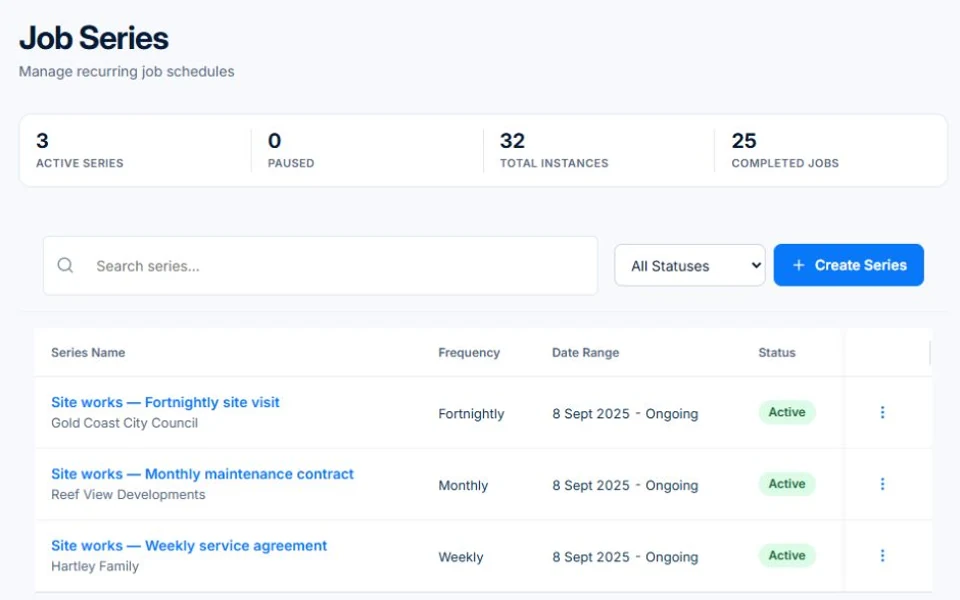
Send a clear quote for an installation. Set up recurring job series for repeat maintenance. Professional variations support agreed changes when a quoted scope grows.

Explore recurring jobs & services →

Recurring job series require Professional at $59 AUD for the first seat per month, excluding GST; additional seats receive graduated discounts. Free and Basic support individual jobs and scheduling; copying an individual job is separate from a recurring series. Recurring invoice templates and automated service reminders also require Professional.

AxiomBlue · Recurring jobs
Public Axiom Blue demo: Recurring jobs.
Explore the records behind this workflow in the live demo. Public demo · sample data

Choose by the work you need to do

Check the fit.
Then check the plan.

Start with the everyday tools. Check the specialist features before choosing what your team needs.

Before you price the next contract

Is each job actually making money?

A plumbing business sells time and parts, and the diagnosis you did not charge for, the supplier run and the fitting from the van never reach the invoice. See a worked month, the ATO benchmarks and the weekly check that catches a leaking job early.

Worked examples are illustrative. Applicable ATO expense benchmarks compare costs with turnover; they do not determine profit or owner pay.

Is a plumbing business profitable? →

Before you decide

Questions for
plumbing businesses.

Can I mix call-outs and planned work?

Yes. Jobs and scheduling support one-off visits, and recurring job series organise repeat maintenance. Use the same customer and job records as the basis for your work.

Does Dispatch Map track the van live?

The feature shown here displays job locations and crew routes. It is not a claim of live vehicle tracking. Professional adds route optimisation.

Can I record the parts used on a job?

Yes. Record job materials and use inventory for stock you track. Review quantities and billing details before sending the invoice.

Practical guides for your business.

Start, choose tools or improve the handover between your clients, team and invoices.

Browse plumbing guides →

Considering a switch?

Check the fit before
moving your business.

Use a familiar job to compare the way you work today with the way Axiom Blue handles it.

  1. 1. Follow a job in the demo

    Check the quote, schedule, job record and invoice. Look for the details your team needs.

  2. 2. Check your plan and team cost

    Compare usage limits, paid seats and specialist features. See plans and pricing →

  3. 3. Confirm your move

    Try your own quote on the free plan. Before moving existing records, ask us about your data and setup needs.

Put it to a practical test

Bring the job
you know best.

Use these starting points in the public demo. Then try your own quote with a free account.

Free plan has usage limits. No time limit. No credit card.

  1. 01

    Compare the calendar with Dispatch Map.

  2. 02

    Open a job and inspect time and material records.

  3. 03

    Find a recurring maintenance series.