Professional · HR Automation
How Do I Track Licence and Certification Expiry Automatically?
An expired licence is never discovered at a convenient moment — it turns up in an audit, a tender, or an incident report. AxiomBlue's weekly expiry-warning automation emails the worker and notifies the owners before the lapse, so renewals happen on notice instead of in a panic.
Quick answerTrack licence expiry automatically by recording each worker's credentials with expiry dates, then letting a scheduled check do the watching. AxiomBlue's Employee Skill Expiry Warning template runs weekly, finds licences and certifications expiring soon, emails the employee, and notifies the owners — on the Professional plan ($59 AUD per seat per month). AxiomBlue starts at $29 AUD per seat per month with a free plan that has no time limit.
Key facts: licence expiry alerts in AxiomBlue
The checkable essentials before the detail. Everything in this table is expanded on this page.
| The template | Employee Skill Expiry Warning — a weekly automated check |
| Who is warned | The employee (by email) and the owners (in-app notification) — both, every time |
| What it tracks | Any recorded skill or certification with an expiry date — trade licences, White Cards, tickets, calibrations |
| What it is not | Not an HR or payroll system; it does not verify credentials with government registers |
| Also in the HR suite | Employee Onboarding Checklist · Leave Request Approval Notification · Leave Approved — Check Job Coverage |
| Plan | Automation is on Professional, $59 AUD per seat/month; platform from $29 (Basic) |
| Free plan | No time limit, no credit card required |
| Apps | Free native iPhone & Android apps + the full platform in any web browser |
How do I track licence and certification expiry automatically?
You record each worker's licences and certifications against their employee record, with expiry dates, and let a scheduled automation do the watching from then on. AxiomBlue's Employee Skill Expiry Warning template runs a weekly check across every employee's recorded skills and certifications, finds the ones expiring soon, emails each affected employee about their own credential, and sends the business owners an in-app notification listing everything the check found.
The design beats the usual alternatives at their common failure point: a single human memory. A spreadsheet with expiry dates is only as good as whoever remembers to open it. Calendar reminders live in one person's calendar, and lapse when that person is on leave, flat out, or no longer with the business. A weekly automated sweep has no single point of failure — it never gets busy, and it tells two parties at once.
That double notification is the practically important part. The employee gets the email, so renewing becomes their job with actual notice to book the course or lodge the renewal. The owners see the same fact, so the business can plan around it — and follow up if the email gets ignored. Neither warning depends on the other being read.
Which Australian licences and tickets can it track?
Anything you can record with an expiry date — which covers the credential load an Australian trade business actually carries:
- Trade licences — electrical, plumbing, gas, refrigerant handling; the ones that make the work legal at all.
- Site cards and tickets — White Cards, working-at-heights, confined-space, EWP and forklift tickets.
- Safety currencies — first aid and CPR, which quietly expire faster than almost anything else.
- Equipment currencies — test-and-tag calibration due dates for testers, and other date-bound equipment checks. If you run test and tag work, the tester's own calibration is a date someone has to watch too.
- The mundane ones — driver licences and anything else that can ground a worker on a Monday morning.
One honesty note: AxiomBlue works from the dates you record. It does not connect to government licensing registers or verify a credential is genuine — no software subscription does that for every Australian licence class. What it removes is the failure mode that actually bites: a real, valid renewal that nobody booked because nobody was watching the date.
How does the expiry warning run, step by step?
The Employee Skill Expiry Warning is a small workflow with a schedule at the front. In plain words, one weekly run looks like this:
- Trigger: a weekly schedule. Nothing needs to happen in the business for it to fire — the calendar is the trigger.
- Find: a query sweeps every employee's recorded skills and certifications for expiry dates falling inside the warning window. Nothing expiring, and the run ends quietly — silence means everyone is current.
- Email the employee: each affected worker gets an email about their own expiring credential — what it is and when it lapses.
- Notify the owners: the owners get an in-app notification listing everything the sweep found, so the business sees the whole picture in one place.
Because it runs weekly, an approaching expiry is raised repeatedly, not once — the credential keeps appearing in the sweep until the recorded date is updated with the renewal. A reminder that nags until the record is fixed is worth ten that fire once and are forgotten.
Can I change the warning window or the message?
Yes. The expiry warning is an ordinary workflow in AxiomBlue's visual automation editor, built from the same drag-and-drop trigger, condition, and action nodes as every other template. Open it on the canvas and you can change the schedule, adjust how far ahead the check looks, reword the email your workers receive, or add steps — no code, no scripting.
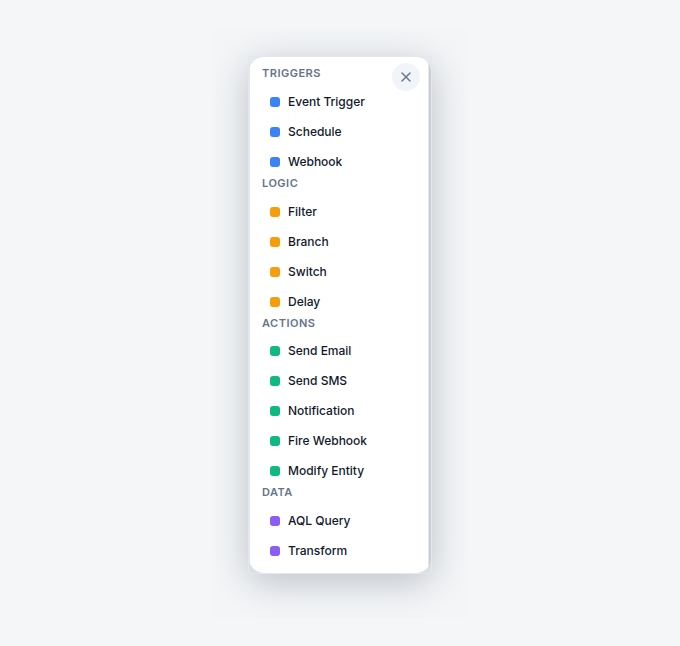
A licensed electrical contractor might want a long runway on the contractor licence and a shorter one on first aid; a business that lives on EWP work might want the ticket warnings louder than the rest. Because the workflow is visible on a canvas, those changes are edits you make in minutes, not feature requests you wait on.
What else can the HR automations handle?
Three more templates cover the other moments where people-admin drops through the cracks — and it's worth being precise about how modest each one is, because that's also why they're reliable:
- Employee Onboarding Checklist — when a new employee is added, they get a welcome email, onboarding tasks are created, and the owners are notified. The first day runs off a checklist instead of memory.
- Leave Request Approval Notification — when a leave request comes in, the owners are notified so a manager can approve it, instead of the request living in a text message.
- Leave Approved — Check Job Coverage — when leave is approved, an automated query finds the jobs that worker is assigned to during the leave window, then notifies the owners and emails the manager. The schedule clash surfaces the day the leave is approved, not the morning the customer is waiting.
None of this makes AxiomBlue an HR platform, and it doesn't try to be one — there are no contracts, performance reviews, or payroll in it. These are job-management automations about people: keeping workers credentialed, started properly, and covered on the roster. For the payroll side, AxiomBlue's timesheet hours export to your payroll system, and that's the whole story.
What changes compared to the spreadsheet and the office calendar?
The difference is what happens when the one person who maintains the spreadsheet gets busy — because they always do. Here is the honest three-way comparison.
| Spreadsheet + calendar reminders | AxiomBlue expiry automation Weekly automated check | Folder of photocopies | |
|---|---|---|---|
| Who does the watching | ~ One person, when they remember | ✓ A weekly automated sweep | ✗ Nobody, until an audit |
| Worker knows their date is coming | ✗ Only if someone tells them | ✓ Emailed directly, automatically | ✗ No |
| Owners see the whole picture | ~ If the sheet is current and open | ✓ In-app notification each run | ✗ No |
| Survives staff turnover | ✗ Dies with the spreadsheet owner | ✓ Runs regardless of who is at the desk | ✗ No |
| Repeats until resolved | ✗ One calendar ping, then silence | ✓ Flagged weekly until the date is renewed | ✗ No |
| Lives with the job data | ✗ Separate file | ✓ Same platform as jobs, timesheets, scheduling | ✗ A drawer |
The spreadsheet isn't wrong — it's fragile. It concentrates the entire compliance function in one person's diligence. The automation spends that diligence once, at setup, and then spends none of it ever again.
What does licence expiry tracking cost in Australia?
The Employee Skill Expiry Warning is part of AxiomBlue's automation engine, included on the Professional plan at $59 AUD per seat per month; AxiomBlue itself starts at $29 AUD per seat per month on Basic. There is also a free plan with no time limit and no credit card required — and the automation comes with the platform rather than as a separate compliance product.
Price it against one lapse. A worker whose ticket has quietly expired can't legally do that work — which means a rescheduled job at best, and at worst a compliance finding or an insurance question after an incident, with costs that make every software subscription in the building look like small change. The weekly check costs nothing to run and nothing to remember. That trade — an afternoon of data entry once, against the lapse that never happens — is about as one-sided as business decisions get.
Licence Expiry Alerts — Common Questions
Record each worker's licences and certifications with their expiry dates, then let a scheduled automation do the watching. AxiomBlue's Employee Skill Expiry Warning template runs a weekly check across every employee's recorded skills and certifications, finds the ones expiring soon, emails the employee directly, and sends the owners an in-app notification - so both people who can fix it know in time.
Any credential you can record with an expiry date: electrical, plumbing, gas, and refrigerant handling licences, White Cards, working-at-heights and confined-space tickets, first aid, driver licences, and test-and-tag calibration due dates. AxiomBlue works from the dates you record against each employee - it does not verify credentials against government registers, so the record is as good as what you enter.
Both the worker and the business. The employee gets an email about their own expiring credential - so renewing it becomes their job, with notice to actually do it - and the owners get an in-app notification listing what the weekly check found. Nobody is the single point of failure, which is exactly the problem with one person's calendar reminders.
Yes. The Employee Skill Expiry Warning is an ordinary workflow in AxiomBlue's visual automation editor - open it on the canvas and you can adjust the schedule, how far ahead it looks, and the wording of the employee email, or add extra steps. It is drag-and-drop nodes, not code, like all 30+ AxiomBlue templates.
No. AxiomBlue is job management software, and its HR automations are deliberately narrow: expiry warnings, an onboarding checklist for new starters, and leave-request notifications that include a check of which jobs an approved leave window affects. There is no payroll in AxiomBlue - timesheet hours export to your payroll system, and that is the extent of it.
The Employee Skill Expiry Warning is part of AxiomBlue's automation engine, included on the Professional plan at $59 AUD per seat per month. AxiomBlue itself starts at $29 AUD per seat per month on the Basic plan. There is a free plan with no time limit, and no credit card is required to start.
Yes - free native AxiomBlue apps for iPhone and Android, and the full platform also runs in any web browser, so office staff and field crews use whichever suits. The expiry warning itself arrives as a normal email to the employee, so it reaches workers wherever they read email, app installed or not.
The template switches on in minutes; the real work is entering each employee's credentials and expiry dates, which for most trade businesses is an afternoon with a folder of photocopied tickets. From then on the weekly check does the remembering, and keeping the record current just means updating a date whenever a renewal comes through.
Never Discover an Expiry the Hard Way
One afternoon entering the tickets, then a weekly check does the remembering forever. Warn the worker, warn the office, renew on notice — and make the audit boring.
No credit card required • Free plan, no time limit • Cancel anytime