Automation · Professional
How Do I Stop Customer No-Shows?
A no-show isn't just an awkward gap in the day - it's a crew and a ute parked outside an empty house, burning an hour you can't invoice. AxiomBlue texts every customer the evening before their job, automatically, so tomorrow's schedule survives contact with real life.
Quick answerThe most effective fix for customer no-shows is an SMS reminder the evening before the job - it catches forgetfulness while there's still time to fix it. AxiomBlue's Job Tomorrow Reminder template does this automatically: each evening it finds every job on tomorrow's calendar and texts the customer. Included on the Professional plan at $59 AUD per seat per month, with a free plan that has no time limit.
Almost every no-show has the same boring cause: the customer simply forgot. They booked the job a fortnight ago, life happened, and this morning they left for the school run with your 8am arrival nowhere in their head. You can't fix forgetfulness with a stern cancellation policy - but you can fix it with a well-timed text. The catch is that ringing or texting tomorrow's list every evening is exactly the kind of admin that gets skipped. AxiomBlue makes it automatic: the reminders go out every evening whether the office had a quiet day or a shocker.
- Runs every evening on a schedule - 6pm by default, editable
- Finds every job scheduled for tomorrow, straight from your calendar
- Texts each customer a personalised reminder - plain SMS, nothing for them to install
- Invites a reply if the time no longer works, so you hear tonight, not at the locked gate
- A companion template follows up anyone who still no-shows, 1 hour after it's flagged
SMS job reminders in AxiomBlue: the key facts
The short, checkable version. Everything in this table is expanded further down the page.
| Key fact | AxiomBlue |
|---|---|
| Template | Job Tomorrow Reminder — ready-made, switch on and go |
| Trigger | Daily schedule, 6pm by default (editable) |
| Who gets texted | Every customer with a job on tomorrow's calendar |
| Channel | Plain SMS — customers install nothing |
| Message | Fully editable, with customer-name and business-name variables |
| If they still no-show | No-Show Job Follow-Up texts them 1 hour after it's flagged |
| Setup | Visual editor, no code — typically live in under 15 minutes |
| Plan | Professional, $59 AUD per seat per month; free plan with no time limit |
What does a no-show actually cost a trade business?
A no-show costs you the trip, the gap it leaves, and the job that could have filled it. Do the maths on one: half an hour of travel each way, an hour of waiting and phone calls, for two people on the tools - that's three or four labour hours gone, plus fuel, before you count the paying job you turned away because that slot was "booked". A business that eats two or three of those a week is quietly losing a day's revenue a fortnight to appointments that were never going to happen.
And the damage isn't only financial. A morning no-show throws the whole run out: the 10am becomes the 11am, someone rings the office annoyed, and the crew ends the day behind through no fault of their own. Reminders are the cheapest schedule protection there is - which is why every dentist, physio, and vet in the country sends them. Trade businesses are just later to the habit, mostly because nobody has time to do it manually. That's the part automation removes.
How does the evening-before reminder run, step by step?
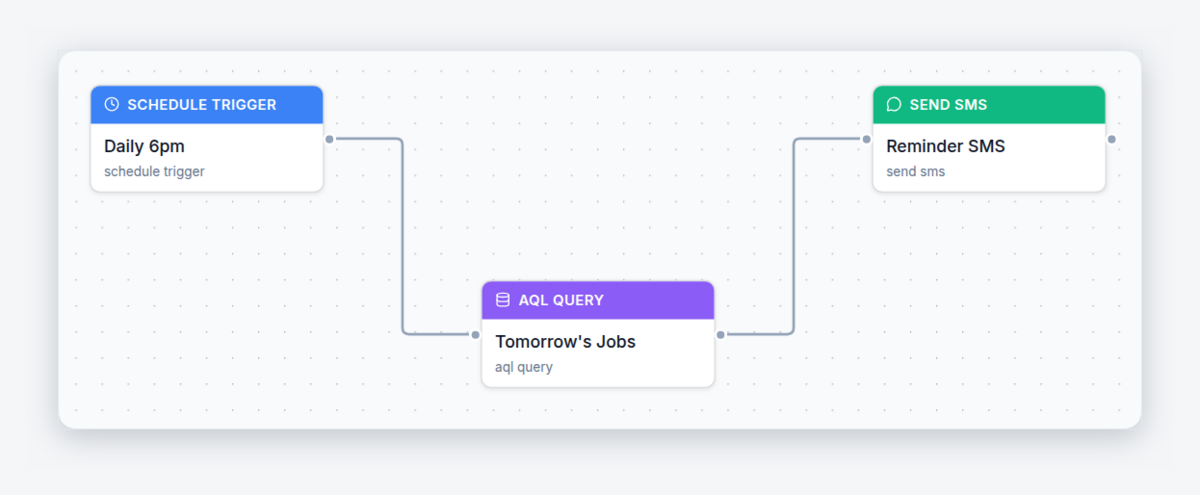
The workflow is three steps: a schedule, a lookup, and the texts. Here is exactly what AxiomBlue's Job Tomorrow Reminder template does, in plain words:
- Schedule — every evening at 6pm. Unlike most automations that wait for an event, this one runs on a clock. Every evening the workflow wakes up - no one starts it, no one can forget it.
- Lookup — find tomorrow's jobs. A query pulls every job scheduled for tomorrow straight from your calendar, with each job's customer and their mobile number. If the schedule changed at 4pm, the 6pm run sees the change - the reminders always match reality.
- Action — text each customer. Every customer on the list gets a personalised SMS: their name, your business name, a heads-up that you'll be there tomorrow, and an invitation to reply if the time no longer suits. Ten jobs tomorrow means ten texts tonight, all sent in one run.
The customer who forgot now remembers. The customer who double-booked replies tonight - and you fill the slot instead of discovering the problem at their front gate. The academy has a full build-along tutorial: automatic SMS reminders to stop no-shows.
When should job reminder texts be sent?
The evening before, around dinner time - which is why the template's schedule defaults to 6pm daily. Evening-before is the sweet spot for a reason: the customer is off work and actually looking at their phone, the job is close enough that the reminder sticks, and there's still a whole evening to reply if something's wrong. A same-morning reminder is too late to save the trip if the customer's already left for work; a reminder three days out gets forgotten all over again.
The send time is one field on the workflow's schedule node. Some businesses prefer 7pm to land after dinner; businesses doing early starts sometimes add a second, shorter run for afternoon jobs. Whatever you pick, the value comes from it happening every single evening without anyone doing it - consistency is the feature.
What should a job reminder text say?
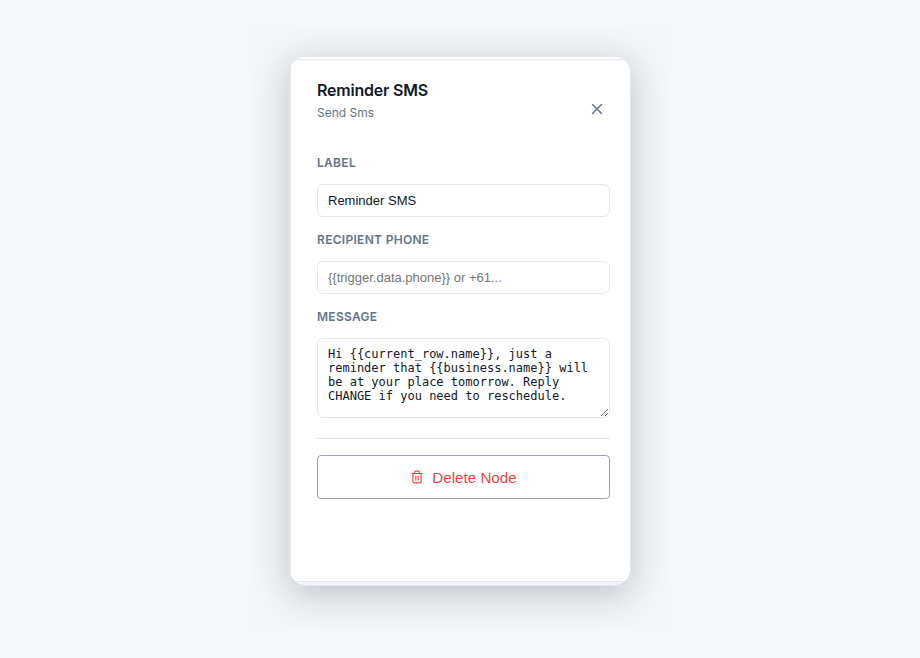
Three things: who's coming, when, and what to do if that no longer works. The template's default message is the pattern to copy - "Hi Sarah, just a reminder that Apex Plumbing will be at your place tomorrow. Reply CHANGE if you need to reschedule." One glance and the customer knows everything they need; one reply and you know tonight instead of tomorrow.
The customer's name and your business name fill in automatically from variables, so every text reads personally without anyone typing it. Keep the message short - it's an SMS, not a letter - and always include the escape hatch. The invitation to reschedule is what turns a would-be no-show into a rebooked job: given an easy way to say "actually, tomorrow's no good", most customers take it, and a rebooked job is revenue delayed rather than revenue burned at an empty house.
What happens if the customer no-shows anyway?
A second template, No-Show Job Follow-Up, makes sure the miss turns into a rebooking instead of a shrug. When your crew flags a job as a no-show - locked gate, nobody home - the workflow checks the flag, waits 1 hour, then texts the customer about getting the job rebooked. The hour's grace matters: it covers the customer who was stuck in traffic or asleep on night shift, so the follow-up lands as courtesy rather than accusation.
After the text goes out, the workflow updates the job record itself - marking the missed visit and adding a note - so the no-show is documented and sitting in front of the office for rescheduling rather than quietly evaporating from the diary. Between the two templates, the loop is closed at both ends: the evening text prevents most no-shows, and the follow-up recovers the ones that slip through. Nobody has to remember either half.
Ringing around vs AxiomBlue vs a standalone reminder app
Three honest ways to remind customers, side by side. The row that decides it is the second one: a reminder tool that can't see your job calendar has to be fed by hand, and hand-fed systems fall over the first busy week.
| Ringing / texting manually | AxiomBlue | Standalone reminder app | |
|---|---|---|---|
| Reminders go out | When the office has time — skipped on busy days | Every evening at 6pm, automatically | Only for appointments someone typed into it |
| Knows tomorrow's schedule | Yes — but someone has to work through the list | Yes — reads the job calendar directly, including late changes | No — runs on its own copy of your bookings |
| Effort per day | 15–30 minutes of calls and texts | Zero after one-time setup | Double entry — every job typed in twice |
| No-show follow-up | Ad hoc, if anyone chases it | Automatic text 1 hour after the job is flagged, job noted for rebooking | None — it only sends reminders |
| Extra subscription | None | None — part of the job platform you already run | Its own monthly fee, on top of your job software |
Can I change how the reminders work?
Yes - every part, with no code. Both templates open in AxiomBlue's visual workflow editor as connected nodes on a canvas: the schedule node sets the daily send time, the SMS node holds the message, and the no-show workflow's delay sets the 1-hour grace period. Rewrite the message the way you'd type a text, and variables handle the personalisation. A test mode lets you run either workflow safely before a real customer gets a message, and the execution history logs every run so you can see exactly who was texted and when.
The reminder pair are two of 30+ ready-made templates in AxiomBlue - the overview of the whole engine is at workflow automation software for Australian businesses. The natural bookends are the automated quote follow-up that wins the job in the first place and the automatic Google review request that goes out the day after it's done.
What do SMS job reminders cost?
SMS reminder automation is included on AxiomBlue's Professional plan at $59 AUD per seat per month - it isn't part of the $29 Basic plan. That covers the whole automation engine, including the no-show follow-up and 30+ other templates, alongside Professional's two-way Xero sync, bills, and CRM pipeline. There's a free plan with no time limit and no credit card required, which is long enough to run a real week of jobs with the reminders on. Set the cost against a single saved no-show - a crew, a ute, and an hour at an empty house - and the automation pays for itself the first time a customer replies "actually, can we move it?" the night before instead of not answering the door.
SMS Job Reminders - Common Questions
Most no-shows are forgetfulness, not flakiness - the customer booked a fortnight ago and it fell out of their head. A text the evening before puts the job back in front of them while there is still time to act: they either plan to be home or reply that they need to change, and either way you find out before the ute is loaded. AxiomBlue's Job Tomorrow Reminder template sends that text automatically for every scheduled job.
The evening before the job. AxiomBlue's template runs on a daily schedule - 6pm by default - finds every job on tomorrow's calendar, and texts each customer. Evening-before timing works because people are off work, near their phone, and can still rearrange their morning. The schedule is editable in the visual editor if you would rather send at a different time.
Who is coming, when, and what to do if that no longer works. The template's default message is a good pattern: a greeting with the customer's name, a reminder that your business will be at their place tomorrow, and an invitation to reply if they need to reschedule. It fills in the customer's name and your business name automatically, and every word is editable in AxiomBlue's visual editor.
A second template, No-Show Job Follow-Up, handles it. When a job is flagged as a no-show, the workflow waits 1 hour - covering the customer who was just stuck in traffic - then texts them about rebooking and updates the job record with a note so the missed visit is documented and the office can reschedule it. The job never silently disappears into the diary.
No. Reminders arrive as ordinary text messages to the mobile number on the customer's record - nothing to install, no account, no link to click. That is why SMS works so well for appointment reminders: it reaches every customer, including the ones who never open email, on the device already in their pocket.
Yes, both. The workflow opens in AxiomBlue's visual editor: the schedule node sets when the daily run happens, and the SMS node holds the message text with variables for the customer's name and your business name. There is no code - you edit the message the same way you would type a text. A test mode lets you check it before any real customer receives one.
SMS reminder automation is included on AxiomBlue's Professional plan at $59 AUD per seat per month - it is not part of the $29 Basic plan. There is a free plan with no time limit and no credit card required. Against the cost of a single no-show - a crew and a ute at an empty house for an hour - the automation pays for itself the first time it saves a trip.
Never Load the Ute for an Empty House Again
Switch on the Job Tomorrow Reminder tonight and every customer on tomorrow's calendar gets a text at 6pm - no ringing around, no forgotten list, no wasted trips. Start free today.
No credit card required • Free plan, no time limit • Cancel anytime