
The starting point
Before sending an overdue invoice reminder, check the due date, unpaid balance, customer contact and any agreed payment arrangement. Send a clear reminder with the invoice reference and payment instructions, then review exceptions personally. Axiom Blue Professional can automate overdue follow-up when configured. Every plan tracks invoice balances; online card payment needs Professional with Stripe connected and processing fees apply.
Key facts
| The automatic chase (Professional) | An email, and optionally an SMS, to the customer the day after an invoice passes its due date, with the amount outstanding, the due date and a link to pay. |
|---|---|
| Then it tells you | If the invoice is still unpaid after the number of days you choose (7 by default, anything from 1 to 90), you are notified to call the customer. |
| It stops itself | A paid invoice is never chased, including one marked paid in Xero and synced back. |
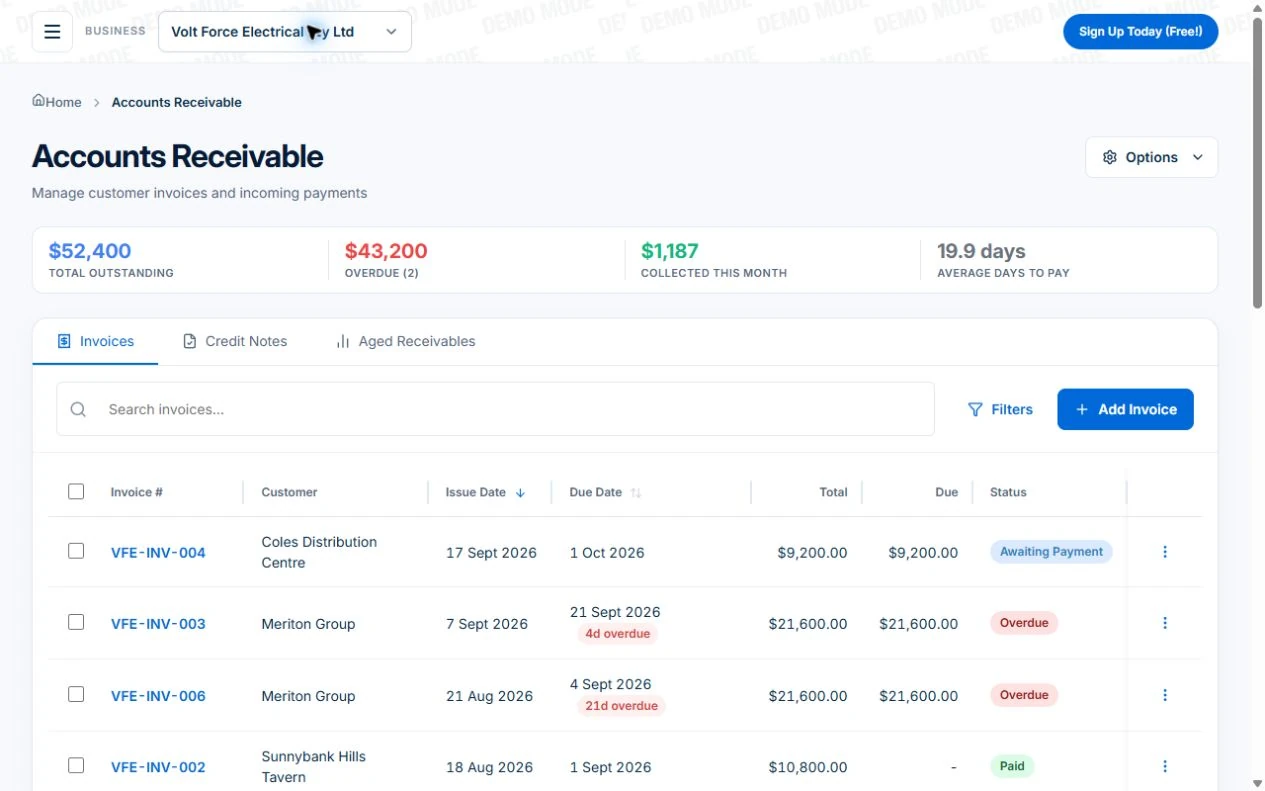
| On every plan | Outstanding, overdue, collected this month and average days to pay; an overdue filter; overdue counts on the home screen; a statement for each customer. |
| Easy to pay | Every invoice links to a no-login page with your bank transfer and PayID details. Card payment through Stripe and automatic billing for regular customers are on Professional. |
| How long Australian businesses wait | 22.9 days on average, paid 6.0 days late (Xero, June quarter 2026). Large businesses take 64 days to pay 95% of their small business invoices (Payment Times Reporting Regulator). |
| If it still is not paid | Reminder, then a letter of demand, then a debt collector or a small claims court (business.gov.au). |
Check the balance before the next reminder
A reminder is useful only if its facts are right. Review payments and correspondence before enabling a workflow, then test the exception cases with your own invoice records.
| Invoice situation | What to check |
|---|---|
| Unpaid and due | Confirm the terms, reference, remaining amount and recipient before sending a clear reminder. |
| Part-paid | Reconcile recorded payments and use the outstanding balance; avoid asking for the original total again. |
| Paid or credited | Confirm the record reflects the payment or credit and test that the configured follow-up handles it correctly. |
| Disputed or on an arrangement | Review the agreement personally and manage the next contact rather than repeatedly sending a generic demand. |
Why do invoices go overdue, and what does it cost you?
Mostly because nobody is asking. Australian small businesses waited an average of 22.9 days to be paid in the June 2026 quarter and were paid six days late on average. Large customers are slower again: the Payment Times Reporting Regulator found that the time large businesses take to pay 95% of their small business invoices rose to 64 days. The scheme reports payment times; it does not set them, so your own terms and follow-up are what move the number.
The cost is not only waiting. If you account for GST on an accruals basis, you report the GST in the period you issue the invoice, whether or not the customer has paid. You only get a decreasing adjustment once the debt is written off as bad or has been overdue for 12 months. Until then, an unpaid invoice is money you have lent your customer, with the tax already paid on it.
Sources: Xero Small Business Insights: Australia · Payment Times Reporting Scheme: Regulator’s update, January 2026 · ATO: Types of GST adjustments
What should an overdue invoice reminder say?
Everything the customer needs to pay in the next minute, and nothing else: the invoice number, the amount still owed, the date it was due, how to pay, and who to talk to if something is wrong with the invoice. Start friendly. business.gov.au’s first step for an unpaid invoice is simply a reminder, because many late payments happen because the customer forgot.
Keep it factual. Under the Spam Act, a bill or reminder becomes a commercial message if it includes promotional content or links to an ad, and then it needs the customer’s consent and an unsubscribe. A reminder that is only about the invoice avoids that entirely.
Set expectations before the invoice is overdue, not after. Put your payment terms on every quote and invoice. business.gov.au notes that late payment interest belongs in a letter of demand only if your contract specified it, so if you intend to charge it, agree it up front. Axiom Blue does not calculate late fees or interest; if your terms include them, apply them yourself.
Sources: business.gov.au: What to do when you haven’t been paid · ACMA: Telemarketing and e-marketing, common issues and mistakes · business.gov.au: Payment terms
How does Axiom Blue chase overdue invoices automatically?
With one switch, and then a person. On Professional, turn on “Automatically chase overdue invoices” under Settings, Invoices. Every night Axiom Blue checks for invoices that have passed their due date with money still owing. The morning after the due date, the customer receives a payment reminder by email with the invoice number, the amount outstanding, the due date and a link to pay online.
Three settings shape it. Choose whether to text the customer as well as emailing them, using your SMS credit; if a text cannot be sent, the email and the rest of the chase still go ahead. Set how many days to wait before you are told the invoice is still unpaid, anywhere from 1 to 90 days, 7 by default. And change the reminder wording to sound like you. Chased invoices are tagged, so you can see at a glance who has already had the reminder.
Then it hands over. If the invoice is still overdue after the delay you chose, you get a notification that it is still unpaid and a suggestion to call the customer directly. That is deliberate. A phone call from the owner settles more overdue invoices than a third automated email, and the ACCC and ASIC debt collection guideline warns that unnecessary or unduly frequent contact can amount to harassment. If you want a different sequence, the reminder is a workflow you can adjust in the visual automation editor.
It stops itself. Once an invoice is paid, recorded in Axiom Blue or marked paid in Xero and synced back, there is no escalation and no awkward reminder to someone who already paid. A part-paid invoice is chased too, once, for the amount still owed.
Read next Automating job follow-up: start with one process you can verify →
Sources: ACCC: Debt collection rules
What shows you who owes what, on every plan?
The receivables page. It shows total outstanding, what is overdue and how many invoices, what was collected this month, and the average number of days customers take to pay you. Filter to overdue invoices, resend an invoice, or record a payment when it arrives, from the office or from your phone.
The home screen puts the count of overdue and soon-due invoices in front of you every morning, one tap from the list. On each customer, the Reports tab shows their aged balance, their payment behaviour over time, their open invoices, and a statement you can download and send. That is the call sheet: before you ring a customer about one invoice, you can see whether it is a one-off or a habit.
On Professional, the Aged Receivables report breaks the whole book into ageing bands, and invoices and payments sync two ways with Xero, so a payment reconciled in Xero clears the invoice in Axiom Blue.
How do you make paying easier than not paying?
Remove every reason to put it off. Every Axiom Blue invoice email links to a payment page that opens without a login, shows the amount due and the PDF, and lists your payment details: bank transfer, PayID and any other method you accept. PayID lets a customer pay using your email, phone number or ABN instead of a BSB and account number, and payments made through the New Payments Platform arrive in near real time, 24 hours a day. You can also allow part payments, with a minimum you set.
On Professional, with card payments connected through Stripe, the same page takes a card. From 1 October 2026 card surcharging on eftpos, Mastercard and Visa is being removed, so build card costs into your prices rather than adding a surcharge.
For regular customers, stop sending invoices to chase at all. On Professional, a customer on a recurring service authorises a card or direct debit once in the customer portal, and each visit’s invoice is charged automatically, with retries and an email to both of you if a charge fails. And the fastest way to shorten the wait is to start the clock sooner: an invoice sent from the job site is due a week before one written up on Friday.
Read next On-site invoicing: invoice on the job →
Sources: RBA: The New Payments Platform · RBA: Merchant card payment costs and surcharging, at a glance
What if the customer still will not pay?
Follow the steps business.gov.au sets out, in order, and keep a record of each one. After friendly reminders, send a letter of demand stating what is owed, what for and the date it must be paid by, and warning that you may take further action. If that fails, a debt collection service or a court claim are the next options. In NSW, claims up to $20,000 go to the Small Claims Division of the Local Court, which is designed to be quick, informal and low cost.
Construction work has its own, faster route. Under NSW security of payment law, a respondent who receives a payment claim must answer with a payment schedule within 10 business days, or becomes liable for the full amount claimed. On Axiom Blue fixed-price jobs, deposit, progress and final claims are raised against the contract, so the claim you rely on is already itemised and dated.
If a debt turns bad, talk to your accountant about the GST: once it is written off or has been overdue for 12 months, you may be entitled to a decreasing adjustment, and you reverse it if the customer later pays.
Sources: business.gov.au: Write a letter of demand · Local Court of NSW: Civil jurisdiction · NSW Government: Making a payment claim under security of payment laws
Is Axiom Blue the right invoice reminder software?
For a trade or service business that wants the invoice, the reminder and the payment in one place, yes. The invoice is built from the job, the reminder goes the morning after it is due, the customer can pay from the email, and you are told exactly which customers need a call.
What it does not do, so you know now: it sends one automatic reminder, not a series, and it does not send reminders before an invoice is due. It does not add late fees or interest or run bulk statements. Those are follow-ups for you, from the receivables list.
Invoicing, receivables and the payment page are on every plan, including the free plan, and Basic is $29 AUD for the first seat per month, excluding GST. The automatic chase, card payments, automatic billing, the Aged Receivables report and Xero sync are on Professional at $59. There is no setup fee.
Read next Job invoicing software: bill from the job record →
Common questions
Questions people ask before they switch
What is the best way to chase an overdue invoice?
Check the invoice, due date, outstanding balance and agreed terms, then send a clear reminder with a way to pay. If the customer does not respond, make personal contact and keep a record of what was agreed. Review disputed balances or payment arrangements before escalating; there is no guaranteed collection timetable.
Can I automate overdue invoice reminders?
Yes. On Axiom Blue Professional, the “Automatically chase overdue invoices” switch emails the customer, and optionally texts them, the day after an invoice passes its due date, with a link to pay. If it is still unpaid after the number of days you choose, you are notified so you can call. It stops as soon as the invoice is paid.
How many reminders should I send for an unpaid invoice?
Use a proportionate contact plan and review the response after each step. Repeated automated emails do not guarantee payment. Keep contacts for a reasonable purpose and record agreements; the ACCC and ASIC debt collection guideline warns against unnecessary or unduly frequent contact.
Can I charge a late fee on an overdue invoice?
Only if the customer agreed to it. business.gov.au notes that late payment interest belongs in a letter of demand only if your contract specified it, so put any late fee or interest in your terms before the work starts. Axiom Blue does not calculate late fees automatically.
Do I pay GST on an invoice that has not been paid?
If you account for GST on an accruals basis, yes: GST is reported in the period you issue the invoice. The ATO allows a decreasing adjustment once the debt is written off as bad or has been overdue for 12 months, and an increasing adjustment if it is later recovered. On a cash basis, you report GST when you are paid.
What if a customer still will not pay?
After reminders and a phone call, send a letter of demand stating the amount, what it is for and the date it must be paid by. If that fails, consider a debt collection service or a small claims court; in NSW, the Local Court’s Small Claims Division hears claims up to $20,000. Keep a record of every step.
Put it to work
Your practical checklist
- Put your payment terms on every quote and invoice.
- Add bank transfer and PayID details to your payment settings so every invoice links to them.
- On Professional, turn on “Automatically chase overdue invoices” and set the days before you are told to call.
- Set payment terms on each customer, so every invoice falls due when you agreed.
- Check the overdue list every Monday, and call each customer you have been told about.
See the records in Axiom Blue
Try the workflow with a familiar job.
Features and usage limits vary by plan. Review the tools relevant to your process before choosing your setup.
Product instructions
Published by Axiom Blue, which is the product described. Payment times, tax, collection and court information comes from Xero, the Payment Times Reporting Regulator, the ATO, business.gov.au, the ACCC and ASIC, the ACMA, the RBA and NSW Government as cited, checked 25 September 2026. It is general information, not legal or tax advice.