
Review the charges
Check the billing method, quantities, billable time and materials, approved extras and taxable lines before approving the invoice.
Invoicing / AxiomBlue
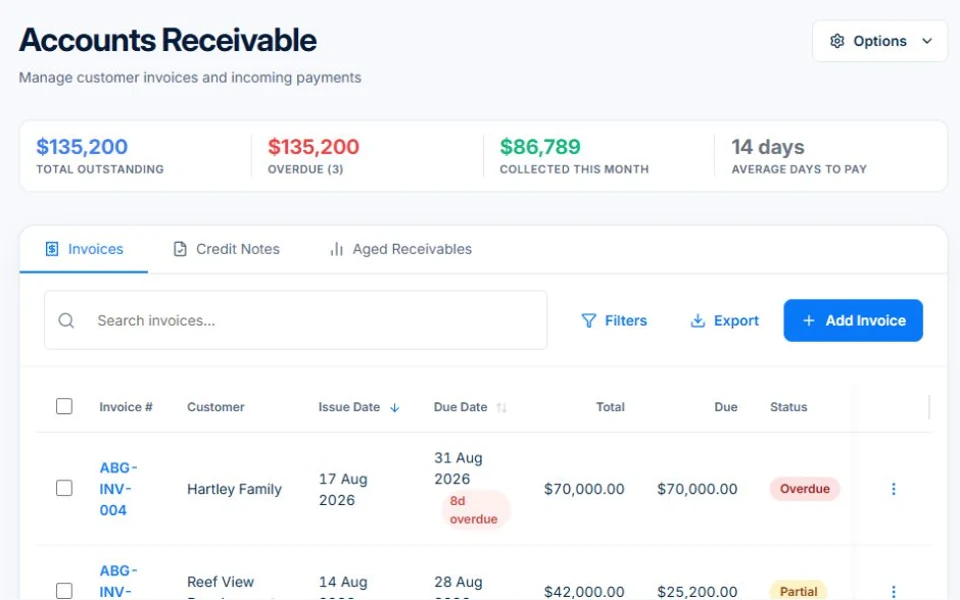
Bring the completed work into an invoice, check the charges and send it to the customer. Every AxiomBlue plan supports core invoicing with a PDF and no-login viewing link, subject to Free usage limits. Add your bank transfer or PayID instructions, then record payments against the balance. Online card payments and accounting sync require Professional and the relevant connected account.
Check the work and the remaining balance before the next customer contact.
Plan fit: Core invoicing is available on every plan; Free allows 10 invoices a month. Basic starts at $29 AUD for the first seat per month, excluding GST. Professional starts at $59 for the first seat and adds configured workflows, accounting connectors and Stripe online card payments; connection setup and payment fees apply. Compare plans →
The part of your day this changes
You have moved on to the next job, but the previous one still needs billing. Start from the job’s record, check the detail and send a bill that reflects the work.
Check the billing method, quantities, billable time and materials, approved extras and taxable lines before approving the invoice.
Send the PDF and no-login invoice link with the payment instructions you configured. Stripe online card payment requires Professional and a connected account.
Record payments and review part-paid or overdue balances. Configure Professional reminder workflows and check exceptions before enabling them.
Picture it in your business / Example
Review the job’s recorded work and the approved extra before creating the invoice. Check its lines, GST where applicable and any earlier charge. Email the approved invoice, then record a part-payment and confirm the outstanding balance before following up.
A practical starting point
Check the agreed billing method and the time, materials or approved scope being charged.
Check the customer, lines, tax treatment, due date and any previous charges.
Email the PDF and no-login link with clear payment instructions.
Record payments, check the remaining balance and review follow-up exceptions.
Know what’s included
Core invoicing is available on every plan; Free allows 10 invoices a month. Basic starts at $29 AUD for the first seat per month, excluding GST. Professional starts at $59 for the first seat and adds configured workflows, accounting connectors and Stripe online card payments; connection setup and payment fees apply.
Compare plans, limits and pricing →Check the workflow in detail
Explore the detail
Availability varies with plan, permissions and enabled features. Check plan inclusions.
See how this fits: get paid & keep customers informed →Before you get started
Have a specific workflow in mind? Talk it through with us.
Yes. The free plan allows one user and 10 invoices a month, with a PDF and no-login viewing link. Basic removes the invoice cap from $29 AUD for the first seat per month, excluding GST; additional seats receive graduated discounts.
Online card payments require Professional and a connected Stripe account. Connection setup and payment processing fees apply. Other plans can show configured bank transfer or PayID instructions.
Record the payment against the invoice and review its remaining balance before the next contact. Reconcile the record with the payment received rather than treating a sent invoice as collected cash.
Accounting connectors and automated follow-up require Professional and configuration. Connect the relevant account and test sync or workflow results before relying on them.
Keep the work connected
Considering a switch?
Use a familiar job to compare the way you work today with the way Axiom Blue handles it.
Check the quote, schedule, job record and invoice. Look for the details your team needs.
Compare usage limits, paid seats and specialist features. See plans and pricing →
Try your own quote on the free plan. Before moving existing records, ask us about your data and setup needs.
Make the next step a small one
You know where the friction is in your business. Open the demo and see how AxiomBlue handles it. Then start with your own quote on the free plan.
Free plan has usage limits. No time limit. No credit card.
Try a quote like one you send every week. Check the detail your customer will see.
Explore a job, its crew, time and materials. Look for the information you usually chase.
Compare the features and limits you need. See plans and inclusions →