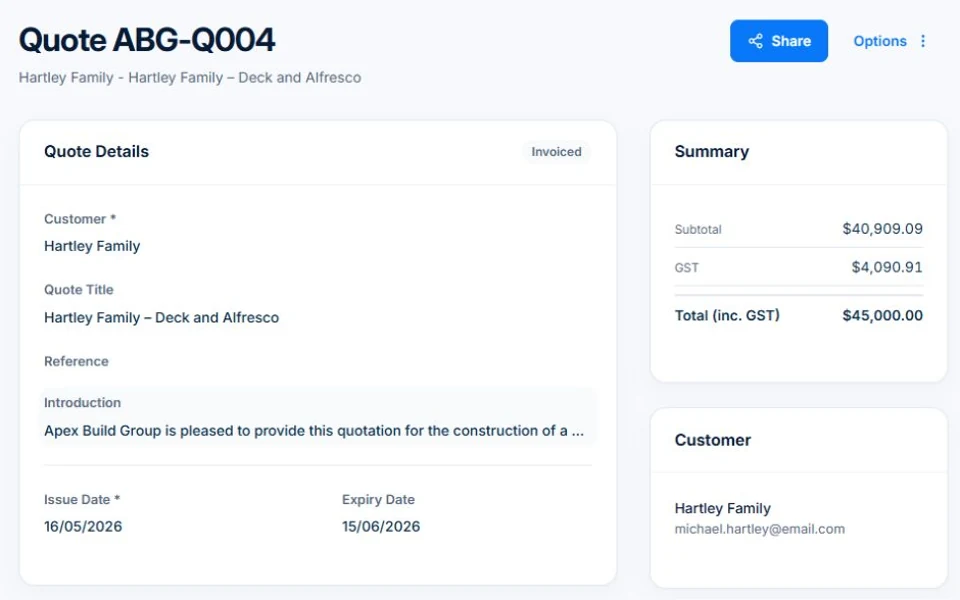
Quoting is often the most time-consuming part of running a trade business — and the part that makes or breaks whether you win the job. AxiomBlue's quoting tool lets you build a detailed, professional quote in minutes, not hours. Pull in items from your price book, use a template for common job types, group line items by room or section for larger jobs, and send a branded PDF your customer can approve with a digital signature from any device. When they say yes, convert it to a job or invoice with a single click and get on with it.

  • Quote editor with line items, sections, discounts, and tax codes
  • Price book and assemblies for fast, consistent pricing
  • Templates by trade category — plumbing, electrical, HVAC, building, and more
  • Customer digital signature with name, email, IP address, and timestamp
  • One-click conversion from accepted quote to job or invoice
AxiomBlue Quote Editor — professional quoting software for Australian tradies

How does trade quoting software save time on the tools?

Building a quote from scratch in Word or Excel means retyping the same items every time, manually calculating totals, and reformatting a PDF that still doesn't quite look right. Trade quoting software replaces that entire process. Your price book stores every item you quote regularly — labour rates, materials, call-out fees — so you insert them with a single click instead of typing them out again. Templates mean a standard electrical fit-out or a bathroom renovation is never more than a few minutes of work. The time you save on admin is time you can spend on the tools.

📋

Quote Templates

Start from a pre-built template for your trade category — plumbing, electrical, HVAC, building, painting, roofing, or landscaping. All the common line items are already there; just adjust quantities and prices.

📦

Price Book & Assemblies

Save your standard items and pre-packaged kits in the price book. Insert a full assembly — say, a Standard Hot Water Installation — as a single line and have all the components added at once.

📱

Quote on Any Device

AxiomBlue is fully mobile-responsive. Build and send a quote from your phone while you're still on site — before the customer has a chance to call your competitor.

What's included in a professional AxiomBlue quote?

An AxiomBlue quote is a fully branded document that presents your pricing clearly and professionally. Each line item has a description, quantity, unit price, optional discount percentage, and tax code. You can group line items into named sections for room-by-room or area-by-area breakdowns on larger jobs. An introduction text field at the top lets you personalise the message; terms and conditions and notes fields handle the legal and logistical details at the bottom.

🏠

Room-by-Room Sections

Group line items by section name — Kitchen, Bathroom, Garage — so customers can see exactly what they're paying for in each area. Ideal for renovations and multi-room fit-outs.

📄

Branded PDF Output

Every quote generates a clean, branded PDF with your logo, business details, and ABN. Customers can download it or view it online through the secure share link.

📬

Secure Share Link

Share quotes via a unique public link — no customer login required. They view the quote in a browser, accept with a digital signature, or decline and leave a reason.

How do customers approve and sign quotes online?

When you send a quote, AxiomBlue generates a secure share link that doesn't require any login. Your customer clicks the link on their phone or computer, reads the quote, and accepts it by entering their name, email address, and digital signature. AxiomBlue records the signatory name, email, IP address, and timestamp — the same information that makes a digital signature legally binding in Australia. You receive an instant notification, and the quote status moves to Accepted. From there, one click converts it to a job or invoice — no re-entry required.

✍️

Digital Signature

Customers sign quotes with their name, email, and a drawn signature. The acceptance is time-stamped and IP-logged for a legally recognised record of approval.

⏱️

Auto-Expiry

Set an expiry date on any quote. Customers see a countdown on the quote page and receive a reminder before it expires — creating urgency without any manual follow-up from you.

🔔

Instant Acceptance Notification

The moment a customer accepts, you're notified in-app. The quote status updates automatically so your team always knows what's been approved and what's still outstanding.

Can I use templates to build quotes faster?

Yes. AxiomBlue includes quote templates organised by trade category — plumbing, electrical, HVAC, building, painting, roofing, and landscaping. Each template comes pre-loaded with the line items, descriptions, and section structure most commonly used for that trade type. You select a template when creating a new quote, adjust quantities and prices for the specific job, and you're ready to send. Template usage is tracked so you can see which ones your team relies on most.

For even faster quoting, the optional internal approval workflow lets you configure quotes to require sign-off from a manager or senior estimator before they're sent. The quote stays in a Pending Approval state until approved, so no one accidentally sends a half-finished or incorrectly priced quote to a customer. For businesses that want control over what goes out the door, it's an easy way to maintain quality without slowing down the estimating process.

Common Questions About Quoting

Yes. AxiomBlue is fully mobile-responsive, so you can build and send a complete quote from your phone or tablet while you're still standing at the customer's property. Pull items from your price book, apply markup and discounts, add your terms, and send the PDF — all before you drive away. Customers who receive a quote before they've had time to call a competitor are far more likely to accept it on the spot.

Your price book stores individual items — labour rates, materials, call-out fees — with pre-set descriptions, unit prices, and tax codes. Insert any item into a quote with one click. Assemblies are pre-packaged groups of items — for example, a "Standard Hot Water Installation" that adds a dozen line items at once with the correct quantities and prices. Both save significant time on repeat job types and ensure your pricing stays consistent across the team.

You receive an instant in-app notification the moment a customer accepts. The quote status automatically updates to Accepted, and you can convert it to a job or invoice with a single click. All line items, customer details, and section breakdowns carry across — there is zero re-entry of information. The digital signature, timestamp, and IP address are stored permanently against the quote for your records.

Yes. Set an expiry date on any quote when you create it. Customers see a countdown on the online quote view page and receive an automated reminder before the deadline. Once the date passes, the quote status changes to Expired and the customer can no longer accept it without you re-issuing. This creates a natural sense of urgency without you having to manually follow up every open quote.

Yes. You can group line items into named sections — rooms, areas, or scope categories — so customers can see exactly what they're paying for in each part of the job. Sections appear as clear visual separators in both the editor and the customer-facing PDF, with a subtotal for each section. This is especially useful for renovations, fit-outs, and multi-trade builds where a single undifferentiated list of items would confuse rather than reassure.

Yes. AxiomBlue includes an optional internal approval workflow. When enabled, a quote created by a team member goes into a Pending Approval state. A designated approver — typically a manager or senior estimator — reviews the pricing and scope, then approves or rejects it. Only approved quotes can be sent to customers. It's a straightforward way to maintain pricing integrity and protect your margins without micromanaging your team's every move.

Start Winning More Jobs With Better Quotes

Explore AxiomBlue quoting on a fully loaded demo — see every feature working with real data. Start your free trial when you're ready.

Explore Live Demo

No credit card required • 14-day free trial • Cancel anytime