Stay on Top of Your Money
Financial Reporting & Accounts
From the day-to-day cash flow to BAS time, AxiomBlue gives Australian trade businesses a complete financial picture — accounts receivable, accounts payable, bank reconciliation, GST reporting, and two-way Xero and MYOB sync, all in one platform.
Most trade businesses manage their finances across at least three different places — the job management tool, the invoicing software, and the accounting package. Information doesn't flow cleanly between them, reconciling takes hours at the end of every month, and BAS time is a nightmare of chasing receipts and cross-referencing spreadsheets. AxiomBlue brings everything into a single platform: every invoice you raise, every supplier bill you receive, every bank transaction you import, and every GST dollar you collect is managed in one place and synced to your accounting package automatically.
- Finance dashboard with live KPIs for cash flow, receivables, and payables
- Full accounts receivable and accounts payable modules with aging analysis
- Bank reconciliation — import transactions and match to bills and invoices
- GST Summary report ready for BAS submission, calculated automatically from tax codes
- Two-way Xero and MYOB sync on Pro and Enterprise plans
How do Australian trade businesses manage their finances in AxiomBlue?
AxiomBlue structures your financial management around the three things that actually drive your cash position: what customers owe you, what you owe suppliers, and how money moves through your bank account. The finance dashboard surfaces these as live KPIs so you can see your receivables, payables, and cash flow without opening a report. Drill down for the detail — aging analysis, individual invoices, supplier bills with due dates — or run a report for your accountant at the end of the quarter. Everything ties back to the jobs and invoices you're already managing in AxiomBlue, so there's no double entry.
Finance Dashboard
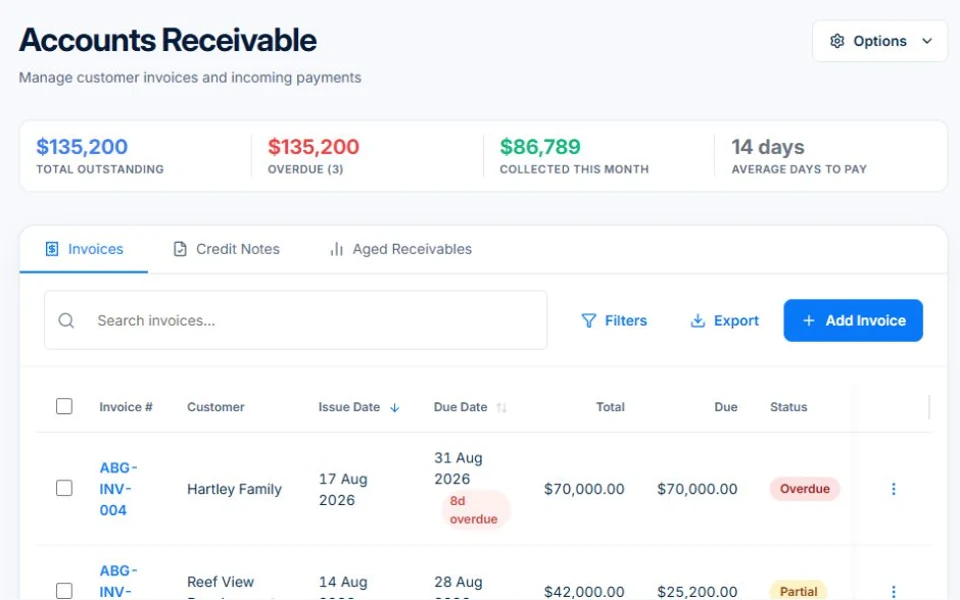
Your cash position at a glance. Key metrics for total receivables, total payables, and cash flow are updated in real time as invoices are raised, bills are recorded, and payments are received. No more end-of-month surprises.
Accounts Receivable
All customer invoices in one view with aging analysis — 0–30 days, 31–60 days, 61–90 days, and 90+ days overdue. See at a glance exactly who owes you money and how long they've owed it, so you know who to follow up first.
Chart of Accounts & Journal Entries
A full general ledger with asset, liability, equity, revenue, and expense account categories. Journal entries support debit/credit posting with draft, posted, and void statuses for complete financial control.
How does accounts payable work for trade businesses?
Trade businesses carry real supplier costs — materials, subcontractors, plant hire, and running costs all come through as bills that need to be tracked, approved, and paid on time. AxiomBlue's accounts payable module gives you a single place to manage every supplier bill from receipt to payment. Set payment terms per supplier, track due dates, run an aged payables report to see what's coming up, and record payments against each bill in the payment method that matches how you actually paid — cash, bank transfer, credit card, cheque, or direct debit.
Bill Editor
Enter supplier bills with full line-item detail — supplier, issue date, due date, line descriptions, quantities, unit prices, and tax codes. Bills move through draft, submitted, approved, and paid statuses with a clear approval workflow for businesses that require sign-off before payment.
Payment Methods
Record payments against bills in the method you actually used — cash, bank transfer, credit card, cheque, or direct debit. Payment records are stored against the bill for reconciliation and audit purposes.
Aged Payables Report
See a full aging analysis of what you owe suppliers broken down by how long each bill has been outstanding. Useful for cash flow planning, supplier relationship management, and making sure you're not incurring late payment fees without realising it.
How do you reconcile your bank account in AxiomBlue?
Bank reconciliation in AxiomBlue works by importing your bank transactions — either through a direct bank feed connection or by uploading a CSV export from your online banking — and then matching each transaction to a bill or invoice already in the system. AxiomBlue attempts the matching automatically using transaction amounts, dates, and reference fields. Matched transactions are presented for confirmation with a single click, and unmatched transactions are queued for manual matching or categorisation against the correct account in your chart of accounts. Once a transaction is reconciled, it's cleared from the outstanding list and your bank balance reflects the current reconciled position.
Every invoice raised in AxiomBlue is automatically linked to the accounts receivable module, and every bill entered flows to accounts payable, so the data feeding your reconciliation is already there — you're just confirming the match, not re-entering the figures. The full invoice modification audit trail records every change made to an invoice or bill so there's always a clear record if your accountant or auditor ever needs to trace a figure back to its source. Multi-currency support means international supplier invoices are handled correctly with the exchange rate recorded at the time of entry.
How does AxiomBlue help with GST reporting and BAS preparation?
GST is calculated automatically on every invoice and bill based on the tax codes applied to each line item. Standard tax codes for Australian businesses — GST (10%), GST-free, input taxed, and out of scope — are available on every line so your tax treatment is always explicit and auditable. The GST Summary report aggregates all taxable supplies (G1), GST-free sales (G3), capital acquisitions, and input tax credits (1B) for any date range you select. The figures map directly to the labels on your BAS so there's no translation work — you can hand the report to your bookkeeper or enter the numbers directly into the ATO's online portal.
For businesses using Xero or MYOB, the two-way sync on Pro and Enterprise plans means your accountant sees the same transactions in their preferred platform without you needing to export anything. Invoices, bills, contacts, tax codes, and payments all sync automatically in both directions, so your BAS figures are consistent across both systems. Your accountant keeps working in the tool they know — Xero or MYOB — and you keep the operational visibility you need inside AxiomBlue.
Common Questions About Financial Management
No. AxiomBlue is designed to work alongside Xero and MYOB, not replace them. The two-way sync on Pro and Enterprise plans keeps both platforms in sync automatically — invoices raised in AxiomBlue post to Xero or MYOB, and bills entered in either system are reflected in both. Your accountant keeps working in the tool they know, and you get the operational visibility you need inside AxiomBlue without any manual data re-entry.
Yes. AxiomBlue includes a full accounts receivable module (customer invoices, aging analysis, payment tracking) and a full accounts payable module (supplier bills, payment terms, due dates, bill approval workflow). You can see your complete cash position — what's coming in and what's going out — from a single finance dashboard, with aged receivables and aged payables reports available for a detailed breakdown.
Import your bank transactions via bank feed or CSV upload and AxiomBlue attempts to match each transaction to an existing bill or invoice automatically. Matched transactions are flagged for confirmation with a single click, and unmatched ones are queued for manual matching or categorisation against the correct chart of accounts code. Once reconciled, the transaction is cleared and your bank balance reflects the current reconciled position.
Yes. Tax codes are applied to each line item on every invoice and bill, and GST is calculated automatically. The GST Summary report aggregates all taxable supplies and input tax credits for any date range you choose, and the figures map directly to your BAS labels. There's no manual tallying — just run the report, check the figures, and submit your BAS.
Yes. AxiomBlue offers two-way sync with both Xero and MYOB on Pro and Enterprise plans. Invoices, bills, contacts, and payments sync between platforms automatically so your data stays consistent without manual exports or imports. The sync is configurable so you control which record types are synchronised and in which direction.
Yes. AxiomBlue includes a profit and loss statement, cash flow statement, aged receivables report, and aged payables report as standard reports. The P&L draws from your chart of accounts and journal entries to give you a complete picture of revenue, cost of goods, gross margin, and net profit for any date range. Reports can be exported for your accountant or bookkeeper.
Ready to Get a Clear Picture of Your Finances?
Stop piecing together your cash position from three different tools. AxiomBlue brings your invoices, bills, bank reconciliation, and GST reporting into one platform — and keeps it in sync with your accountant's software automatically.
No credit card required • 14-day free trial • Cancel anytime