
Keep decisions moving
Customers can review quotes and accept eligible quotes through the portal.
Customer portal / AxiomBlue
Give the customer access to their portal. They can respond to a quote, look up a job or open an invoice themselves, using the email linked to their account.
Customers can review quotes and accept eligible quotes through the portal.
Plan fit: Customer access must be configured for the business and its records. Online card payments require Professional and a connected Stripe account; new Stripe merchant onboarding currently supports Australian businesses only. Processing fees apply. Compare plans →
A practical workflow / Example
The demo’s Customer Portal settings show the business-wide access switch and sign-in instructions. Check the customer email on file and review any customer-specific access setting.
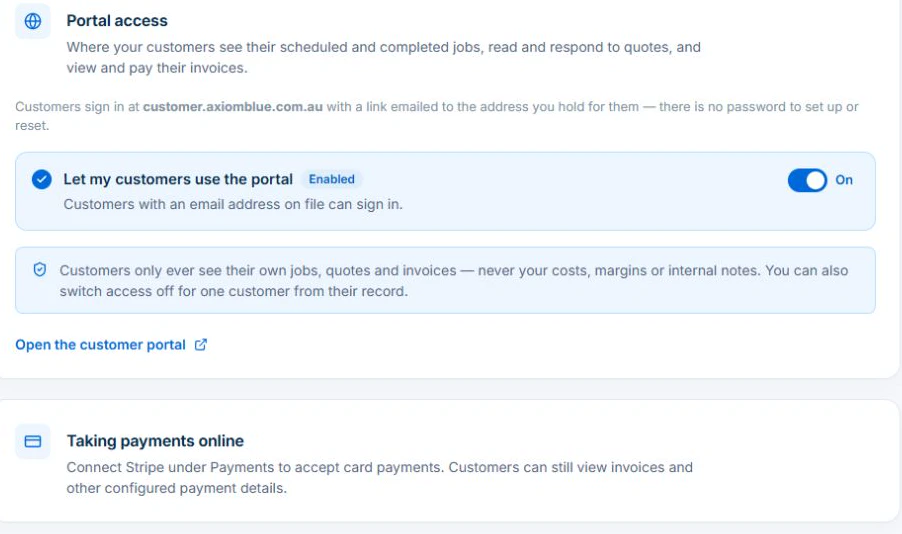
Keep internal notes, costs and margins in the business workspace. Confirm what the customer can see before telling them their paperwork is ready.
Give the customer portal access linked to their email. They can sign in, check their jobs, respond to a quote or view an invoice without waiting for someone to resend the document.
Verify the customer email and the records associated with that customer before inviting access. Use the quote or invoice preview to check the details you are asking them to review.
Use a customer with a quote and an invoice. Check that they can open their own documents, respond to the quote and recognise the related job without seeing another customer’s records.
Customers can review quotes and accept eligible quotes through the portal.
Give customers invoice detail, received payments and the remaining amount due.
Expose the appropriate job progress, photos and paperwork to the customer.
Picture it in your business / Example
A customer signs in to find their invoice and payment history, with the related work available in the same customer experience.
A practical starting point
Check the customer portal settings and record access.
Check the customer-facing documents and job information.
Give customers the sign-in path for their records.
Know what’s included
Customer access must be configured for the business and its records. Online card payments require Professional and a connected Stripe account; new Stripe merchant onboarding currently supports Australian businesses only. Processing fees apply.
Compare plans, limits and pricing →Check the workflow in detail
Explore the detail
Availability varies with plan, permissions and enabled features. Check plan inclusions.
See how this fits: get paid & keep customers informed →Before you get started
Have a specific workflow in mind? Talk it through with us.
Business Settings → Customer Portal · Customer portal sign-in. Available controls depend on your permissions and enabled features.
Customer access must be configured for the business and its records. Online card payments require Professional and a connected Stripe account; new Stripe merchant onboarding currently supports Australian businesses only. Processing fees apply.
Try a familiar job, check the records and confirm the plan inclusions your team needs.
Keep the work connected
Considering a switch?
Use a familiar job to compare the way you work today with the way Axiom Blue handles it.
Check the quote, schedule, job record and invoice. Look for the details your team needs.
Compare usage limits, paid seats and specialist features. See plans and pricing →
Try your own quote on the free plan. Before moving existing records, ask us about your data and setup needs.
Make the next step a small one
You know where the friction is in your business. Open the demo and see how AxiomBlue handles it. Then start with your own quote on the free plan.
Free forever for one person. No credit card. Usage limits apply.
Try a quote like one you send every week. Check the detail your customer will see.
Explore a job, its crew, time and materials. Look for the information you usually chase.
Compare the features and limits you need. See plans and inclusions →