
Identify the right asset
Keep equipment identifiers, categories and status in the asset register.
Assets & service records / AxiomBlue
Find the equipment by its asset record, check its current holder and review the last return. Record the next check-out so the following crew knows where to look.
Keep equipment identifiers, categories and status in the asset register.
Plan fit: Asset register and custody access is available on Basic and Professional, subject to permissions. Recurring service jobs and specialist compliance registers require Professional; uploads start on Basic. Compare plans →
A practical workflow / Example
The landscaping demo shows a mower with its own asset record. Match the equipment identifier before checking assignment and custody.
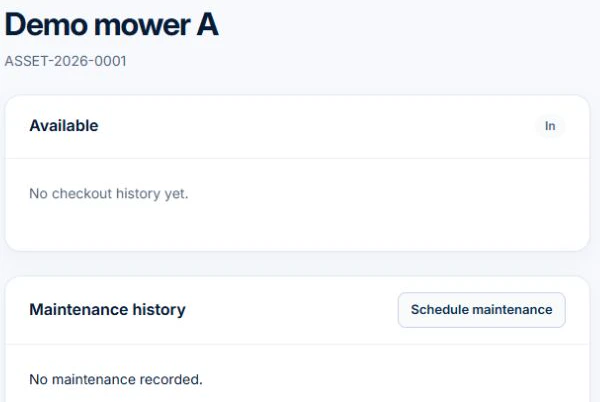
Record the return when the tool comes back. Use the service job to record work performed on it so the next person can review the maintenance evidence.
Look up the specific item and review its current holder and recorded condition. Two identical machines can be on different sites, so use the serial number or asset identity to pick the right one.
Record the check-out, due date and return condition. On Basic or Professional, custody history gives the office a place to start when the next crew needs a tool that has not come back.
Start with the recorded holder rather than calling every crew. Check the expected return and the last handover. If the machine has already changed hands, update the record while the location and condition can still be confirmed.
Keep equipment identifiers, categories and status in the asset register.
Record a check-out and return, then review custody history before assigning equipment again.
Store purchase and warranty details. Retain service findings with the relevant job rather than treating custody history as proof of maintenance.
Picture it in your business / Example
Find its asset record, check the identifier and review the current check-out before assigning it. Record the return so the next person has a clear custody history. Keep any service findings in the relevant job record.
A practical starting point
Enter the asset identifier, category and status.
Check the current assignment and record a check-out or return.
Keep findings and supporting files with the relevant job. Review recurring service jobs separately on Professional.
Know what’s included
Asset register and custody access is available on Basic and Professional, subject to permissions. Recurring service jobs and specialist compliance registers require Professional; uploads start on Basic.
Compare plans, limits and pricing →Check the workflow in detail
Explore the detail
Availability varies with plan, permissions and enabled features. Check plan inclusions.
See how this fits: organise your work →Before you get started
Have a specific workflow in mind? Talk it through with us.
Use the asset assignment, check-out and return records to review current custody and its history. Keep those records current when equipment changes hands.
Use the asset register for equipment identity, status and custody, and job records for service findings. Professional recurring series can organise planned service visits.
Basic and Professional provide asset register and custody access, subject to permissions. Recurring job series and specialist compliance registers require Professional.
Keep the work connected
Considering a switch?
Use a familiar job to compare the way you work today with the way Axiom Blue handles it.
Check the quote, schedule, job record and invoice. Look for the details your team needs.
Compare usage limits, paid seats and specialist features. See plans and pricing →
Try your own quote on the free plan. Before moving existing records, ask us about your data and setup needs.
Make the next step a small one
You know where the friction is in your business. Open the demo and see how AxiomBlue handles it. Then start with your own quote on the free plan.
Free forever for one person. No credit card. Usage limits apply.
Try a quote like one you send every week. Check the detail your customer will see.
Explore a job, its crew, time and materials. Look for the information you usually chase.
Compare the features and limits you need. See plans and inclusions →