
Keep certificates organised
Record relevant certificates and their job context.
Trade compliance records / AxiomBlue
Match the equipment or site to its recorded evidence before the next handover. AxiomBlue Professional helps your team retrieve the details entered when the work was carried out.
Record relevant certificates and their job context.
Plan fit: Compliance management requires Professional. Check that the available record fields suit the requirements of your trade and jurisdiction. Compare plans →
A practical workflow / Example
The electrical demo shows equipment records in Test & Tag, with their latest test information. Open the relevant equipment record before relying on its status.
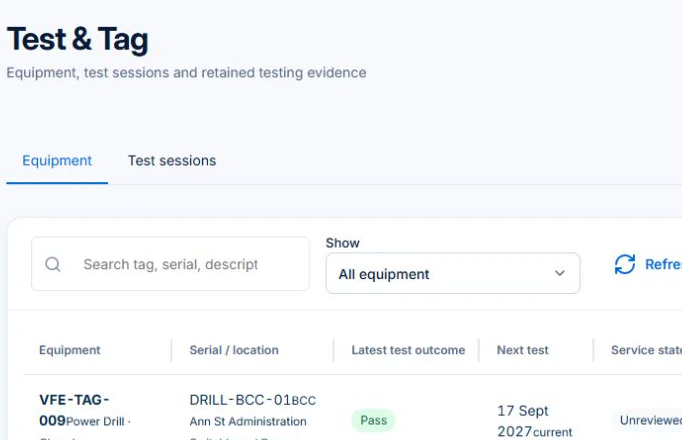
Use the register to organise evidence. Have the responsible person check the record and follow the testing, certification and recordkeeping requirements that apply to the work.
Use the equipment identity, job or site to locate the relevant Professional record. Check dates, recorded findings and supporting documents before the next handover.
A recorded certificate, tag or refrigerant entry helps staff retrieve evidence of work performed. Check the underlying document and the person responsible for the work before representing a status to a customer.
Record relevant certificates and their job context.
Maintain test-and-tag records in the register.
Keep refrigerant transaction detail available for the work that needs it.
Picture it in your business / Example
Complete the relevant record and link it to the work. Check the detail against your business’s required process before sharing or relying on it.
A practical starting point
Open the appropriate certificate, testing or refrigerant area.
Enter the required detail and job context.
Review completeness against the requirements that apply.
Know what’s included
Compliance management requires Professional. Check that the available record fields suit the requirements of your trade and jurisdiction.
Compare plans, limits and pricing →Check the workflow in detail
Explore the detail
Availability varies with plan, permissions and enabled features. Check plan inclusions.
See how this fits: make it work your way →Before you get started
Have a specific workflow in mind? Talk it through with us.
Jobs & Crews → Compliance → Certificates / Test & Tag / Refrigerant Logs. Available controls depend on your permissions and enabled features.
Compliance management requires Professional. Check that the available record fields suit the requirements of your trade and jurisdiction.
Try a familiar job, check the records and confirm the plan inclusions your team needs.
Keep the work connected
Considering a switch?
Use a familiar job to compare the way you work today with the way Axiom Blue handles it.
Check the quote, schedule, job record and invoice. Look for the details your team needs.
Compare usage limits, paid seats and specialist features. See plans and pricing →
Try your own quote on the free plan. Before moving existing records, ask us about your data and setup needs.
Make the next step a small one
You know where the friction is in your business. Open the demo and see how AxiomBlue handles it. Then start with your own quote on the free plan.
Free forever for one person. No credit card. Usage limits apply.
Try a quote like one you send every week. Check the detail your customer will see.
Explore a job, its crew, time and materials. Look for the information you usually chase.
Compare the features and limits you need. See plans and inclusions →