
See money still to collect
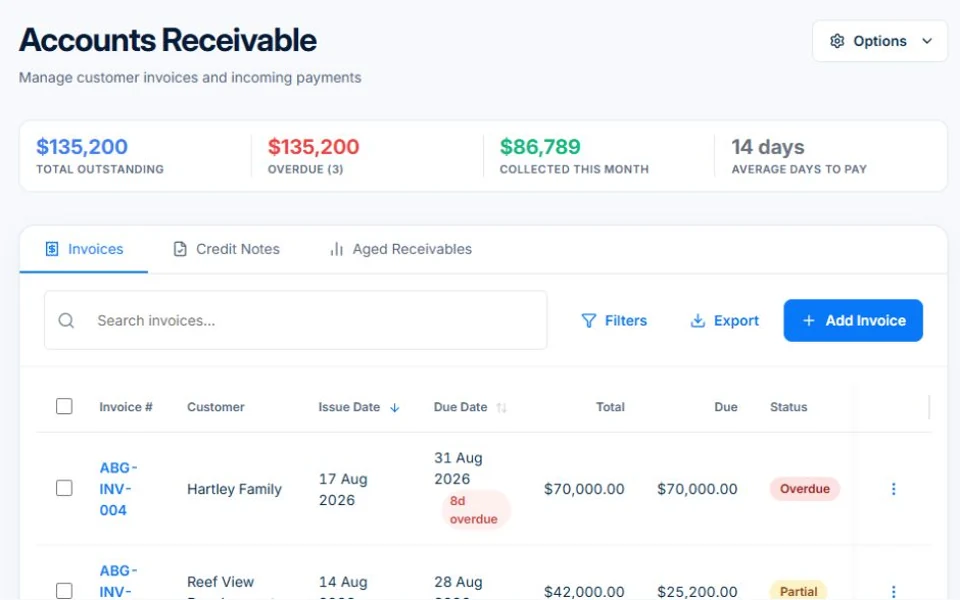
Review customer invoices, recorded payments and outstanding balances in accounts receivable. Open the invoice for the detail behind the number.
Finance & reporting / AxiomBlue
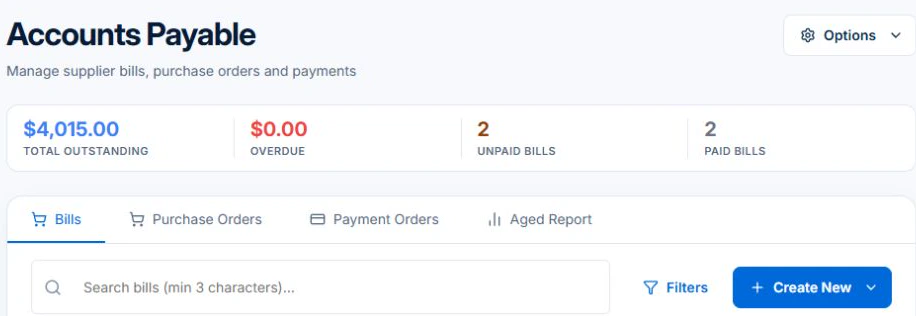
Check outstanding customer invoices against the payments already recorded. Open Professional Accounts Payable to review the other side of the ledger before arranging supplier payments.
A clearer starting point for the money conversations.
Plan fit: Core invoicing and receivables are included in Basic. Accounts payable, advanced financial reports and Xero integration require Professional. Compare plans →
In the demo, Accounts Payable shows supplier bill balances and overdue amounts. Open the underlying bill to check its details before arranging payment.
Use Accounts Receivable when a customer owes the business. For ageing reports or connected accounting, follow the separate reporting and integration workflows.
Open their invoices and recorded receipts. Check part payments, credits and the amount outstanding before asking for payment. Reconcile a recorded receipt with money actually received.
On Professional, review the supplier bill, its outstanding balance and supporting records before arranging payment. Keep the amount the business owes separate from money owed by its customers.
Open a customer with a part payment and trace the original invoice, receipt and balance. For a supplier, check the bill and any recorded payment. That gives the office a specific amount and document to discuss on the next call.
Review customer invoices, recorded payments and outstanding balances in accounts receivable. Open the invoice for the detail behind the number.
Professional accounts payable gives supplier bills and payments a place alongside the rest of the business record.
Use Professional reports such as aged receivables, aged payables and revenue views to explore the business. Connect Xero on Professional for accounting sync.
Picture it in your business / Example
Check which customer invoices remain outstanding, review supplier bills and follow up the records that need attention. Use the report detail to guide the conversation rather than relying on the diary alone.
A practical starting point
Open receivables and check unpaid invoices.
On Professional, review supplier bills and payables.
Open the underlying records and use the relevant report to investigate.
Know what’s included
Core invoicing and receivables are included in Basic. Accounts payable, advanced financial reports and Xero integration require Professional.
Compare plans, limits and pricing →Check the workflow in detail
Explore the detail
Availability varies with plan, permissions and enabled features. Check plan inclusions.
See how this fits: get paid & keep customers informed →Before you get started
Have a specific workflow in mind? Talk it through with us.
AxiomBlue brings jobs, billing and operational finance together. Professional connects to Xero so you can keep your accounting workflow alongside AxiomBlue. Review the records you want to sync as part of setup.
Accounts payable, advanced financial reports and Xero sync require Professional. Core invoicing and receivables are included in Basic.
Open the invoice and review its recorded payments and remaining balance. The accuracy of the view depends on keeping those records current.
Keep the work connected
Considering a switch?
Use a familiar job to compare the way you work today with the way Axiom Blue handles it.
Check the quote, schedule, job record and invoice. Look for the details your team needs.
Compare usage limits, paid seats and specialist features. See plans and pricing →
Try your own quote on the free plan. Before moving existing records, ask us about your data and setup needs.
Make the next step a small one
You know where the friction is in your business. Open the demo and see how AxiomBlue handles it. Then start with your own quote on the free plan.
Free forever for one person. No credit card. Usage limits apply.
Try a quote like one you send every week. Check the detail your customer will see.
Explore a job, its crew, time and materials. Look for the information you usually chase.
Compare the features and limits you need. See plans and inclusions →