Crew Scheduling & Dispatch · Built in Australia
Crew Scheduling Software for Multiple Crews, Concurrent Jobs, and the Call-Out That Just Landed
Three crews, six live jobs, a subbie on site two, and an emergency call-out on line one. AxiomBlue puts every crew in its own lane on one calendar, so you dispatch on what you can see — not on what you can remember.
Quick answerCrew scheduling software manages multiple teams running concurrent jobs from one visual calendar — each crew in its own colour-coded lane, jobs reallocated by drag-and-drop, and every affected crew member's phone updated the moment plans change. AxiomBlue is crew scheduling software built in Australia, with subcontractors on the same calendar and the schedule feeding time tracking and invoicing, from $29 AUD per seat per month with a free plan that has no time limit.
One crew off a whiteboard is manageable. Three crews across six concurrent jobs, with a subbie in the mix and a call-out landing mid-morning, is a memory game you eventually lose — and losing means a double-booked crew, a site with nobody on it, or an emergency customer told "we'll try for Thursday". AxiomBlue turns that memory game into a picture.
- Every crew, technician, and subcontractor in its own colour-coded calendar lane
- Drag a job between lanes to reallocate — the change reaches the field instantly
- Dispatch urgent call-outs onto visible capacity, not guessed capacity
- Multi-crew jobs supported — assign more than one team to the same job
- Every assignment carries the full job: site, scope, notes, customer, history
What is crew scheduling software?
Crew scheduling software is a system for assigning jobs to teams of workers — crews — and managing several of those teams running different jobs at the same time across different sites. It differs from personal scheduling in one structural way: the unit being scheduled is a team against a job, not a person against a time slot, and the hard problems are all about concurrency — who's free, who's closest to done, and what happens to four other bookings when one job blows out.
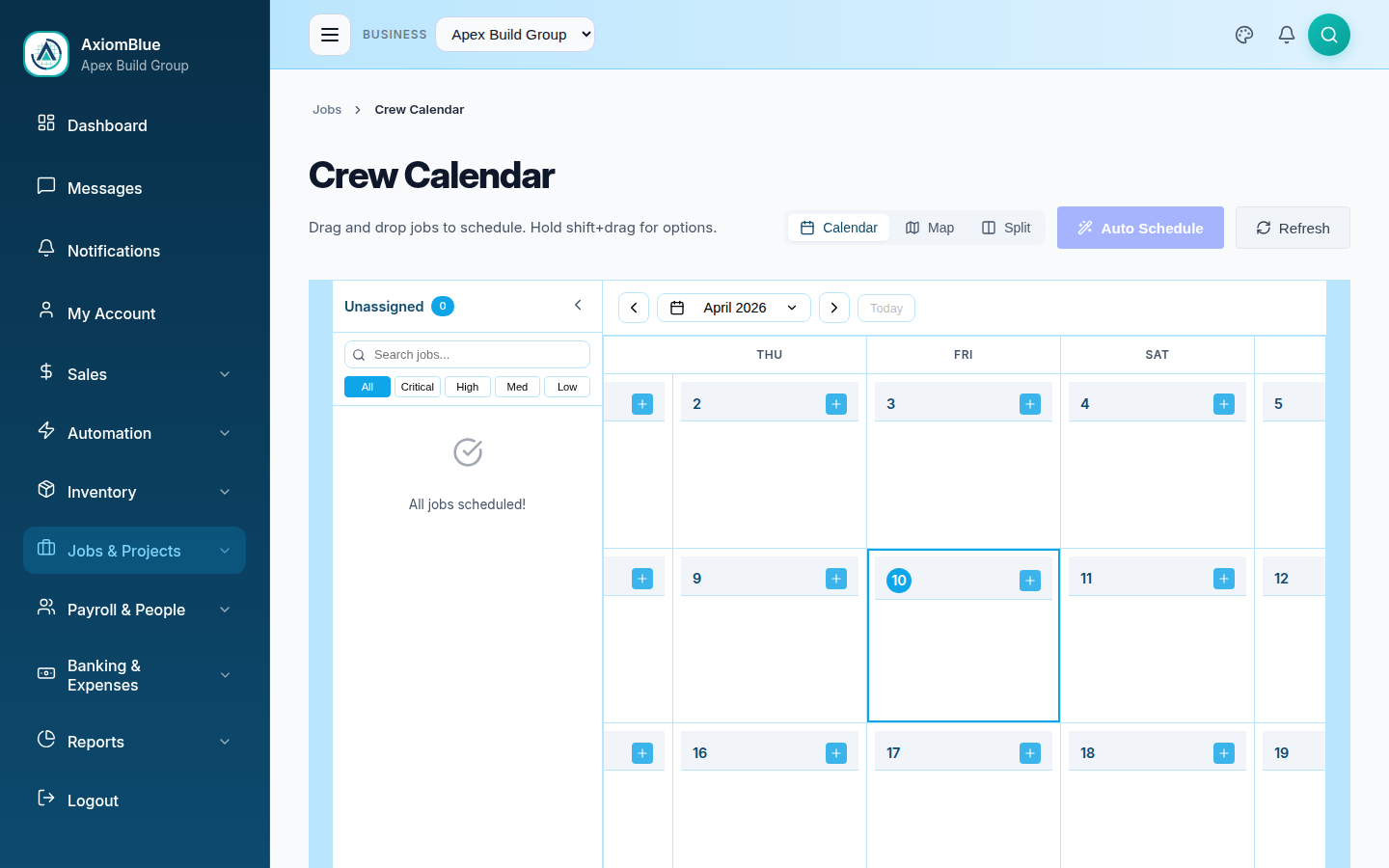
In AxiomBlue, crew scheduling is a calendar where every crew and technician has a colour-coded vertical lane. All lanes sit side by side, so the dispatcher sees the whole operation's day on one screen: which crews are stacked, which have gaps, and where the new job fits without colliding with an existing one. Assigning is a drag; reassigning is another drag. Because AxiomBlue is job management software underneath, each calendar entry is a full job record — the crew that receives it gets the site address, scope, customer, notes, and history, not just a time and a suburb.
Crew scheduling in AxiomBlue: the key facts
Here is the short, checkable version of what AxiomBlue's crew scheduling costs and covers. Everything in the table is expanded on this page.
| Key fact | AxiomBlue |
|---|---|
| Price | From $29 AUD per seat per month (Basic); $59 Professional |
| Free plan | No time limit, no credit card required |
| Crew limit | No fixed cap — pricing is per seat, not per crew |
| Best for | Businesses dispatching two or more crews across concurrent jobs |
| Standout capability | Colour-coded crew lanes with drag-and-drop reallocation reaching the field instantly |
| Subcontractors | Scheduled on the same calendar as employees |
| Platform | Native iPhone & Android apps + the full platform in any web browser |
| GST & accounting | GST automatic on quotes/invoices; two-way Xero sync; MYOB sync |
How do you run three crews across six concurrent jobs without double-booking?
You stop scheduling from memory and start scheduling from a picture — double-booking happens when the person allocating work can't see existing commitments at the moment they commit a crew. AxiomBlue's answer is structural: because every crew's lane shows its existing bookings side by side with every other crew's, the clash you were about to create is visible before you create it, and the crew with capacity is as obvious as the crew without.
Lanes make load visible
A stacked lane looks stacked; a gap looks like a gap. Balancing six jobs across three crews stops being arithmetic and becomes pattern-matching you do at a glance.
Reallocation is a drag
Move a job between crew lanes to reassign it, drag within a lane to retime it, resize it when the estimate changes. No forms, no re-entry.
Multi-crew jobs
Big job needing two teams? Assign multiple crews or individuals to the same job — each sees it in their lane, and the job record shows every assignment.
How do you dispatch an urgent call-out without blowing up the day?
You create the job, look at the lanes for real capacity, and drag it onto the crew that can actually take it — in AxiomBlue that whole sequence takes under a minute, and the assigned crew sees the call-out on their phone with the address and details attached. The difference from the phone-and-whiteboard version isn't speed alone; it's that you dispatched onto visible capacity. You saw which crew was finishing early, which was mid-pour and untouchable, and what the knock-on to the afternoon looks like before you committed.
The knock-on is the half of call-out handling most tools ignore. Slotting an emergency in at 11am usually means something else moves — and on a whiteboard, that displaced job is where the dropped ball happens. On the AxiomBlue calendar you drag the displaced job to its new home in the same motion, so it stays a scheduled commitment instead of becoming a sticky note. The customer whose job moved can then be told early — and on the Professional plan, automation templates can handle appointment reminder messages automatically.
What happens when one crew's job runs over?
The rest of that crew's day shifts, and the calendar is where you absorb it: drag the affected bookings later, hand one to a crew with a gap, or push tomorrow's first job back — each move updating the relevant crew members' phones as you make it. A multi-crew schedule is never the plan you wrote at 7am; it's the plan as amended by reality at 9:40, 11:15, and 2:30. The tool's job is to make each amendment cost seconds instead of a round of calls.
This is where crew scheduling differs most from single-tradie scheduling: with one operator, a blow-out inconveniences one diary. With multiple crews, one blow-out ripples across teams — crew two was meeting crew one at the next site, the subbie was booked around your electrician's rough-in, and so on. Because every lane is on the same screen, you resolve the ripple where you can see all of it, and everyone affected gets the amended plan without the office playing switchboard.
Can subcontractors sit on the same calendar as your crews?
Yes — in AxiomBlue, subcontractors get a lane like everyone else, so the schedule shows your real workforce rather than just your payroll. You assign a subbie to a job the same way you assign an employed crew, the allocation is tracked on the job record, and their booking is visible alongside your own teams when you're working out who takes the next job.
The alternative — employees in the system, subbies in a spreadsheet or someone's head — splits the schedule into two sources of truth, and the gap between them is where a site ends up double-covered or not covered at all. One calendar for everyone who does your work is the boring, correct answer.
Crew scheduling vs shift rostering: which do you need?
Most "scheduling software" you'll find is shift rostering — built for cafes and warehouses, where the question is which person covers which hours at a fixed location. Field crew scheduling answers a different question: which team does which job, at which site, and what happens when the jobs move. The honest comparison is between the roster tools, the whiteboard-and-group-chat status quo, and a job-based system.
| Shift rostering apps | AxiomBlue Job-based crew scheduling | Whiteboard + group chat | |
|---|---|---|---|
| Unit of scheduling | Person × hours at a location | ✓ Crew × job at a site | Whatever fits on the board |
| All crews visible at once | ~ Staff list, not job lanes | ✓ Colour-coded lane per crew | ~ Until someone wipes it |
| Mid-day reallocation | ✗ Re-rostering workflow | ✓ Drag to another lane, done | ✗ Round of phone calls |
| Job details travel with the assignment | ✗ Separate job system needed | ✓ Site, scope, notes, history attached | ✗ "Ring me when you get there" |
| Subcontractors schedulable | ✗ Employees only, usually | ✓ Same calendar as employees | ~ In someone's head |
| Feeds timesheets & invoicing | ~ Payroll hours only | ✓ GPS time tracking → job cost → invoice | ✗ Reconstructed Friday night |
How does crew scheduling feed timesheets and job costing?
Directly — in AxiomBlue the crew assignment on the calendar is the same record the crew clocks onto in the field, so scheduled work becomes tracked hours without anyone transcribing anything. A crew member taps to clock on at the site, GPS check-in confirms where, and the hours land against the job they were scheduled to. From there the job's estimated-versus-actual cost updates live, and the invoice is built from what was actually logged.
For a multi-crew business this connection is the difference between knowing and guessing. When five crews log time against the jobs they were dispatched to, you can see which jobs — and which kinds of jobs — make money while they're still running. The details live on the GPS time tracking and job costing software pages.
Only scheduling yourself — or still weighing up the category?
This page is about the multi-crew problem: concurrency, dispatch, and the ripple when the day changes. If it's just you and a ute — where the enemy is the whiteboard and the 7am ring-around, not double-booked crews — the tradie scheduling software page is written for your setup. And if you're still working out what this category of software is and how it works before comparing anything, start at the job scheduling software guide. For how scheduling fits into running the whole business — quote to invoice to report — see trade management software.
Crew Scheduling Software — Common Questions
Crew scheduling software assigns jobs to teams of workers and manages multiple crews running concurrent jobs across different sites. It gives the dispatcher one visual calendar where every crew has its own colour-coded lane, so workload, gaps, and double-booking risks are visible across all teams at once. AxiomBlue is crew scheduling software built in Australia for trade and field-service businesses.
As many as you run - there is no fixed cap on crews. Pricing is per seat ($29 AUD Basic, $59 Professional, per seat per month), so the cost scales with the people using the system, not the number of crews or jobs. Each crew and technician gets its own colour-coded lane on the calendar.
Every crew's existing bookings are visible in their lane before you drag a new job onto them, so a clash is something you see rather than something you discover. Because the calendar shows all crews side by side, the free crew is as obvious as the booked one - you drop the job on capacity instead of guessing from memory.
Yes. Subcontractors appear on the same AxiomBlue calendar as your employed crews - you assign jobs to them the same way, their allocation is tracked on the job record, and their lane sits next to everyone else's. There is no separate system or spreadsheet for subbies.
You drag the job from one crew's lane to another, and the change is live immediately. The newly assigned crew sees the job on their phone with the site address, scope, and notes attached; the crew that lost it sees it drop off their schedule. The job record itself updates too, so time tracking and invoicing follow the new assignment automatically.
Yes. Every scheduled job connects to quoting and invoicing with GST applied automatically, and AxiomBlue syncs two-way with Xero so invoices, payments, and contacts stay matched across however many crews generated the work. MYOB sync is also available.
AxiomBlue starts at $29 AUD per seat per month, with crew scheduling included alongside job management, quoting, time tracking, and invoicing - it is not a paid add-on. There is a free plan with no time limit, and no credit card is required to start.
Put Every Crew in Its Own Lane
Stop dispatching from memory. See every crew's day side by side, drag the work to where the capacity is, and let the field find out instantly — start free today.
No credit card required • Free plan, no time limit • Built in Australia