Scheduling & Dispatch · Built in Australia
Tradie Scheduling Software That Replaces the Whiteboard and the 7am Ring-Around
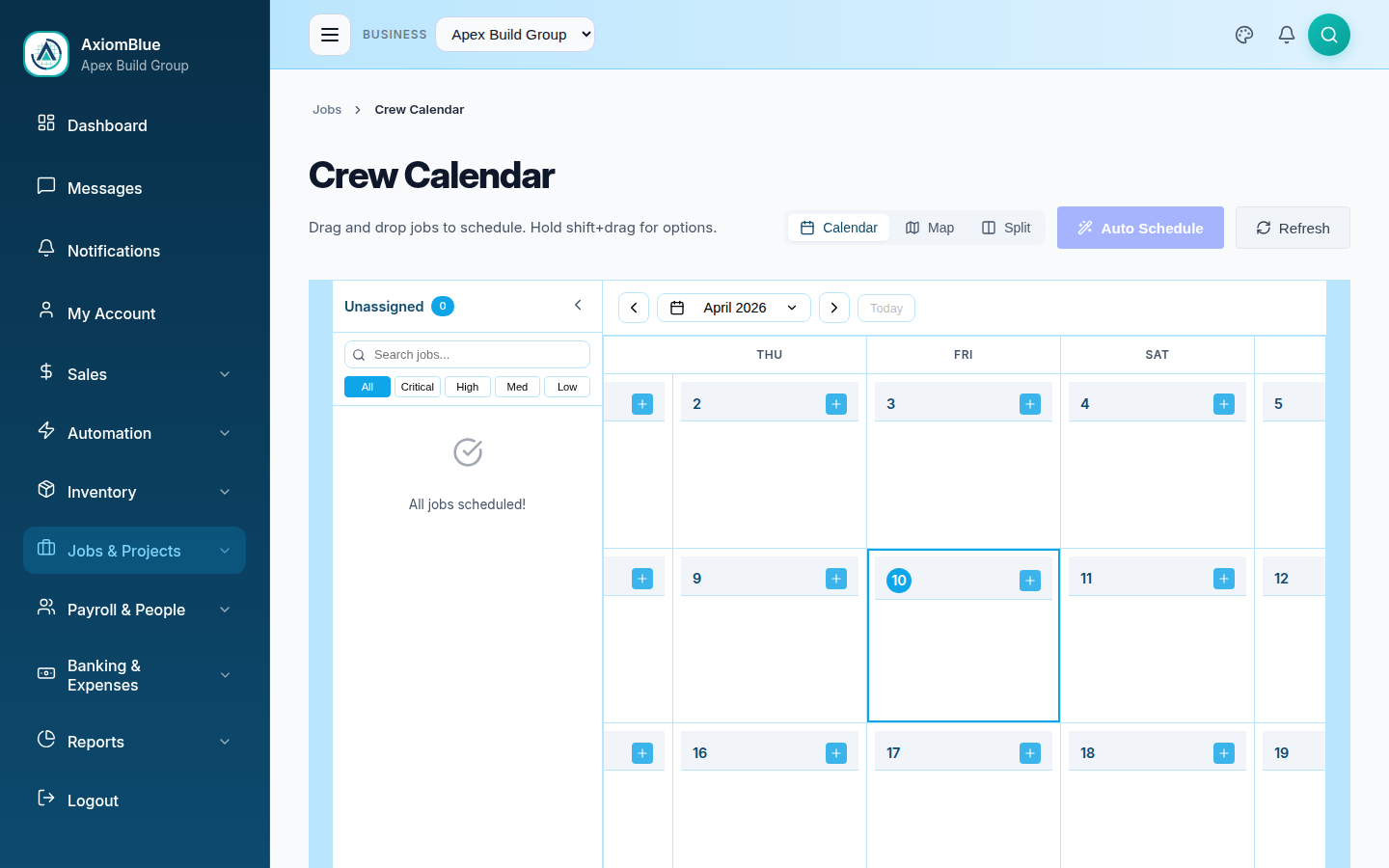
You didn't start a trade business to spend 7am on the phone telling everyone where to go. AxiomBlue puts the week on a drag-and-drop calendar that you and your crew see live on any phone — and every job on it carries its quote, its site details, and its invoice with it.
Quick answerTradie scheduling software replaces the whiteboard and the morning ring-around with a drag-and-drop calendar that the whole business sees live on any phone. AxiomBlue is tradie scheduling software built in Australia: reshuffle a day in seconds, and each scheduled job flows straight through to time tracking and invoicing — from $29 AUD per seat per month with a free plan that has no time limit.
For an owner-operator or a small team, the schedule is the business. When it lives on a whiteboard, in your head, and in a group chat, you are the only person who knows the plan — which means every change routes through you, usually before breakfast. AxiomBlue moves the plan somewhere everyone can see it, and takes you out of the loop for the routine stuff.
- Drag-and-drop calendar — book, move, or reshuffle a job in seconds
- Your crew sees the live schedule on their phone, with address and notes attached
- Free native iPhone & Android apps — plus the full platform in any phone browser
- Each scheduled job carries its quote, customer, photos, and history
- Scheduled work flows straight into GPS-tracked time and the invoice
Tradie scheduling software: the key facts
The table below is the short version of what AxiomBlue's scheduling costs and covers for an Australian tradie. Everything on it is expanded further down the page.
| Key fact | AxiomBlue |
|---|---|
| Price | From $29 AUD per seat per month (Basic); $59 Professional |
| Free plan | No time limit, no credit card required |
| Platform | Native iPhone & Android apps + the full platform in any web browser |
| Best for | Owner-operators and small trade teams replacing a whiteboard or paper diary |
| Standout capability | Every scheduled job carries its quote, customer, and invoice — one record end to end |
| GST | Applied automatically on quotes and invoices |
| Accounting sync | Two-way Xero sync; MYOB sync |
| Data hosting | Australian-hosted (Google Cloud, Sydney) |
Why does the whiteboard always fail by Tuesday?
The whiteboard fails because it only exists in one place, and your business doesn't. The plan on the office wall is right for about as long as nothing changes — then a customer cancels, a supplier delivery slips, a job runs half a day over, and the board is fiction. From that moment, the real schedule lives in your head, and everyone has to ring you to get at it.
That's what the 7am ring-around actually is: a daily manual sync between the one person who knows the plan and everyone who needs it. It costs you the first hour of every day, it repeats every time the plan changes, and it doesn't scale past a handful of people. Most tradies don't experience this as a scheduling problem — they experience it as their phone never stopping.
AxiomBlue fixes the underlying issue instead of the symptom: the schedule becomes a shared, live thing. You drag a job on the calendar; everyone affected sees the change on their phone, with the site address and notes attached. The plan updates once, in one place, and the phone calls stop being the delivery mechanism.
How does scheduling software replace the 7am ring-around?
Scheduling software replaces the ring-around by giving every crew member their own live view of the day, so nobody needs to be told where to go — they look. In AxiomBlue, each person opens the app on their phone — the free native iPhone or Android app, or any browser — and sees their jobs in order: site address, gate code in the notes, the accepted quote they're working to, and the photos and history from the last visit. If you reshuffle the day at 6:50am, that's what they see at 6:51.
The calendar is the schedule
Not a copy of it. Drag a job to a new slot or a new person and that IS the change — there's no second step where someone updates the board or sends the text.
Everyone carries the plan
Each crew member's phone shows their current day — address, notes, and job detail attached. Native iPhone and Android apps, or any phone browser — nobody is forced to install anything.
The group chat retires
Job details stop living in a scrollback of texts. They live on the job, where the person doing the work finds them without asking.
Can I run the schedule from the ute?
Yes — the full calendar works in a phone browser, so the ute is as good as the office. Book the follow-up visit while you're still standing in the customer's kitchen. Slot a call-out into Thursday from the merchant's carpark. Drag tomorrow forward when today wraps early. Because the complete AxiomBlue platform runs in the browser — alongside the free native iPhone and Android apps for the field day — there's no cut-down "mobile companion" version: the calendar on your phone is the same one on the office screen, with the same drag-and-drop.
This matters most for owner-operators, because you're the scheduler and the person on the tools. Scheduling software that only works properly on a desktop means the admin waits until tonight — which is exactly the after-hours backlog you're trying to kill. With AxiomBlue, the thirty-second version of the task (book it now, while you're looking at the job) replaces the thirty-minute version (write it on a docket, transcribe it tonight, hope you can read it).
And because a scheduled job in AxiomBlue is a full job record, booking it from the ute also means the quote, customer details, and site notes are already attached when you or your crew arrive. Nothing gets re-typed later. If you want the field side of the story in full, see the job management app guide.
What happens when a job runs over or a customer cancels?
You drag the affected jobs to their new slots, and everyone's phone shows the new plan — that's the whole process. A cancellation opens a gap you can fill by dragging the next job forward. A blow-out pushes the afternoon back, and the customers who need to know can be told before they're standing at the front window wondering where you are.
On a whiteboard, a mid-morning change means a round of calls and a decent chance someone still turns up to the wrong place. In AxiomBlue the change is made once and seen everywhere, which is why the software earns its keep on the bad days, not the smooth ones. On the Professional plan, automation templates can also send customers an SMS reminder before a scheduled job automatically — fewer locked houses, fewer wasted trips — without you remembering to send anything. See workflow automation software for how those templates work.
How does the schedule flow into quoting, time tracking, and invoicing?
In AxiomBlue, the scheduled job, the quote behind it, the hours worked on it, and the invoice for it are all one record — so nothing is copied between systems and nothing falls into a gap. An accepted quote becomes a job in one tap and lands in the scheduling queue. When the job's booked and the work starts, one tap starts the timer with GPS check-in, so the hours land on the right job. When it's done, the invoice already exists, built from the logged time and materials, with GST applied correctly and two-way Xero sync keeping the books straight.
This is the practical difference between tradie scheduling software and a generic calendar: a calendar can hold your Tuesday, but it can't invoice it. For a small operation, the connected flow is where the evenings come back — the admin that used to happen after dinner (transcribe the diary, work out the hours, build the invoice) simply doesn't exist as a separate task. The full picture of that end-to-end flow is on the trade management software page, and the paperwork side on invoicing software for tradies.
Whiteboard, group chat, or scheduling software — what actually changes?
The honest comparison for a small tradie business isn't against enterprise dispatch systems — it's against the whiteboard-and-texts setup you're running now, and the free shared calendar you've probably already tried.
| Whiteboard + 7am phone calls | AxiomBlue Built for tradies | Shared calendar app | |
|---|---|---|---|
| Where the plan lives | ✗ One wall + your head | ✓ Live on every phone | ✓ On every phone |
| What a booking holds | ✗ A name and a suburb | ✓ Quote, customer, notes, photos, history | ✗ A title and a time |
| Mid-day reshuffle | ✗ Round of phone calls | ✓ Drag once, everyone sees it | ~ Moves the block, not the job details |
| Hours captured against the job | ✗ Reconstructed Friday night | ✓ Tap to clock on, GPS check-in | ✗ Not a concept it has |
| Becomes an invoice | ✗ Re-typed after hours | ✓ Built from the job, GST correct, Xero synced | ✗ Separate system entirely |
| Cost | Free (paid in evenings) | From $29 AUD/seat/month | Free |
What does tradie scheduling software cost in Australia?
AxiomBlue starts at $29 AUD per seat per month on the Basic plan, and scheduling isn't sold separately — the same plan includes quoting, job management, time tracking, and invoicing. A solo operator runs the whole business on one seat; a small team pays per person on the tools. The Professional plan at $59 AUD per seat per month adds two-way Xero sync's deeper accounting stack and 30+ automation templates, including the SMS job reminders customers actually notice.
Every plan has a free plan with no time limit with no credit card, so the sensible way to evaluate it is to run one real week's schedule through it: book your actual jobs, reshuffle when the week goes sideways, and see whether the 7am calls stop. The free plan is the demo.
Got more than one crew on the road?
This page is written for the owner-operator and the small team, where the pain is the whiteboard and the ring-around. If you're dispatching several crews across concurrent jobs — juggling call-outs, double-booking risks, and subcontractors — the multi-crew mechanics get their own treatment on the crew scheduling software page. And if you're earlier in the research and want the category basics first — what job scheduling software is, how it works, and what to look for — start with the job scheduling software guide.
Tradie Scheduling Software — Common Questions
If you ever double-book yourself, forget a booked job, or spend evenings working out next week, yes. AxiomBlue gives a solo tradie one calendar that also holds the quote, the customer's details, and the invoice for every job - so the same entry that books your Tuesday also gets you paid for it. From $29 AUD per seat per month, a solo operator runs the whole business on one seat.
Yes. The full AxiomBlue calendar runs in any phone browser, so you can drag a job to a new day, book the follow-up visit while you are standing in the customer's kitchen, or fit a call-out into this afternoon - all from the ute. The free native iPhone and Android apps keep your own schedule and job details in your pocket too, and the calendar you see on your phone is the same one the office sees.
Yes. Every schedule change in AxiomBlue updates in real time - your crew opens the free native iPhone or Android app, or any phone browser, and sees the current plan, with the site address, notes, and job history attached to each job. Nobody works off a photo of the whiteboard taken on Monday.
Yes. AxiomBlue's automation templates (Professional plan, $59 AUD per seat per month) include SMS and email reminders sent automatically before a scheduled job, which cuts the locked-house, nobody-home wasted trips. You switch the template on and set the timing - no code involved.
Yes. GST is applied automatically on the quotes and invoices attached to your scheduled jobs, and AxiomBlue syncs two-way with Xero so invoices, payments, and contacts stay matched without double entry. MYOB sync is also available.
Yes - AxiomBlue has free native apps for iPhone and Android, on the App Store and Google Play, covering the field day: your schedule, job details, GPS clock-on, photos, materials, quotes, and on-site invoicing. The full platform also runs in any phone browser, so a new starter can work from a link before installing anything.
AxiomBlue starts at $29 AUD per seat per month on the Basic plan, which includes scheduling alongside quoting, job management, and invoicing. The Professional plan ($59 AUD per seat per month) adds automation templates like SMS job reminders. There is a free plan with no time limit, and no credit card is required to start.
Retire the Whiteboard
Put next week on a calendar the whole crew can see, and let 7am go back to being coffee. Run one real week through the free plan — if the phone calls don't stop, walk away.
No credit card required • Free plan, no time limit • Built in Australia