
Key facts
| Assisted planning | AxiomBlue proposes assignments using recorded job duration, bookings, working hours and travel. |
|---|---|
| Crew fit | Professional adds managed crews, recorded skills and approved leave. |
| Your control | Review proposed people, times, warnings and unplaced jobs before applying Auto Schedule. |
| Changed days | Preview a day reschedule, apply it and check the result; an undo option is available. |
| Access | Free and Basic schedule individuals. Free usage limits apply; managed crews and recurring job series require Professional. |
Test the changing day in AxiomBlue’s scheduler
- Enter the installation, service and repair jobs with Site Address and Estimated Duration. On Professional, record the repair’s Required Skills and the current crew/leave data. Keep materials and access readiness explicit in Description.
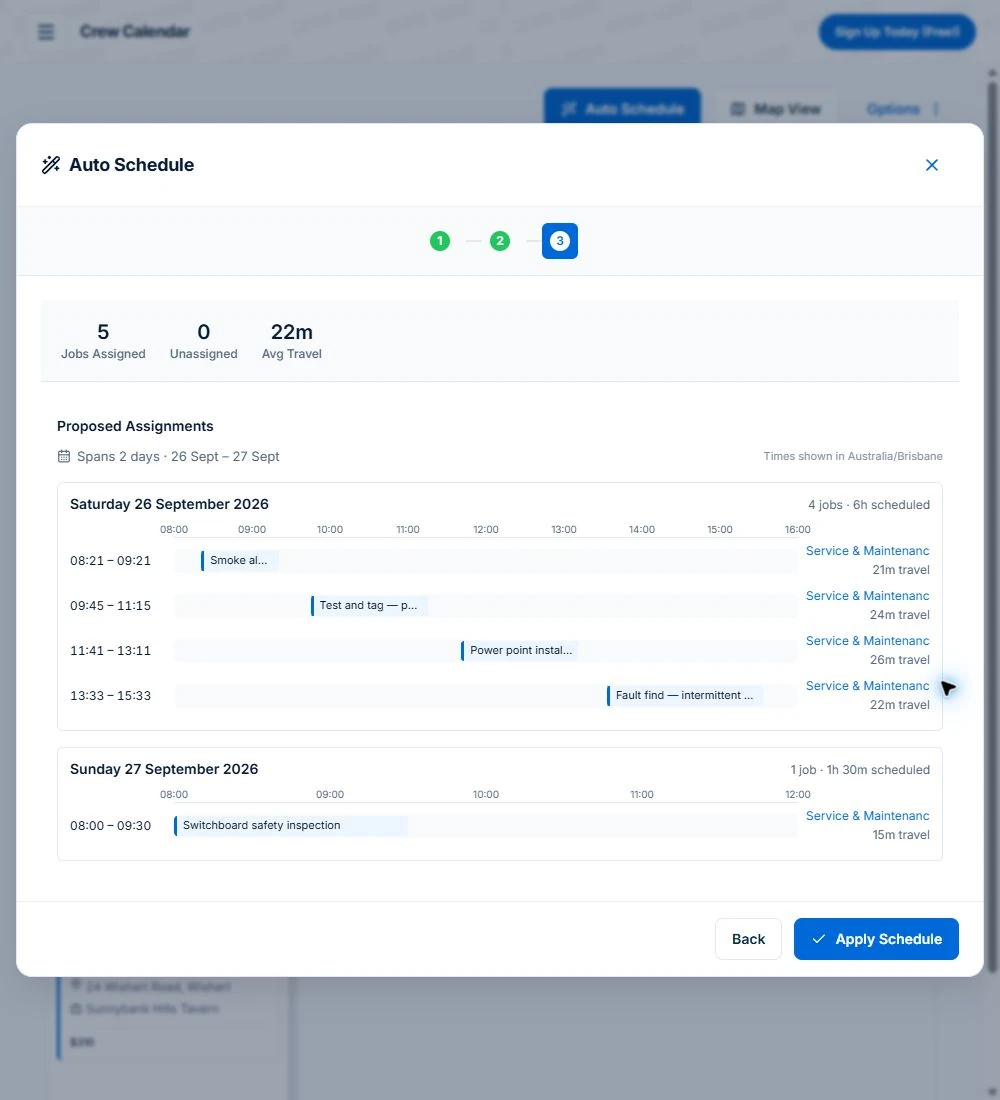
- Open Auto Schedule from Calendar & Schedule, choose the unassigned jobs and preview using the available controls. Compare the proposed people, times, travel and reasons for unplaced work with the agreed appointments.
- Apply the reviewed plan, then introduce the rain delay or urgent call-out in the example. Preview the changed day and inspect the actual result before confirming it with customers. A subscribed external calendar refreshes separately and does not replace this check.
Test who should do the work, as well as when
Use three familiar jobs: an installation, a short service visit and a repair with a required skill. Record their locations and realistic durations, alongside the team’s bookings and working hours.
Check whether the tool can propose suitable assignments and show why work could not fit. A blank slot alone does not establish that the person is suitable or has enough time to reach and complete the job.
Inspect the inputs and the proposed plan
In AxiomBlue, Auto Schedule considers job duration, existing bookings, working hours and travel. On Professional, crew membership, recorded skills and approved leave also shape the proposal.
Review the proposed assignments, travel, warnings and unplaced work. Apply the proposed schedule when it fits, and review a fresh proposal if the day or availability changes. The system does not keep reallocating work unattended.
Recorded skills help match the work. Keep qualifications and other job requirements current; a recorded skill is not independent validation of a licence.
Put a rain delay and an overrun through the same test
Open Reschedule Entire Day, choose the affected date and a specific new day or the next available date. Set whether to keep the original crews where possible and exclude weekends.
For a rain delay, choose jobs already marked weather-sensitive. Review the preview, apply the change and check the actual result. The reschedule result includes an undo option.
An overrun or urgent call-out also needs a person to check the affected customer commitments and the rest of the day. Keep realistic durations and enough flexibility for the work your business usually encounters.
Check how the revised booking reaches people
Check the revised job in the AxiomBlue app and agree a process for confirming changes with the team. Each person can subscribe to their jobs in an external calendar, but that calendar refreshes on its own schedule.
On Professional, a configured Job Rescheduled workflow can send customer updates. Inspect the recipients, wording and conditions before enabling it. SMS uses separately purchased credits. A schedule change alone is not proof that the customer received a message.
Compare the plan your scheduling process needs
Free and Basic support individual scheduling and reviewed assisted assignments. Free has one user and usage limits; Basic adds capacity and uploads.
Professional adds managed crews, skills, approved leave and recurring job series. Compare the whole-team subscription and the features your test requires; do not treat a first-seat price as the bill for every user.
Use the demo for crew planning, or Free for your own jobs
Inspect a schedule proposal and a changed day in the live demo. For your own limited one-user core workflow, start free. Use the required plan when testing several people, managed crews or recurring work.
- Choose realistic job durations and locations.
- Check suitability, availability and travel in the proposal.
- Review warnings and any unplaced work.
- Apply a reviewed plan, then check a changed day.
- Confirm how the team and customers receive revised arrangements.
Make it useful today
Print or keep a working copy.
Each resource includes a blank worksheet and an illustrative example. Open it to print, or download an HTML copy to keep. No signup needed.
Common questions
Questions people ask before they switch
What is job scheduling software?
Job scheduling software keeps the customer, site, work and assigned person with the booking. Axiom Blue supports day, week and month calendar views and reviewed assisted schedules. Free and Basic schedule people individually; managed crews, skills and leave require Professional.
How do I reschedule a whole day when it rains?
In Axiom Blue, Reschedule Day moves a day’s jobs in one action: all of them, or only jobs marked weather-sensitive, to a day you choose or the next available one, keeping the same crews where possible. You see a preview of every move before it applies, and Undo puts the day back if the weather clears. It is on every plan.
Does the customer get told when their job is moved?
On the Professional plan, yes. The ready-made Job Rescheduled automation emails and texts the customer the new date and time whenever a booked job moves, whether you dragged it, rescheduled the day or Auto Schedule moved it. On every plan, the job’s tracking link shows the current booked time. Texts use prepaid SMS credits.
Can customers see when the crew will arrive?
Yes. When the crew taps On my way in the Axiom Blue app, the job’s tracking link shows an arrival time worked out from the drive, or from the booked start if the phone is not sharing its location. Running late updates it. The link opens in any browser with no login. It shows the arrival time, not where the vehicle is.
Can my crew see their jobs in Google Calendar or Outlook?
Yes. Each person can add a private subscribe link to Google Calendar, Outlook or Apple Calendar, and their Axiom Blue jobs appear there, from a fortnight back to six months ahead, showing anything from the job number alone to the full customer details, as each person chooses. Subscribed calendars refresh on their own schedule, so the Axiom Blue app is always the most current view.
Is there free job scheduling software?
AxiomBlue Free supports one user and up to 10 jobs a week, with individual scheduling and reviewed assisted assignments. Basic adds capacity and uploads. Managed crews, skills, approved leave and recurring job series require Professional. Check current pricing and usage limits before choosing.
What is the difference between job scheduling and job allocation?
Allocation chooses suitable people for the work; scheduling places it at a time and helps review changes. Axiom Blue provides individual calendar scheduling and reviewed assisted assignments on Free and Basic. Professional adds managed crews, skills and leave. The scheduler does not keep reallocating jobs unattended.
Put it to work
Your practical checklist
- Use Free within its limits for individual scheduling; use Professional or inspect the demo for crews, skills, leave, repeat work and automated customer messages.
- Put tomorrow’s jobs on the Crew Calendar by dragging them from Unassigned.
- Mark your outdoor jobs weather-sensitive, then preview a Reschedule Day for them and undo it.
- Send one customer a tracking link and tap On my way from the app on the way there.
- Add your own subscribe link to your phone’s calendar.
- On Professional, switch on Job Rescheduled and move one test job to see the message.
See the records in Axiom Blue
Try the workflow with a familiar job.
Features and usage limits vary by plan. Review the tools relevant to your process before choosing your setup.