
Meet customers where they find you
Share a hosted form link, embed it on your website or download a QR code.
Lead capture forms / AxiomBlue
Ask for the job details at the point of enquiry. Review the customer’s answers and preferred date, then decide whether to quote, call back or offer a booking.
Share a hosted form link, embed it on your website or download a QR code.
Plan fit: Form availability follows your lead-management access. Free-plan record limits apply. Workflow follow-ups require Professional. Compare plans →
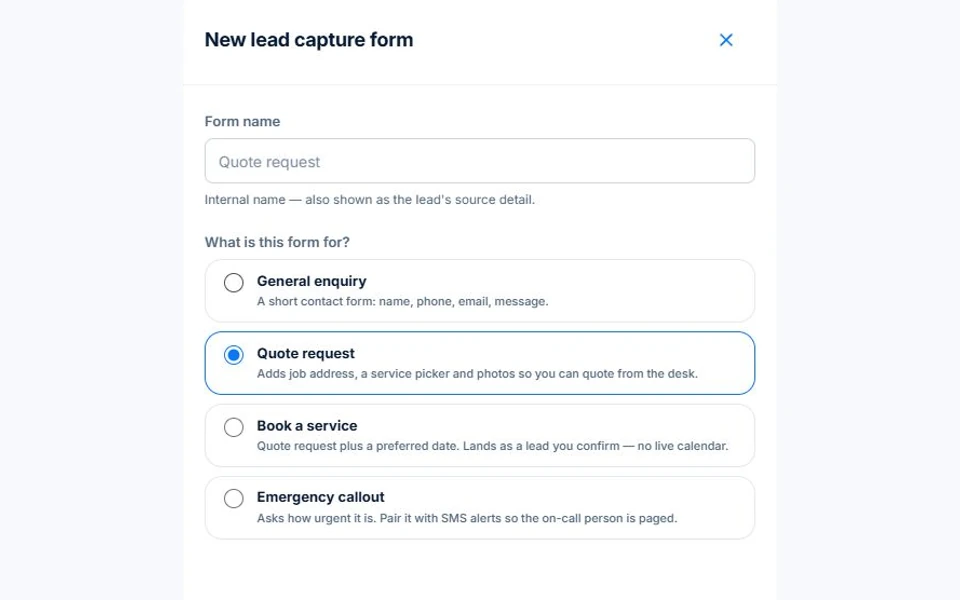
The demo editor shows contact questions mapped to the lead. Preview the hosted form to check the labels from the customer’s side. For a preferred date, explain that the team will confirm the timing.
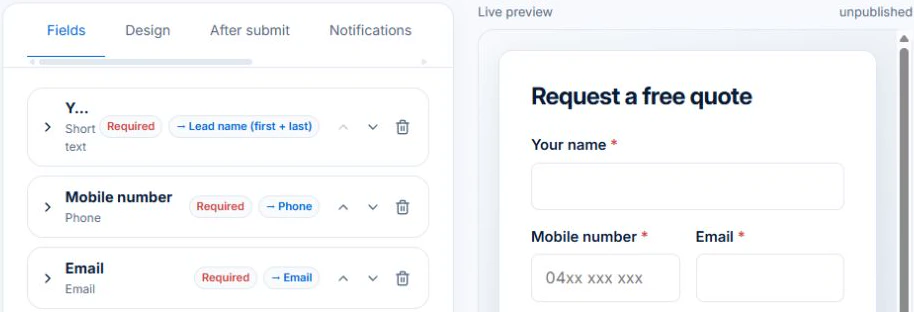
Submit a sample enquiry to verify which details arrive on the lead. Keep approval of the quote and confirmation of the booking as distinct steps.
Choose the customer details, work location and job information your team needs. Publish the form by hosted link, embed or QR code so a request arrives with usable details.
Review the submitted lead and preferred date. Clarify scope before quoting and check availability before offering a booking. The form records the request; the office confirms the commitment.
Open the link on a phone, enter a request at a second work site and submit it. Check that the office receives the right site, preferred date and scope before it calls the customer.
Share a hosted form link, embed it on your website or download a QR code.
Choose fields and conditional questions to collect relevant details about the work.
Review submitted enquiries and bring them into your lead process.
Picture it in your business / Example
Link to a form that asks what work is needed and where. Review the submission before contacting the customer, with the useful detail already in front of you.
A practical starting point
Choose the fields and questions for this kind of enquiry.
Use the hosted link, website embed or QR code.
Open submissions and take the next action on the lead.
Know what’s included
Form availability follows your lead-management access. Free-plan record limits apply. Workflow follow-ups require Professional.
Compare plans, limits and pricing →Check the workflow in detail
Explore the detail
Availability varies with plan, permissions and enabled features. Check plan inclusions.
See how this fits: win more work →Before you get started
Have a specific workflow in mind? Talk it through with us.
Sales → All Leads → Options → Lead Capture Forms. Available controls depend on your permissions and enabled features.
Form availability follows your lead-management access. Free-plan record limits apply. Workflow follow-ups require Professional.
Try a familiar job, check the records and confirm the plan inclusions your team needs.
Keep the work connected
Considering a switch?
Use a familiar job to compare the way you work today with the way Axiom Blue handles it.
Check the quote, schedule, job record and invoice. Look for the details your team needs.
Compare usage limits, paid seats and specialist features. See plans and pricing →
Try your own quote on the free plan. Before moving existing records, ask us about your data and setup needs.
Make the next step a small one
You know where the friction is in your business. Open the demo and see how AxiomBlue handles it. Then start with your own quote on the free plan.
Free forever for one person. No credit card. Usage limits apply.
Try a quote like one you send every week. Check the detail your customer will see.
Explore a job, its crew, time and materials. Look for the information you usually chase.
Compare the features and limits you need. See plans and inclusions →