
Know the team
Keep employee details and crew memberships organised.
Crews & team coordination / AxiomBlue
Check who belongs to the crew, which skills the job needs and who is on approved leave. Review the proposed assignment before offering the customer a time.
Keep employee details and crew memberships organised.
Plan fit: Core employee records are included in Basic. Advanced crew skills, leave and subcontractor capabilities require Professional and may depend on enabled features. Compare plans →
A practical workflow / Example
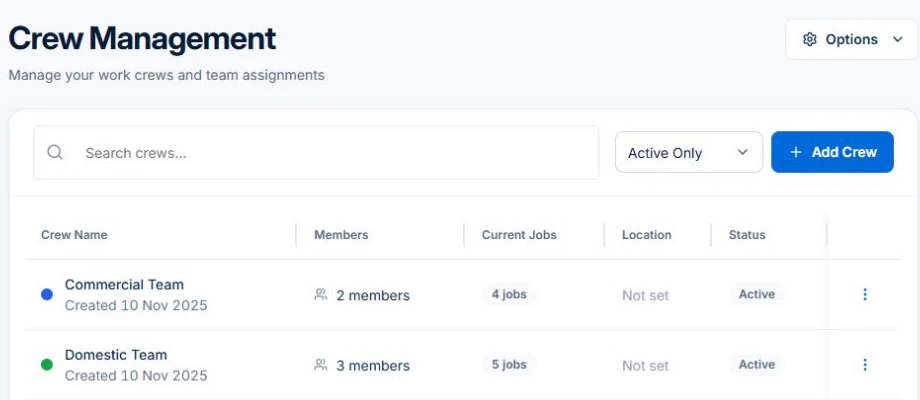
In the Volt Force Electrical demo, Crew Management lists separate Domestic and Commercial teams, with a count of members and current jobs for each.
For work that needs a particular skill, check the skill and who holds it in Skill Management. Review dates in Leave Management before choosing who can cover the visit.
Check which workers belong to the crew and whether its recorded skills suit the task. Compare the proposed day with approved leave and existing assignments before you offer the booking.
Recheck the replacement crew against the same job requirements. Give the assigned people the work address and scope, then inspect the booking so the office can see who is actually going.
Take a booking that needs a particular skill and put a regular crew member on approved leave. Check whether the assignment you intend to make still meets the requirement before applying it.
Keep employee details and crew memberships organised.
Review skills, certifications and leave when coordinating work.
Keep subcontractor records and assignments connected to delivery.
Picture it in your business / Example
Review the leave record and upcoming assignments, then check the team available for the work.
A practical starting point
Keep employees, crews and skills current.
Look at leave and planned work.
Connect the right people to the jobs.
Know what’s included
Core employee records are included in Basic. Advanced crew skills, leave and subcontractor capabilities require Professional and may depend on enabled features.
Compare plans, limits and pricing →Check the workflow in detail
Explore the detail
Availability varies with plan, permissions and enabled features. Check plan inclusions.
See how this fits: organise your work →Before you get started
Have a specific workflow in mind? Talk it through with us.
Employees → All Employees · Jobs & Crews → Crew Management. Available controls depend on your permissions and enabled features.
Core employee records are included in Basic. Advanced crew skills, leave and subcontractor capabilities require Professional and may depend on enabled features.
Try a familiar job, check the records and confirm the plan inclusions your team needs.
Keep the work connected
Considering a switch?
Use a familiar job to compare the way you work today with the way Axiom Blue handles it.
Check the quote, schedule, job record and invoice. Look for the details your team needs.
Compare usage limits, paid seats and specialist features. See plans and pricing →
Try your own quote on the free plan. Before moving existing records, ask us about your data and setup needs.
Make the next step a small one
You know where the friction is in your business. Open the demo and see how AxiomBlue handles it. Then start with your own quote on the free plan.
Free forever for one person. No credit card. Usage limits apply.
Try a quote like one you send every week. Check the detail your customer will see.
Explore a job, its crew, time and materials. Look for the information you usually chase.
Compare the features and limits you need. See plans and inclusions →