Window Cleaning · Automatic Invoicing
How Do I Invoice Window Cleaning Rounds Automatically?
A commercial window cleaning round is a high-volume, small-ticket business: dozens of visits a week, each worth invoicing and none worth an evening of admin. AxiomBlue makes completing the visit the act of billing it - the invoice raises itself from the job record with GST and a payment link, slow payers get chased automatically, and a Friday report proves nothing slipped through.
Quick answerConnect the round to the billing so completing a visit is the act of invoicing it. AxiomBlue's Job Completed — Auto-Generate Invoice raises each visit's invoice - GST applied, online payment link attached - the moment it is marked done, and the Invoice Overdue Payment Chaser follows up unpaid ones. Automation is on the Professional plan at $59 AUD per seat per month (platform from $29); free plan with no time limit.
Window cleaning admin has a shape problem: the invoices are many and small, so each one feels too trivial to do immediately and the pile feels too big to face weekly. That is exactly the shape of work automation eats. When each visit invoices itself at the moment of completion, the pile never forms - thirty visits this week simply means thirty invoices already sent, each traceable to a dated visit, each carrying a payment link, and each one syncing into the books on its own.
- Recurring commercial rounds regenerate on schedule - set each contract once
- Visit marked complete → invoice created from the job record, automatically
- GST applied correctly on every invoice; two-way Xero sync, MYOB sync
- Online payment link on every invoice - small invoices get paid when paying is easy
- Overdue invoices chased automatically; a Friday report lists anything unbilled
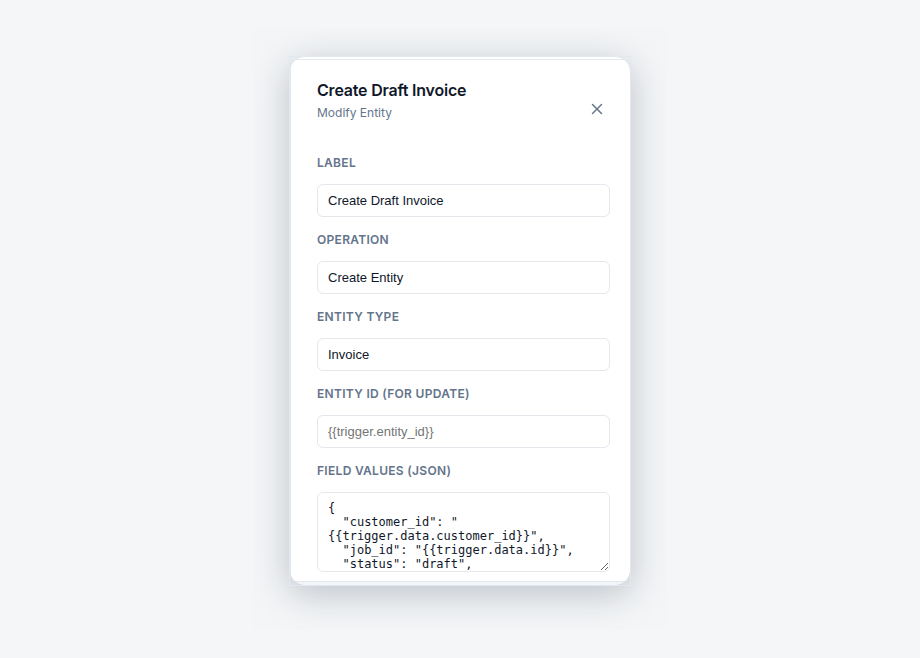
| Key facts — invoicing window cleaning rounds in AxiomBlue | |
|---|---|
| Scheduling | Recurring job series — weekly, monthly, quarterly contracts regenerate themselves |
| Billing trigger | Job Completed — Auto-Generate Invoice: visit marked complete → invoice raised from the job record |
| Billing model | One invoice per completed visit, each traceable to a dated job (no automated monthly consolidation) |
| GST | Applied automatically on every invoice |
| Getting paid | Online payment link on every invoice; two-way Xero sync, MYOB sync |
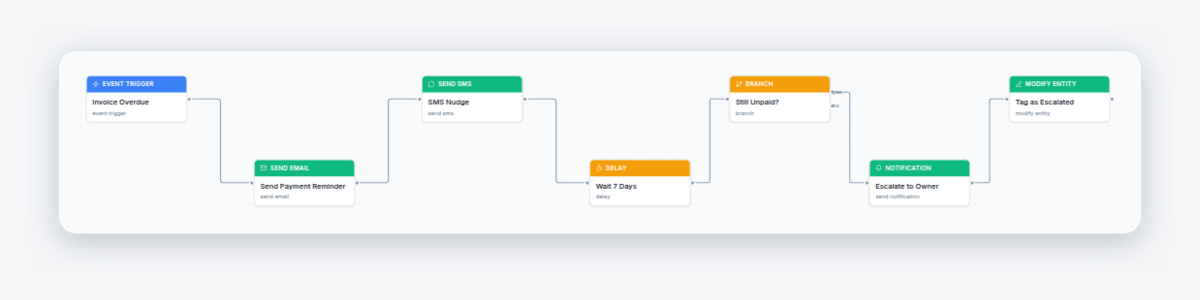
| Slow payers | Invoice Overdue Payment Chaser: email + SMS, 3-day wait, still-unpaid check, owner escalation |
| Safety net | Weekly Unbilled Jobs Report — Friday sweep for completed, uninvoiced visits |
| Price | Automation on Professional, $59 AUD per seat per month; platform from $29; free plan with no time limit |
How do you invoice window cleaning rounds automatically?
You make the job record the invoice's source and the completion tap its trigger. In AxiomBlue, every visit on a round is a job - generated by the contract's recurring series, priced when the series was set up, assigned to a cleaner. When the cleaner marks the visit complete in the free iPhone or Android app, the Job Completed — Auto-Generate Invoice automation fires: it creates the invoice from that job's record, applies GST, notifies the business owners in-app, and emails the customer the branded invoice with an online payment link. The visit is billed before the squeegees are back in the van.
The reason this suits window cleaning specifically is volume. A sole trader doing bathroom renovations raises four invoices a month and can afford to hand-craft them; a window cleaning round raises a hundred and thirty, and hand-crafting them is a part-time job that produces nothing a template couldn't. Automating the invoice run doesn't just save the hours - it removes the lag. Every day between "visit done" and "invoice sent" is a day added to the front of the payment cycle for no reason, and on a hundred small invoices those days compound into a permanently fatter debtors ledger than the business needs to carry.
AxiomBlue is job management software built in Australia for trade and field-service businesses, so everything downstream behaves properly too: the invoice is a real invoice in a real system - itemised, GST shown, synced two-way with Xero - not an export from a booking tool that the bookkeeper has to re-enter.
How do recurring commercial rounds regenerate on schedule?
Each contract is a recurring job series: created once with its cycle, then left to regenerate every future visit on the calendar by itself. The café strip that gets done monthly, the real estate office on a six-week cycle, the three-storey commercial building done quarterly with the water-fed pole - each is its own series against its own customer, and the calendar assembles the week's round from whatever falls due. Nobody rebuilds the run; the run rebuilds itself.
Each generated visit is an ordinary job, which keeps changes cheap and honest. A site asks to skip a month? Skip that occurrence; the cycle continues. A body corporate moves you from quarterly to monthly? One change to the series. And the honest boundary: a series regenerates scheduled work - it is not a contract auto-renewal or a direct-debit subscription. It will keep generating visits until you stop it, and stopping a lapsed contract is a deliberate decision a person makes, which is exactly where that decision belongs.
For billing, the series is what makes per-visit invoicing viable at all: because every visit exists as a dated, priced job before the cleaner arrives, the automation always has a complete record to invoice from. The schedule feeds the billing; neither needs a human courier between them.
How does the completed-visit invoice run, step by step?
The Job Completed — Auto-Generate Invoice template is three plain steps from tap to inbox:
- The visit is marked complete. The cleaner taps complete in the app at the site - or the office does it from the portal. That status change is the trigger; there is no invoice queue for anyone to work through.
- The invoice is created from the job. The automation's create-invoice-from-job step builds the invoice off the visit's record: the contract price from the series, anything extra logged on the day, GST applied automatically.
- Owners are notified, the customer is emailed. The owners get an in-app notification that receivables just grew; the customer gets the branded invoice by email with the online payment link attached.
Every run is logged in the automation's execution history - which job fired it, when, and whether each step succeeded - so "did the Collins Street visit get billed?" is a lookup, not an archaeology dig. And the template is a starting point, not a locked setting: open it in the visual editor and you can reword the email, add a delay, or remove the auto-send so a person reviews each invoice before it leaves. The full mechanics live in the automatic invoice generation guide; the wider engine - triggers, conditions, and 30+ templates - is covered in workflow automation software for Australian businesses.
What about GST and actually getting paid?
GST is applied automatically on every AxiomBlue invoice - automated or hand-raised - and shown correctly for the client's records, which is precisely the detail a commercial client's accounts payable team checks before paying. Invoices sync two-way with Xero (MYOB sync is also available), so the hundred-and-thirty invoices a month land in the accounting file as they are raised, not as a batch someone re-keys at BAS time.
Payment is where small invoices win or die. Nobody disputes a $95 shopfront clean - they just don't get around to paying it, thirty times over. The online payment link on every invoice attacks that directly: the email lands, the link is right there, and paying takes less effort than filing the invoice for later. Friction, not refusal, is the enemy on a rounds business, and the payment link is the lowest-friction path there is short of a direct debit.
On consolidated billing, the honest position: AxiomBlue's automation invoices per visit. Each completed job generates its own invoice, which keeps every charge traceable to a dated, documented visit - and commercial clients generally accept that readily, because each invoice matches a service date their facilities team can verify. What AxiomBlue does not do is automatically roll a month of visits into one consolidated invoice; if a client insists on a single monthly document, that is a manual arrangement, not something the automation produces.
How do you chase slow-paying commercial clients automatically?
With a second ready-made template: the Invoice Overdue Payment Chaser. The moment an invoice goes overdue, the workflow emails and texts the customer a reminder, then waits 3 days, then checks whether the invoice is still unpaid. If it is, it notifies the owners and tags the invoice - so the human follow-up starts from a flagged list of genuinely stubborn invoices, not from scrolling the whole ledger wondering who owes what.
This matters doubly on a rounds business, because the overdue pile inherits the same shape problem as the invoice pile: lots of small amounts, each individually not worth an awkward phone call, collectively worth a great deal. The chaser makes the polite persistence automatic and uniform - every overdue invoice gets the same prompt, courteous nudge on the same schedule, whether it's the $95 shopfront or the $1,400 quarterly building clean. Slow-paying accounts departments are rarely malicious; they pay whoever reminds them. Now that's always you.
The chaser's full anatomy - wording, timing, and escalation - is covered in the overdue invoice reminders guide.
How do you know no visit slipped through unbilled?
Because a third automation audits for exactly that. AxiomBlue's Weekly Unbilled Jobs Report runs every Friday afternoon, queries for jobs that are completed but have no invoice against them, and sends the owners an in-app report listing every one. It is a scheduled sweep rather than an event trigger, which is precisely why it catches what event-based automation can't: the visit completed while a workflow was paused for editing, the invoice deleted during a client dispute, the job closed out manually by someone helpful.
On a high-volume round this is the report that changes how the business feels. Without it, "did we bill everything this month?" is answered by vibes and discovered at BAS time; with it, the question is answered every Friday with a list that is usually empty. The worst case stops being "unbilled forever" and becomes "unbilled for four days, then on a list in front of the owner". For a business whose margin lives in dozens of small invoices, converting silent leaks into weekly line items is worth more than most features that demo better.
Invoice book vs accounting software alone vs AxiomBlue
Three honest ways a window cleaning round gets billed today. The deciding row is the third: only a system that watches the jobs can notice one was never billed.
| Invoice book / spreadsheet | Accounting software alone | AxiomBlue Job-triggered | |
|---|---|---|---|
| When each visit is invoiced | End of week or month, in a pile | When someone remembers to raise it | ✓ The moment the visit is marked complete |
| Effort per 100 visits | Hours of writing and typing | Hours of raising and sending | ✓ Zero after one-time setup |
| Notices an unbilled visit | No — a missed page is just missing | No — it never sees the job list | ✓ Friday Weekly Unbilled Jobs Report |
| Chasing overdue invoices | Awkward calls, when someone gets to it | Reminders configured invoice by invoice | ✓ Automatic email + SMS chaser with owner escalation |
| GST and the books | Reconciled by hand at BAS time | Native, but disconnected from the round | ✓ GST automatic; two-way Xero sync; MYOB sync |
| Customer payment | Bank transfer from an emailed PDF | Payment link, if configured | ✓ Online payment link on every invoice, automatically |
Can I change how the billing automation works?
Yes - all three templates open in AxiomBlue's visual editor as nodes on a canvas, and every step is editable without code. Reword the invoice email, add a review step before sending, change the chaser's 3-day wait, or adjust its message wording to suit commercial clients rather than homeowners. A test mode simulates a workflow against a real record before it goes live, and the execution history logs every run afterwards. If you can describe your billing rules out loud, you can arrange the nodes to match them.
What does automatic round invoicing cost?
The three automations - Job Completed — Auto-Generate Invoice, the Invoice Overdue Payment Chaser, and the Weekly Unbilled Jobs Report - are part of AxiomBlue's Professional plan at $59 AUD per seat per month, which also carries the other 30+ templates, the visual builder, and two-way Xero sync. The platform itself starts at $29 AUD per seat per month on Basic, which includes recurring schedules, invoicing with payment links, and the mobile apps, but not automation. Every plan starts with a free plan that has no time limit, no credit card required - long enough to run two full weeks of a real round and watch every visit bill and chase itself.
Invoicing Window Cleaning Rounds — Common Questions
Connect the round to the billing so completing a visit is the act of invoicing it. In AxiomBlue, recurring series regenerate every scheduled visit, and the Job Completed - Auto-Generate Invoice automation raises each visit's invoice from its job record the moment the cleaner marks it done - GST applied, online payment link attached, customer emailed. A round of thirty visits produces thirty invoices with nobody touching an invoice screen.
AxiomBlue's automation invoices per visit - each completed job generates its own invoice, which keeps every charge traceable to a dated, documented visit. There is no automated end-of-month consolidation of many visits into a single invoice. Businesses that bill this way find commercial clients accept per-visit invoices readily, because each one matches a specific service date their facilities team can verify.
As recurring job series. Each contract - the monthly shopfront strip, the quarterly office building - is created once in AxiomBlue with its cycle, and the series regenerates every future visit on the calendar automatically. Each generated visit is a full job with the site, price, and assigned cleaner on it, so the round rebuilds itself indefinitely without anyone re-entering a site.
Yes. GST is applied automatically on every AxiomBlue invoice, whether a person raised it or the automation did, and the invoice shows it correctly for the client's tax records. Invoices also sync two-way with Xero (MYOB sync is available too), so an automatically generated invoice lands in your accounting file exactly the way a hand-raised one does.
Through the online payment link on every AxiomBlue invoice. The email lands with the invoice attached and a link the customer can pay from any device - which matters on a rounds business, where the real enemy is not refusal but friction multiplied across dozens of small invoices. The easier each one is to pay, the fewer end up in the overdue pile.
AxiomBlue's Invoice Overdue Payment Chaser automation takes over. When an invoice goes overdue it emails and texts the customer, waits 3 days, checks whether the invoice is still unpaid, and if so notifies the owners and tags the invoice for follow-up. The polite persistence that slow-paying accounts departments respond to happens automatically, on every overdue invoice, without the awkward phone call being anyone's job.
The Weekly Unbilled Jobs Report is the safety net. Every Friday afternoon it queries AxiomBlue for jobs that are completed but have no invoice against them and sends the owners an in-app report listing them. On a rounds business doing dozens of small visits a week, that Friday sweep is what turns 'we probably billed everything' into a checked fact.
The automation templates - Job Completed - Auto-Generate Invoice, the Invoice Overdue Payment Chaser, and the Weekly Unbilled Jobs Report - are part of AxiomBlue's Professional plan at $59 AUD per seat per month. The platform itself, including recurring schedules, invoicing with payment links, and the mobile apps, starts at $29 AUD per seat per month on Basic. There is a free plan with no time limit, and no credit card is required to start.
Let the Round Bill Itself
Set the contracts up once, switch on two templates, and run a fortnight of real visits - every one invoiced the moment it's done, every slow payer nudged without you dialling. The invoice pile doesn't survive the first fortnight.
No credit card required • Free plan, no time limit • Cancel anytime