Solar Installation • Scheduling
How to Reschedule Solar Installs Around Weather Without the Ring-Around
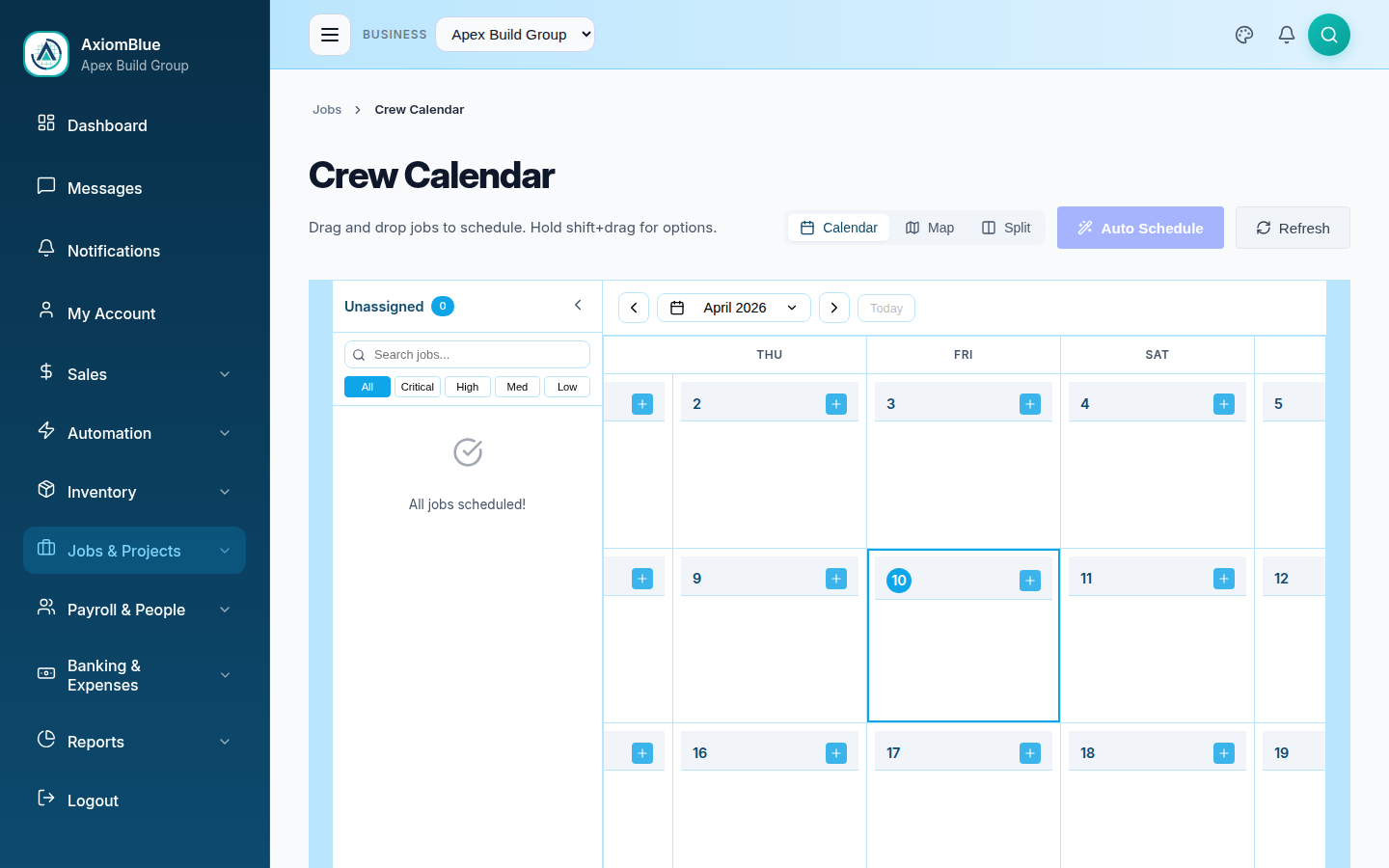
Rain stops roof work — that part isn't negotiable. What's negotiable is the afternoon that follows: the calls to the customer, the crew, the customer again. AxiomBlue collapses it to one drag on the calendar; the new time reaches the customer by email and SMS automatically, and the crew's phones show the new plan.
Quick answerYou reschedule around weather by making one action do everything: drag the install to the next clear day, and let software handle the telling. AxiomBlue, Australian job management software, sends the customer the new time by email and SMS automatically on reschedule and updates the crew's mobile schedule — from $29 AUD per seat per month with a free plan that has no time limit.
A wet-week forecast can force a solar business to move half its board. Done by phone, every moved install is three conversations and a risk that one of them doesn't happen — the customer who took Thursday off for an install that quietly became Monday. Done in AxiomBlue, moving the job is the communication.
- Drag the install to the next clear day — the reschedule is one action
- Job Rescheduled — Notify Customer sends the new time by email and SMS (Professional)
- The crew sees the change in the app on their phones — the day view is always current
- Photos and compliance documents stay on the job across any number of moves
- You make the weather call — the system does the notifying
| Key facts — weather rescheduling with AxiomBlue | |
|---|---|
| The move | Drag-and-drop on the scheduling calendar — one action per install |
| Customer notified | Job Rescheduled — Notify Customer: new time by email + SMS, automatic (Professional) |
| Crew informed | Updated schedule in the app on their phones — in-app, not push notifications |
| Job history | Photos, documents and compliance paperwork stay on the job record |
| Weather decision | Yours — no forecast integration; the system automates what follows |
| Platform | Free native iPhone & Android apps + the full platform in any browser |
| Price | From $29 AUD per seat per month; automation on Professional at $59 |
| Free plan | No time limit, no credit card |
How do you reschedule solar installs around weather without the ring-around?
By making the reschedule itself carry the communication. In AxiomBlue, moving an install is one drag on the scheduling calendar — and with the Job Rescheduled — Notify Customer automation switched on, that drag fires the customer's email and SMS with the new time, while the crew's schedule in the app updates to match. One action, three outcomes: the board is right, the customer knows, the crew knows. The ring-around existed only because those three things used to be three separate tasks.
The distinction that makes this honest: the decision stays human. Whether Thursday is workable depends on the roof pitch, the tile type, how much of the array is already racked, and how much you trust a 60% rain probability — judgement no software should be making. What software should absolutely be doing is everything downstream of the judgement, because the downstream part is pure relay work: telling person A and person B what you just decided. AxiomBlue automates the relay and leaves you the call.
The rest of this page walks each piece: the drag, the customer notification, the crew's view, and the job record that holds everything steady while the dates move around it.
Why does one rain day cost an afternoon of phone calls?
Because a moved install touches at least three parties and manual communication scales linearly with all of them. Rain forecast for Thursday means: ring Thursday's customer to move them, find a slot, discover the slot collides with Friday's second job, ring Friday's customer, brief the crew on the new order, then field the call-back from the first customer who wants a different day after all. Multiply by a wet week's four or five moved installs and scheduling becomes the day's actual job — unbillable, error-prone, and repeated every time the forecast shifts again.
Solar cops this worse than most trades. Roof work has a hard weather dependency — wet tiles and lightning risk aren't a judgement call, they're a stop — and installs are long jobs booked tightly, often weeks out, so one move cascades. The customer has usually arranged to be home, sometimes taken leave; an install that moves without them hearing about it isn't an inconvenience, it's a burned day and a one-star story. The cost of the ring-around isn't just the afternoon — it's that under pressure, one of those calls doesn't get made, and that's the one the review mentions.
The fix is not a better phone manner. It's removing the phone tree from the critical path, so that the reschedule is complete — board, customer, crew — the moment the decision is made.
How does one drag replace the ring-around?
The drag replaces the ring-around because in AxiomBlue the calendar entry is not a note about the job — it is the job, and everything that should react to the job moving is wired to it. Drag Thursday's install to Monday and you're not updating a wall planner that three other systems now contradict; you're changing the single record that the customer notification, the crew's day view and the job's own history all read from. There is nothing to synchronise afterwards, because nothing else held a copy.
On a wet-week morning this is the difference between triage and typing. Open the week, see Thursday and Friday's roof work, and drag each install to the next clear day — the calendar shows crew loading as you go, so you can see Monday filling up and spill the second job to Tuesday instead of double-booking a crew. Five installs moved is five drags and a couple of minutes, done from the office browser or from a phone at the kitchen table, before the crews have finished breakfast.
Indoor-phase work — inverter commissioning, switchboard tidy-ups, paperwork visits — can be dragged into the gap the same way, so a rain day becomes a reshuffle rather than a write-off. The deeper pattern is covered in the crew scheduling guide; the weather case is just its highest-stakes rehearsal.
How does the customer find out the new install time?
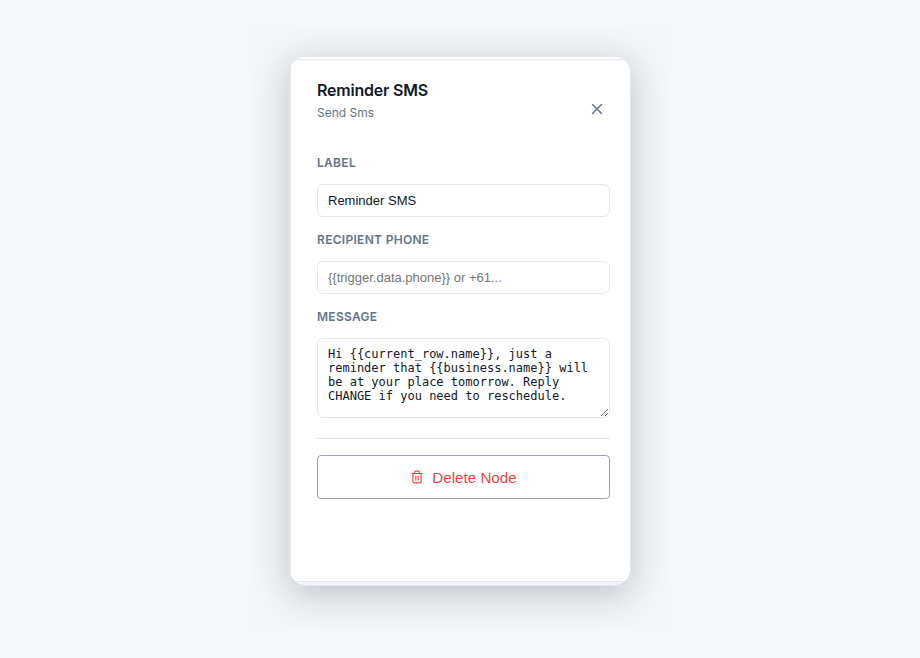
Automatically, on both channels, the moment you move the job. AxiomBlue's Job Rescheduled — Notify Customer template fires on the reschedule event itself and sends the customer an email and an SMS carrying the new booking time. The SMS gets seen within minutes; the email survives as the written record they check the night before. Because the trigger is the reschedule event, the message can never be forgotten, sent to the wrong version of the plan, or left until after the customer has already taken the day off — if the booking moved, the message went.
The wording is yours. The message body is a text box in a node on the visual automation canvas — most solar businesses add a line like "weather's turned, so we've moved your install to the next clear day" so the reschedule reads as professional caution rather than flakiness, which, for roof work, is exactly the truth. Test-run mode lets you fire the workflow against a real job before it goes live, and every send is recorded in the execution history, so "did the Hendersons get the new time?" is a lookup, not a debate. Automation templates are part of the Professional plan at $59 AUD per seat per month; the full family of customer messages lives in the automated customer notifications guide.
How does the crew know the plan changed?
Because their schedule is the same record you just changed. AxiomBlue's free native iPhone and Android apps show each crew member their day and week from the live schedule, so the moment the install moves, the plan on their phones is the new plan — and the full platform runs in any web browser for anyone who'd rather not install an app. There's no morning printout going stale in the glovebox and no version of the schedule that's right in the office but wrong in the ute.
One honest note on mechanics: these are in-app updates, not push notifications — the app shows the current schedule when the crew looks at it, rather than buzzing their pocket the second you drag. For a same-morning move with a crew already loading racking, the professional move is still a quick call or message; what the system guarantees is that whenever anyone opens their schedule, it tells the truth. In practice that kills the worst rain-day failure — the crew that turns up to a cancelled site because the change lived only on the office whiteboard.
The same live view works in reverse: the crew clocking on and off with GPS, adding photos, and updating job status feeds the office the real state of each install, so the next weather decision is made against reality rather than yesterday's assumptions.
What happens to photos and compliance documents when an install moves?
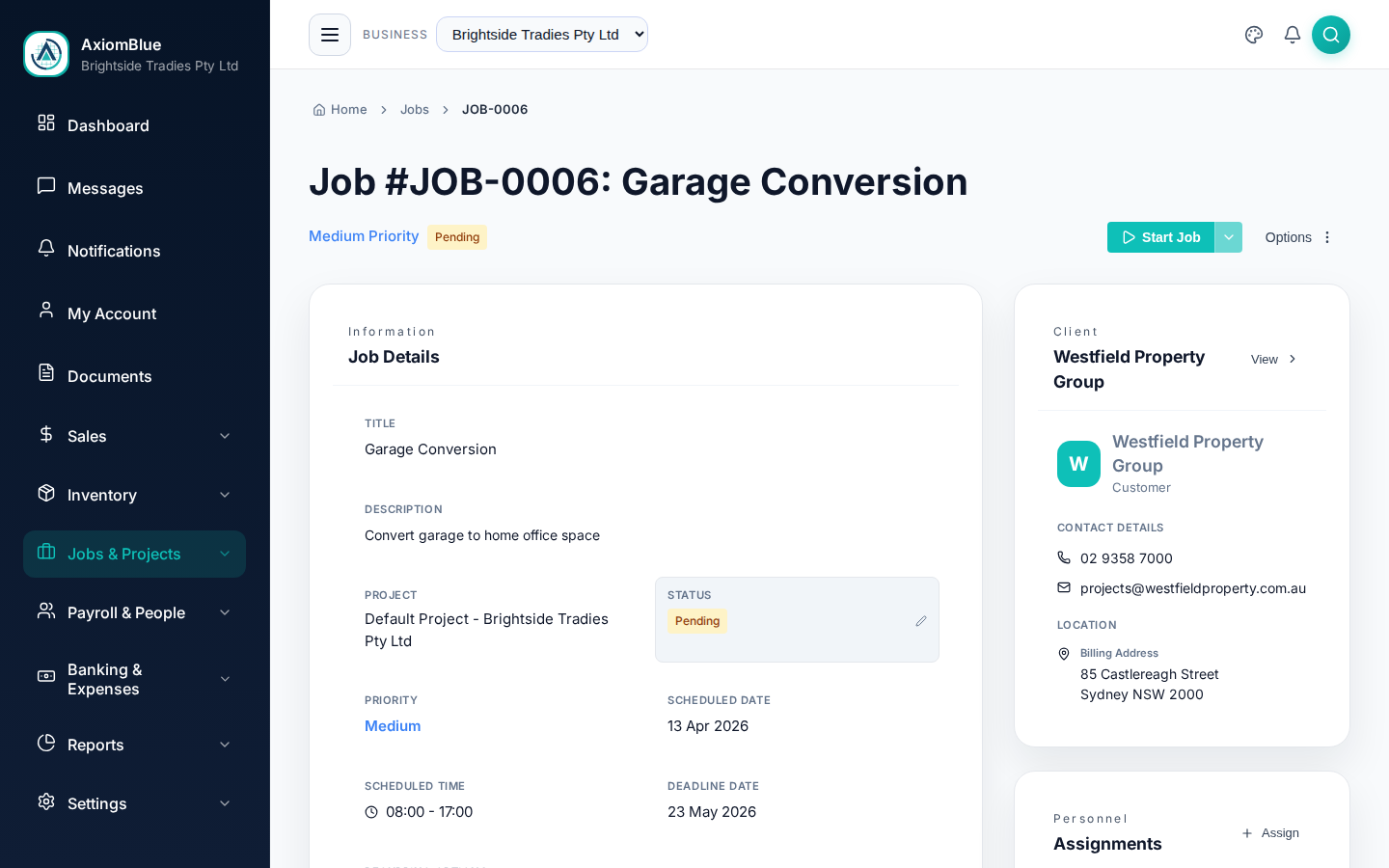
Nothing — they're attached to the job, not the date, so they ride through every reschedule untouched. The site assessment photos, the roof and switchboard shots, the signed quote, the compliance paperwork accumulating toward handover: all of it lives on the job record in AxiomBlue, and dragging the install to Monday moves the appointment while the record stays whole. Whenever the install finally happens, everything captured before it is exactly where the crew and the office expect it.
This matters more in solar than almost anywhere, because a solar job is a long paper trail wearing a hard hat — photos before, during and after, serial numbers, certificates, the documents the STC process and the electrical safety paperwork demand. In a business run on email threads and phone-gallery photos, each reschedule is a chance for that trail to fragment: the "final" details in one thread, the amended date in another, photos on whichever phone was on site that day. A job-centred record makes the reschedule a non-event for the paperwork — the date is just one field, and it's the only one that changed.
It also means the reschedule history itself is visible on the job — useful when a customer asks why a February booking completed in March, and the answer is two documented weather moves rather than a shrug.
Does AxiomBlue watch the weather forecast for me?
No — and you wouldn't want it to. AxiomBlue has no weather-forecast integration and never moves a job on its own; the workable-or-not call belongs to the person who knows the roof, the crew's capability and how far along the install is. A 40% shower probability means different things for a single-storey tin roof at lock-off stage and a two-storey tile job on day one, and no rain icon captures that. Software that rescheduled your board off a forecast would be automating the one step that needs judgement.
What AxiomBlue automates instead is the expensive part that needs none: the aftermath. You check the radar, you make the call — and from that point, one drag re-plans the board, the customer's email and SMS go out with the new time, and the crew's schedules are current. The division of labour is clean and it's the right one: the human decides, the system does the notifying. That's also why this workflow stays useful for every non-weather reschedule — the sick installer, the delayed panel shipment, the customer who begs for a different day — because the mechanics are identical regardless of what caused the move.
How does this compare with the phone-and-whiteboard reschedule?
The honest comparison is with how most installers actually handle a wet forecast: the office phone, the whiteboard or shared spreadsheet, and a group text to the crew. It works — at the cost of an afternoon, and with a failure mode that lands on a customer. Side by side, per rain day:
| Phone + whiteboard | AxiomBlue One drag | |
|---|---|---|
| Moving five installs | An afternoon of calls and call-backs | ✓ Five drags, minutes |
| Customer told the new time | If the call connects and gets made | ✓ Email + SMS, automatic on the move |
| Written record of what was sent | None | ✓ Execution history on every send |
| Crew's schedule | A photo of the whiteboard, aging fast | ✓ Live day view in the app |
| Photos & compliance docs | Scattered across threads and phones | ✓ On the job record, through every move |
| Double-booking a crew | Easy to do, found out on the day | ✓ Crew loading visible as you drag |
The workflow costs from $29 AUD per seat per month on AxiomBlue's Basic plan for the calendar, job records and apps; the automatic customer notification is part of the Professional plan at $59. Both start with a free plan that has no time limit, no credit card — which in most of Australia is long enough to include at least one rain day to test it on.
Weather Rescheduling — Common Questions
Drag it. In AxiomBlue, moving an install is dragging the job to the next clear day on the scheduling calendar - and if the Job Rescheduled - Notify Customer automation is on, that one drag also sends the customer their new time by email and SMS. The crew sees the updated schedule on their phones, and the job's photos, documents and details move with it.
Yes. AxiomBlue's Job Rescheduled - Notify Customer template fires on the reschedule event itself and sends the customer both an email and an SMS carrying the new booking time. Moving the job in the schedule is the act that notifies the customer - there is no separate call to make or remember. Automation templates are part of the Professional plan at $59 AUD per seat per month.
No. AxiomBlue does not integrate with weather forecasts or move jobs on its own - the call on whether a day is workable stays with you, because it depends on the roof, the crew and the forecast confidence, not just the rain icon. What AxiomBlue automates is everything after the decision: the drag, the customer's email and SMS with the new time, and the crew's updated schedule.
Through their schedule. When you move the install, the change is reflected in what the crew sees in AxiomBlue on their phones - the free native iPhone and Android apps, or the full platform in any browser. Their day view shows the current plan, not the one from last night. These are in-app updates, not push notifications, so a quick message or call still makes sense for a crew already loading the ute.
Nothing - and that is the point. In AxiomBlue, photos and documents live on the job record, not on the date, so the site assessment shots, the switchboard photos and the compliance paperwork stay exactly where they were through any number of reschedules. Whenever the install actually happens, everything captured before it is still attached to the job.
Yes. AxiomBlue has free native iPhone and Android apps covering the field workflow - today's schedule, job details, clock on and off with GPS, photos and documents to the job record, and on-site invoicing - and the full platform also runs in any web browser. The office and the roof see the same job, live.
AxiomBlue starts at $29 AUD per seat per month on the Basic plan, which includes the scheduling calendar, job records with photos and documents, quoting, invoicing with GST and the mobile apps. The Professional plan at $59 AUD per seat per month adds the automation library, including Job Rescheduled - Notify Customer. There is a free plan with no time limit, and no credit card is required to start.
Next Rain Day, Just Drag
Set up the reschedule notification once, and the next wet forecast costs you five drags instead of an afternoon. Your customers get the new time in writing, your crew gets the truth on their phones, and you get the afternoon back.
No credit card required • Free plan, no time limit • Cancel anytime