
The starting point
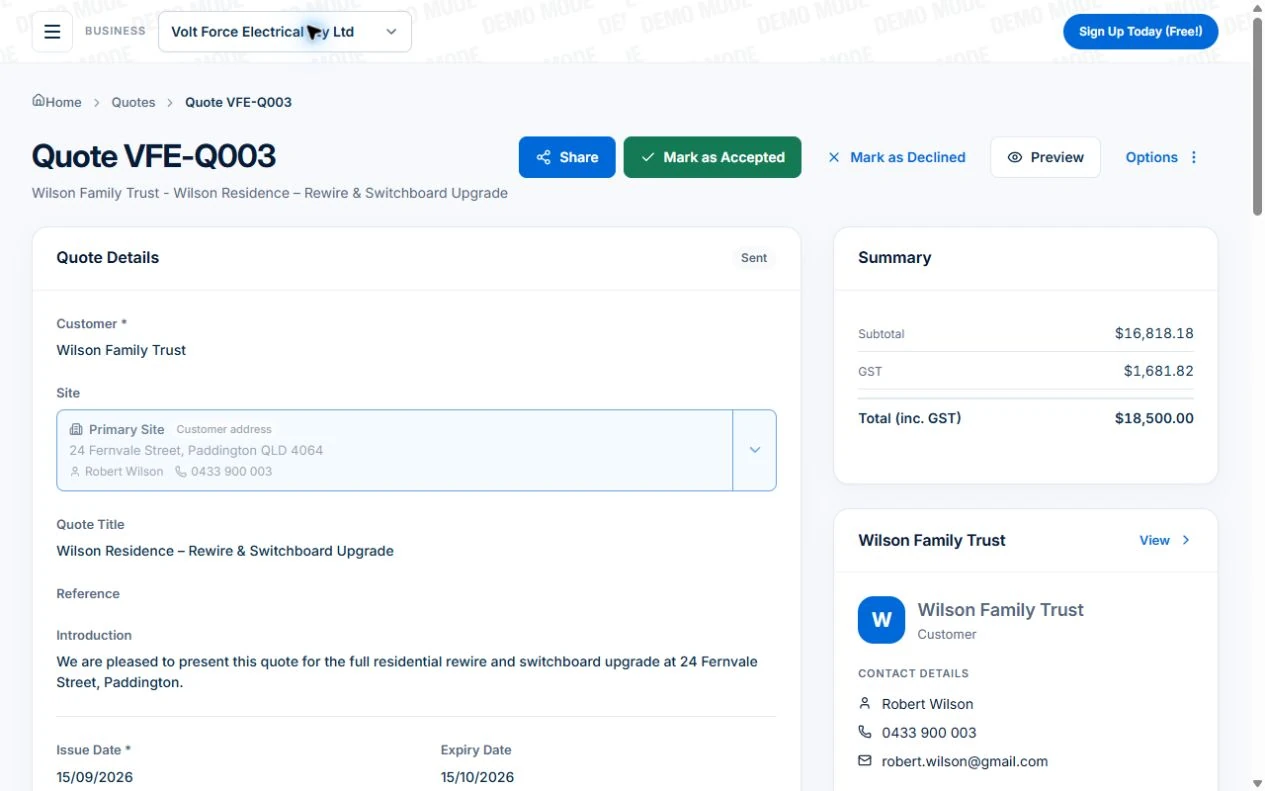
Job quoting software helps turn an enquiry into an itemised price, send it to the customer and track the response. In Axiom Blue, quotes use your price book and can be accepted online without a customer account. Review the accepted quote before converting it to a job or invoice. Automated follow-up requires Professional; the free plan allows 10 quotes a month.
Key facts
| Build it | Lines from your price book, saved assemblies, sections for each room, area or stage, per-line discounts and GST, and saved quote templates. Every plan. |
|---|---|
| Send it | Email with the PDF and a link to a no-login quote page. The customer accepts with their name and signature, or declines with a reason, and you are notified. |
| Know where it stands | Draft, Sent, Viewed, Accepted, Declined or Expired, with the date the customer first opened it. The home screen shows quotes about to expire. |
| After the yes | Convert an accepted quote into a job or straight into an invoice, with every line carried across. |
| Follow-up (Professional) | A reminder three days after sending, a warning before a quote expires, automatic expiry, and a job created as soon as a quote is accepted. |
| Price | Free plan: 10 quotes a month, one user. Basic $29 and Professional $59 AUD for the first seat per month, excluding GST, with no quote or job limits and no setup fee. |
| Quote or estimate? | A quote is the total price and forms a binding contract when accepted; an estimate is a best guess (Consumer Protection WA). |
Test one quote from scope to agreed work
Use the same familiar job when comparing quoting tools. Check the scope and price yourself before sending; software cannot decide whether your allowance covers the work.
| Step | What to check |
|---|---|
| Describe the scope | List inclusions, exclusions, assumptions and any customer-supplied items. Distinguish a fixed quote from an estimate. |
| Review the price | Check quantities, labour and material allowances, GST where applicable, validity and payment terms. |
| Send and accept | Open the customer link on a phone and check the acceptance record without requiring a customer account. |
| Hand over the job | Review the accepted scope before converting. Test configured Professional follow-up separately from the core quote workflow. |
Read next Quoting work and materials in AxiomBlue → · From website enquiry to booked job: a practical process for tradies →
What is job quoting software?
It is the part of your business system that turns a site visit into a priced, professional quote, and then keeps track of it until the customer decides. A Word template or a spreadsheet can produce a quote. What it cannot do is price it from the same list every time, tell you the customer opened it last night, remind you to follow up on Thursday, or turn it into a job on Monday without someone typing it again.
Judge any quoting software on four things. Does it price consistently from your own items and bundles, so two people quote the same job the same way? Does the customer get something they can accept on their phone, today? Do you know which quotes are waiting, viewed or about to expire? And when they say yes, does the quote become the job and the invoice, or a document someone has to copy?
What must a quote include in Australia?
business.gov.au sets out the minimum for a written quote: your business name, ABN and contact details; the customer’s name and contact details; a clear description of the work; itemised and total costs, including GST if it applies; any variations and revisions you discussed; payment terms, such as the due date and any late payment fees; your preferred payment method; start and finish dates; the date the quote expires; and space for the customer to accept, with a signature and date.
Two further rules shape how you word it. When you quote to consumers, the ACCC requires a single total price that includes GST; you can show the components, but the total must be prominent. And be clear whether it is a quote or an estimate. Consumer Protection WA puts it plainly: a quote is the total amount you agree to charge and forms a binding contract when accepted, while an estimate is a best guess that can end up higher or lower. Consumer Affairs Victoria adds that a quote should say whether it includes travel, time spent collecting materials, call-out fees and weekend or public holiday rates, and how changes and delays will be handled.
Axiom Blue quotes carry your business details and ABN, GST on each line, an introduction, your terms and notes, and an expiry date that defaults to 30 days from issue. Set your standard terms once in quote settings so every quote starts with them, and the customer’s acceptance, with their name and signature, is recorded against the quote.
Sources: business.gov.au: Prepare quotes · ACCC: Price displays · Consumer Protection WA: Estimates, quotes and deposits · Consumer Affairs Victoria: Giving quotes
Why do quotes lose money, or lose the job?
A quote loses the job when it is slow or vague, and loses money when it is fast and wrong.
Speed matters because your customer is not waiting for you alone. NSW Fair Trading tells homeowners to get itemised written quotes from three contractors and compare each part of the work. The quote that arrives the same day, itemised clearly enough to compare, is the one that gets read first. Research on online sales enquiries published in the Harvard Business Review found most businesses respond far too slowly, and a quote is the same race.
Money is lost in the detail. A price book that has not been updated since last year: the ABS reported that the prices of inputs to house construction rose sharply in the June 2026 quarter on raw material, freight and fuel costs. An item left off because it was written from memory. Travel or a call-out fee that was never stated. business.gov.au’s advice is blunt: quote for profit, not just to win the job, including all of your costs and a fair margin.
Read next Quoting work and materials in AxiomBlue →
Sources: NSW Fair Trading: Getting quotes for contractors · ABS: Producer Price Indexes, Australia, June 2026 · Harvard Business Review: The Short Life of Online Sales Leads
How does Axiom Blue build a quote?
From the same price book every time, so the quote is fast because it is not written from scratch, and right because nothing depends on memory.
Your products and services live in one price book with a cost price and a sell price for each item. Add lines from it, type a one-off line, or add an assembly: a saved bundle of lines, such as a downlight with its driver, cable and fitting labour, or a bathroom waterproofing package, added in one step so it is priced the same way every time. Assemblies and quote templates are on every plan. Split a larger quote into sections, one per room, area or stage, so the customer can see exactly what each part costs and an added room is plainly a new section.
Give a discount on any line, and GST is set on each line and totalled for you. Quote a new enquiry as a lead or an existing customer. Save a finished quote as a template and apply it to the next similar job, either replacing the lines, adding to them, or bringing across just the introduction and terms. Duplicate last month’s quote for a repeat customer instead of starting again. Quotes can also be created from the Axiom Blue app on iPhone and Android, with sections, price book items and assemblies, so the quote can be written in the driveway.
Keep the price book honest. Quote lines use each item’s sell price, so when a supplier’s price moves, update the item once and every future quote uses the new price.
What happens after you send it?
The quote goes by email with the PDF attached and a link to a quote page the customer can open on any device, with no account and no app. They can download the PDF, accept it by entering their name and signing, or decline it with a reason. Either way, you are told straight away in the app and by email. From your phone, you can also share the quote link through your own messaging app.
You can see where every quote stands: Draft, Sent, Viewed, Accepted, Declined or Expired. Viewed matters more than it sounds. A quote the customer opened last night is a warm phone call this morning; a quote that has not been opened in four days probably went to junk. The quotes list shows what is in draft, what has been sent and accepted in dollars, and your conversion rate, and the home screen shows quotes about to expire on every plan.
On Professional, at $59 for the first seat monthly, excluding GST, the follow-up stops depending on memory. The Quote Follow-Up Reminder goes out three days after a quote is sent if the customer has not answered, an expiry warning goes out before the quote lapses, quotes can expire automatically, and an accepted quote can create its job on its own. Each is a switch in quote settings.
Read next Automating job follow-up: start with one process you can verify →
Sources: business.gov.au: Prepare quotes
From an accepted quote to the job and the invoice
Nothing is retyped. Convert an accepted quote into a job and its lines are carried across, ready to schedule. For small work that is finished on the day, convert it straight into an invoice instead. Set the job’s billing method, time and materials or fixed price, on the job, and a fixed-price job then invoices a deposit, progress claims and a final invoice against the contract.
Deposits are regulated for residential building work, so check your state before asking for one. In NSW, work over $5,000 needs a written contract and the deposit cannot exceed 10%. In Queensland, domestic building work over $3,300 needs a written, dated and signed contract, with a deposit of no more than 10% up to $19,999, or 20% for work of $3,300 or less. Axiom Blue does not take a payment when a customer accepts a quote; raise the deposit invoice from the job.
When the customer asks for more after accepting, treat it as a change, not a favour. Consumer Protection WA is clear that a tradesperson must get the customer’s permission before doing extra work. On Professional, variations record the extra work against the job, get it approved and carry it to the invoice at the agreed price. And if you quote at the customer’s door after knocking on it, rather than being invited, the ACCC’s unsolicited consumer agreement rules apply, including a 10 business day cooling-off period.
Read next Record and bill job variations in AxiomBlue → · On-site invoicing: invoice on the job →
Sources: NSW Fair Trading: Contracts for residential building work · QBCC: Domestic building contracts · ACCC: Telemarketing and door-to-door sales
Is Axiom Blue the right quoting software for a small business?
For an Australian trade or service business that wants the quote, the job and the invoice in one place, yes. The quote is built from your own prices, accepted online with a signature, tracked to the day it was opened, and converted without retyping. On Professional, the follow-up happens without you.
What it does not do, so you know now: there are no optional or alternative items on a quote, so quote a genuine alternative as a second quote; there is no version history, so duplicate a quote to revise it; the customer cannot pay a deposit at the moment of acceptance; quotes are not sent by SMS from the system; and quotes show your sell prices, not your costs and margins.
Pricing is simple. The free plan has no time limit and no credit card: one user, 10 quotes a month and 10 jobs a week, with the price book, assemblies, sections, templates, online acceptance and conversion to jobs and invoices. Basic is $29 AUD for the first seat per month, excluding GST with no quote or job limits. Professional is $59 and adds the follow-up automations, the sales pipeline and two-way Xero sync. There is no setup fee.
Read next Job invoicing software: bill from the job record →
Common questions
Questions people ask before they switch
What is the best job quoting software for a small business?
Compare tools on a quote you already understand: itemised scope, pricing, customer acceptance and the handover to agreed work. Axiom Blue supports price-book quotes and no-login customer acceptance, with 10 quotes a month on Free. Basic is $29 AUD for the first seat monthly, excluding GST with no quote cap; workflow follow-up requires Professional at $59.
Is there free quoting software in Australia?
Axiom Blue has a limited free plan with one user and 10 quotes a month. You can prepare a price-book quote, send its no-login customer link and review acceptance before converting it to a job or invoice. Basic is $29 AUD for the first seat monthly, excluding GST, and removes the quote cap. Workflow follow-up requires Professional.
What should a quote include?
business.gov.au lists your business name, ABN and contact details, the customer’s details, a clear description of the work, itemised and total costs including GST, variations discussed, payment terms and method, start and finish dates, an expiry date, and space for the customer to accept with a signature and date.
What is the difference between a quote and an estimate?
A quote is the total amount you agree to charge and forms a binding contract when the customer accepts it. An estimate is a best guess at the cost, and the final price may be higher or lower. Under the Australian Consumer Law, you must still use your skill and experience when estimating.
Can customers accept a quote online?
Yes. Every Axiom Blue quote email links to a quote page the customer can open on any device without an account. They accept by entering their name and signing, or decline with a reason, and you are notified straight away. The quote shows as Viewed from the first time they open it.
Can I turn a quote into a job and an invoice?
Yes. In Axiom Blue, an accepted quote converts into a job with every line carried across, or straight into an invoice for work finished on the day. On Professional, an accepted quote can create its job automatically.
Put it to work
Your practical checklist
- Load your ten most-quoted items into the price book with a cost and a sell price.
- Save your most common bundle as an assembly and your standard wording as default quote terms.
- Send your next quote from Axiom Blue and watch it move from Sent to Viewed.
- Call the customer the morning after it shows as Viewed.
- Convert the accepted quote into the job, and invoice it from the same record.
See the records in Axiom Blue
Try the workflow with a familiar job.
Features and usage limits vary by plan. Review the tools relevant to your process before choosing your setup.
Product instructions
Published by Axiom Blue, which is the product described. Guidance on quotes, pricing and contracts comes from business.gov.au, the ACCC, Consumer Protection WA, Consumer Affairs Victoria, NSW Fair Trading, the QBCC and the ABS as cited, checked 25 September 2026. It is general information, not legal advice; contract rules vary by state and by type of work.