
The starting point
Job invoicing software turns recorded work into an invoice you check before sending. In Axiom Blue, preview a completed time-and-materials job’s billable labour and materials, plus approved variations on Professional. GST follows your business registration and taxable lines. Invoicing is on every plan, including limited free; Basic is $29 AUD for the first seat monthly, excluding GST. Online card payment requires Professional with Stripe connected.
Key facts
| What it does | Turns a completed job into a draft invoice: labour, materials and approved variations, with GST, from what was recorded on the job. |
|---|---|
| Labour | One line per person at their billable rate, after your rounding, minimum-charge and overtime rules. |
| Extra work on the day | Approved variations go onto the invoice at the agreed price and are marked invoiced, so they are never billed twice (variations are on Professional). |
| Before it is created | A preview shows every line, the GST and the total. Nothing is created until you confirm. |
| Fixed-price work | Deposit, progress and final claims against the agreed contract, with retention if you hold it. |
| Getting paid | A link the customer opens in any browser, no login, to view the invoice, download the PDF and pay online (online payment is on Professional with Stripe connected). |
| Plans and price | Invoicing on every plan including free (10 invoices a month), then $29 AUD for the first seat per month, excluding GST (Basic) or $59 (Professional). Paid plans have no job caps; there is no setup fee. |
| What it does not do | Send or take payment with no signal, lodge BAS, or run payroll. |
What is job invoicing software?
Job invoicing software uses the work recorded on a job to prepare invoice lines for review. In Axiom Blue, a completed time-and-materials job supplies billable labour and materials; approved variations are included on Professional. Preview the lines and GST before creating the draft, then approve and send it. A completed job and a sent invoice are separate steps.
That is why it matters more to a trade business than to a shop. A shop sells the same thing at the same price all day. A trade job is different every time, and the invoice is only as accurate as the record of what happened on site.
In Axiom Blue the job record is the source. The crew clocks on and off in the app, adds materials as they use them and records any extra work the customer asks for. When the job is marked complete, that record is the invoice, waiting for you to review.
Why do invoices written on a Friday come out short?
Because three things fall off a Friday invoice, and all three are money. The half hour at the end of the job that nobody wrote down. The extra box of fittings grabbed from the van. And the “while you’re here, could you also…” that the customer asked for and the crew did, which nobody priced because it was never on the quote.
None of it is dishonesty or carelessness. It is a record kept in heads, dockets and text messages, reassembled days later by someone who was not on site. The longer the gap between the work and the invoice, the more of it is lost, and the extras go first because they were never written anywhere.
The fix is not a better Friday routine. It is making the record the invoice, so there is nothing to remember.
How does Axiom Blue turn a finished job into an invoice?
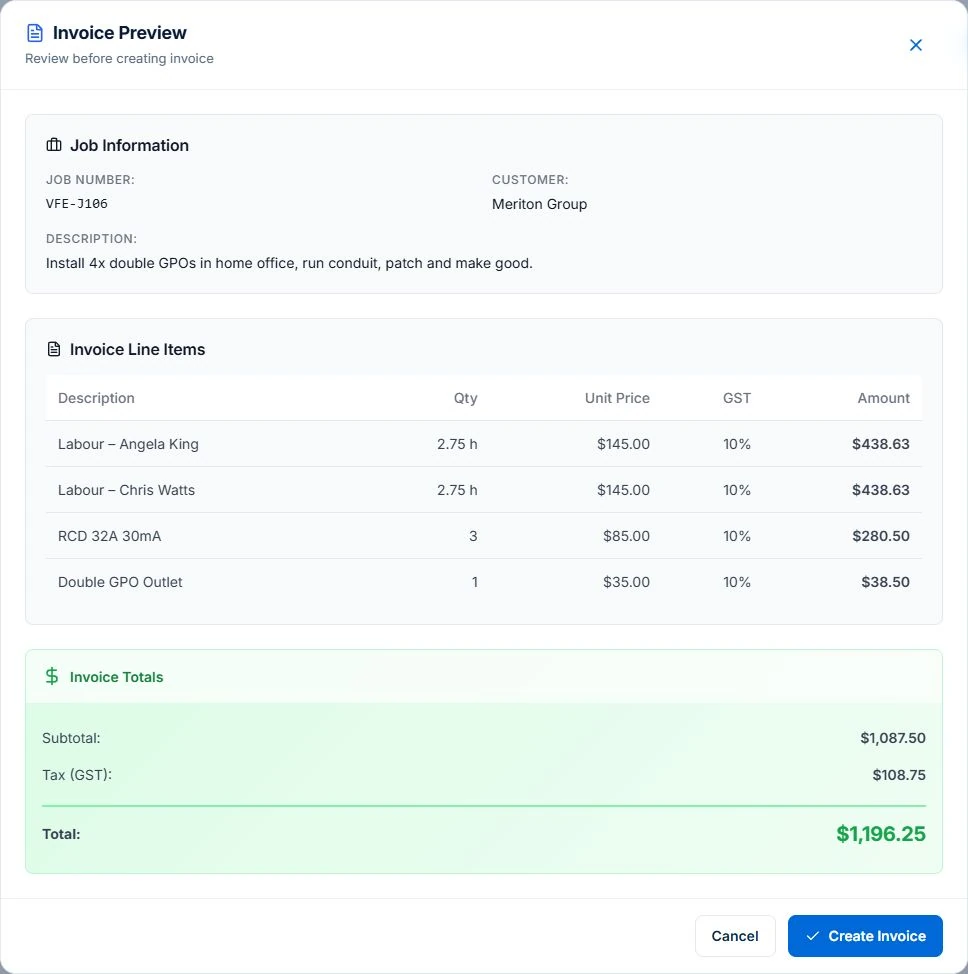
When a job is marked complete, Generate Invoice builds the lines from what was recorded on it, shows you a preview of every one, and creates a draft only when you confirm.
Labour comes across as one line per person: Labour – Sam, 2.75 hours at your billable rate. The hours have your billing rules applied, so if you round to the quarter hour, charge a minimum call-out or bill overtime at a higher rate, the invoice already does it. Someone who worked into overtime gets a line at each rate. Every billable material comes across at its sell price, or at cost plus your markup where no sell price is set. Any approved variation comes across at the price the customer agreed, tagged so you can see which lines they are.
GST is worked out on every line when your business is registered for GST. The job number goes on as the reference, and the invoice falls due in 14 days unless you change it. The draft carries a provisional number; approving it issues the real number from your sequence and makes it a document the customer can see. Until then you can edit any line, add one from your price book or remove one.
- Labour per person, after rounding, minimum-charge and overtime rules
- Billable materials at sell price
- Approved variations at the agreed price
- GST on every line, when you are registered
- Nothing created until you confirm the preview
What happens to the extra work the customer asked for on the day?
It goes on the invoice, at the price the customer agreed, as long as it was recorded as a variation and approved. That one step is what turns “while you’re here” from a favour into revenue.
In Axiom Blue a variation is recorded against the job with what was asked for, why and the price, then approved, with a record of who signed it off. When the job is invoiced, every approved variation not already billed goes onto the invoice and is marked invoiced, so the next invoice cannot bill it twice. If you delete the draft, they go back to approved and wait for the next one.
Where a variation was priced line by line (the fitting and the labour to install it) the invoice carries those lines. Where it was agreed as a single figure, it goes on as one line at that figure. It never bills a different number to the one the customer approved. Variations are on the Professional plan.
Time and materials, fixed price or progress claims: which should you use?
Use time and materials when the job’s size is uncertain, a fixed price when the scope is clear, and progress claims when a fixed-price job runs long enough that waiting for the end would strain your cash flow.
Each needs something different from the software. Time and materials needs the hours and parts captured accurately, because they are the invoice. A fixed price needs the agreed contract and any approved variations, because the invoice is the contract, not the hours. Progress claims need the software to track how much of the contract has already been claimed, so the final claim is the balance and not a guess.
Axiom Blue handles all three on every plan. A time-and-materials job invoices its actuals as described above. A fixed-price job is claimed against its contract instead: a deposit, progress claims as a percentage, an amount, a milestone or a percentage complete per line, and a final claim for whatever is left, with retention held and released if the contract has it. Approved variations raise the contract value those claims are measured against.
| Time and materials | Fixed price | Progress claims | |
|---|---|---|---|
| Best for | Repairs, fault-finding, jobs of uncertain size | Installs and jobs with a clear scope | Larger fixed-price jobs over weeks |
| The invoice is built from | Hours and materials recorded | The agreed contract | The contract, claim by claim |
| Extra work | Approved variations added as lines | Approved variations raise the contract | Approved variations raise the contract |
| The risk | Unrecorded time and parts | Scope creep nobody priced | Losing track of what is left to claim |
| In Axiom Blue | Generate Invoice from the completed job | A final claim for the contract | Deposit, progress and final claims, with retention |
Can you invoice before you leave the site?
Yes, for time-and-materials work: finish the job in the Axiom Blue app, generate the invoice on your phone, check it and send it before you drive away. The customer gets it by email with a link that opens in any browser, with no app or login, where they can view it, download the PDF and pay.
Invoicing on site is the simplest way to be paid sooner, because the invoice arrives while the customer is still standing in front of the finished work. It also catches the mistake while you can still fix it: a missing part is obvious in the driveway and invisible on Friday.
Two limits to know. Sending an invoice and taking payment need a connection, so at a site with no signal, finish the job there and send the invoice from the next stop. Online payment by card is on the Professional plan with Stripe connected; without it, the invoice lists the ways to pay you that you have set up, such as bank transfer or PayID. Fixed-price claims are raised from the office.
Read next On-site invoicing: invoice on the job → · Job management app for iPhone and Android →
What must be on a tax invoice in Australia?
If you are registered for GST, a tax invoice must show that it is a tax invoice, your identity and ABN, the date it was issued, what was sold with quantity and price, and the GST included. For a sale of $1,000 or more it must also show the buyer’s identity or ABN. You must provide one within 28 days if a customer asks for it on a taxable sale over $82.50 including GST.
Axiom Blue puts all of that on the invoice. A GST invoice is headed Tax invoice, with your business name and ABN, the issue date, every line with its quantity and price, and the GST. The customer’s name is on it, which covers the buyer-identity rule for larger sales. If your business is not registered for GST, the heading reads Invoice and no GST is charged, because a business that is not registered must not issue a tax invoice.
Check the current rules on the ATO’s site if you are unsure: they change rarely, but they do change.
- The words tax invoice
- Your business name and ABN
- The date of issue
- What was sold, with quantity and price
- The GST amount
- For $1,000 or more: the buyer’s name or ABN
Sources: ATO: Tax invoices · business.gov.au: Invoicing
How long do Australian small businesses wait to be paid?
About three weeks on average. Xero’s Small Business Insights for the June quarter of 2026 put the average wait at 22.9 days, with invoices paid 6.0 days after they fell due.
Part of that wait is the customer, and part of it is you. Every day between finishing the job and sending the invoice is a day added before the clock even starts. That is the part you control, and it is why invoicing from the job, on the day, matters more than chasing harder later.
Axiom Blue shows both halves. Unbilled Work lists every completed job still waiting to be invoiced, valued at what its invoice would be, so nothing sits finished and unbilled. Accounts Receivable shows what is outstanding, what is overdue and your average days to pay, worked out from invoices actually paid in the last 90 days. On the Professional plan, a ready-made overdue reminder emails and texts the customer the balance still owing and the link to pay it, then tells you if it is still unpaid a week later.
Does it sync with Xero or MYOB?
Yes, on the Professional plan. Axiom Blue syncs two ways with Xero, covering customers, invoices and payments, and syncs invoices and payments with MYOB, so your accountant sees the same figures without anyone typing them twice.
If you keep your books in Axiom Blue instead, the finance side is built in on every plan: accounts receivable, recorded payments (cash, bank transfer, card, cheque or direct debit, in full or in part), credit notes, and GST on every invoice. Credit notes stay in Axiom Blue rather than syncing to Xero.
What does job invoicing software cost in Australia?
Most job management products in Australia charge per user per month, and a few charge by the number of jobs or invoices instead. For a trade business the model matters more than the headline price, because the business grows by adding people and doing more jobs.
Axiom Blue is $29 AUD for the first seat per month, excluding GST on Basic and $59 on Professional, with no job caps, no per-invoice fees and no setup fee. Invoicing from jobs, fixed-price claims, the customer link, recorded payments and GST are on every plan, and the free plan includes 10 invoices a month with no time limit. Professional adds online card payment, Xero and MYOB sync, variations and the overdue reminders.
| Product | How it is priced (as at September 2026, check their site) | What that means for invoicing |
|---|---|---|
| ServiceM8 | By number of jobs a month, users unlimited | A busy month costs more; a free tier for very small volumes |
| Tradify | Per user, from $48 a month | Progress invoicing and reminders from the Pro plan |
| Fergus | Per user, no free plan | Strong job-card invoicing; every person is another seat |
| AroFlo | Per user, $80 a month with a three-user minimum | Deep compliance and supplier features, priced for larger teams |
| Invoice2go | By number of invoices a year | Invoices only; no jobs, time or materials behind them |
| Axiom Blue | Free plan, then $29 for the first seat monthly, excluding GST (Basic) or $59 (Professional) | No job or invoice caps on paid plans; invoicing on every plan |
Read next Tradify vs Fergus vs ServiceM8 vs AroFlo vs Axiom Blue: an Australian job management comparison →
Is Axiom Blue the right invoicing software for a trade business?
AxiomBlue can suit a trade or service business that wants completed work, agreed extras and billing connected. Review the invoice preview and previous charges before creating the next invoice. Basic starts at $29 for the first seat monthly, excluding GST; variation approvals require Professional. Free supports a limited one-user core invoicing workflow.
The limits, so you know them now. Sending an invoice and taking payment need a connection. Online card payment, Xero and MYOB sync, variations and the overdue reminders are Professional. It does not lodge BAS or run payroll; it reports GST and, on Professional, exports approved timesheet hours as a CSV for your payroll system. And the invoice is only as good as the record, so the first week is worth spending on getting the crew to clock on and add materials in the app.
Read next Best job management software in Australia: how to tell you have outgrown the spreadsheet →
Invoice your last finished job through it
Take a job you invoiced last week. Put it into Axiom Blue as it happened: the time each person spent, the materials, and the extra the customer asked for. Mark it complete and generate the invoice.
Compare the preview with the invoice you actually sent. If they match, you have lost nothing. If the new one is higher, the difference is what the Friday invoice left behind, on one job. The free plan has no time limit and needs no credit card, so finding out costs one job’s worth of typing.
Make it useful today
Print or keep a working copy.
Each resource includes a blank worksheet and an illustrative example. Open it to print, or download an HTML copy to keep. No signup needed.
Common questions
Questions people ask before they switch
What is job invoicing software?
Job invoicing software builds the invoice from the job record rather than from memory: the time recorded, the materials used and any changes agreed on site. Axiom Blue turns a completed job into a draft invoice in one step, with labour per person at your billable rate, materials at sell price, approved variations at the agreed price and GST, and shows a preview of every line before anything is created.
Can I send an invoice from my phone on site?
Yes, for time-and-materials jobs. In the Axiom Blue app you complete the job, generate the invoice, check it and send it by email before you leave. The customer opens it in any browser with no app or login and can view, download and pay it. Sending needs a connection, so at a site with no signal, send it from the next stop.
How do variations get onto the invoice?
In Axiom Blue, extra work is recorded against the job as a variation with its price, and approved with a record of who signed it off. When the job is invoiced, every approved variation not already billed goes on at the agreed price and is marked invoiced, so it cannot be billed twice. Variations are on the Professional plan.
Does Axiom Blue do progress claims and deposits?
Yes, on every plan. A fixed-price job in Axiom Blue is invoiced as claims against its contract: a deposit, progress claims by percentage, amount, milestone or percentage complete per line, and a final claim for the balance. Retention can be held and released, and approved variations raise the contract value the claims are measured against.
Is GST worked out automatically?
Yes. When your business is registered for GST, Axiom Blue applies 10% GST to each taxable line and heads the invoice Tax invoice, with your ABN, the date, each line’s quantity and price, and the GST. A business that is not registered gets an invoice with no GST and the heading Invoice.
Can customers pay the invoice online?
Yes, on the Professional plan with Stripe connected. Every Axiom Blue invoice has a link the customer opens in any browser, with no login, to view it and download the PDF; with online payments on, they can pay by card there too, and the money goes to your own Stripe account. Without it, the invoice shows the payment methods you have set up, such as bank transfer or PayID.
Does it sync invoices to Xero or MYOB?
Yes, on the Professional plan. Axiom Blue syncs customers, invoices and payments two ways with Xero, and syncs invoices and payments with MYOB, so your accountant sees the same figures without re-entry. Credit notes stay in Axiom Blue.
What does job invoicing software cost in Australia?
Compare current plans for your team and required features. Axiom Blue is $29 AUD for the first seat per month, excluding GST on Basic and $59 on Professional, with no job caps, no per-invoice fees and no setup fee. Invoicing is on every plan, and the free plan includes 10 invoices a month with no time limit.
Put it to work
Your practical checklist
- Enter one finished job as it happened: each person’s time, the materials and the extra work.
- Generate the invoice and read every line of the preview before creating it.
- Compare it with the invoice you actually sent for that job.
- Send one invoice from your phone before leaving a site, and see how soon it is paid.
- Open Unbilled Work and invoice anything that finished and was never billed.
See the records in Axiom Blue
Try the workflow with a familiar job.
Features and usage limits vary by plan. Review the tools relevant to your process before choosing your setup.