
What to evaluate
For each shortlisted tool, record the plan, role, device, input, expected result and evidence. Mark a requirement demonstrated, a manual step, unavailable or untested. A feature label or a tidy calendar is not a completed workflow test.
Prepare the same job and expected result for each test
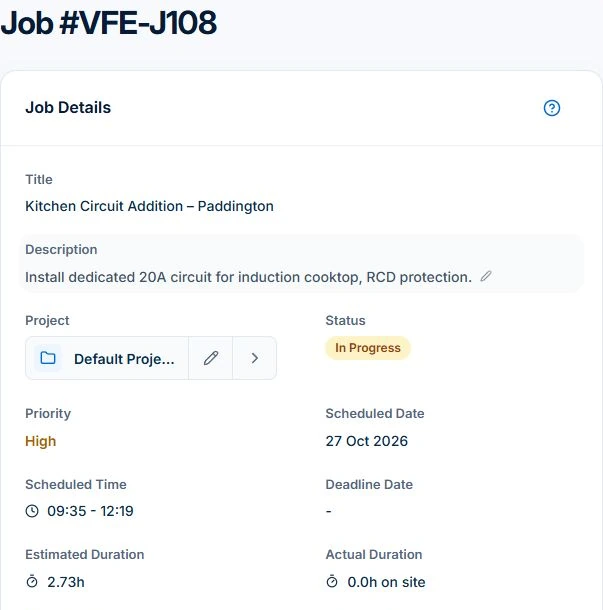
The current public electrical demo shows job VFE-J108, Kitchen Circuit Addition – Paddington. Its Job Details record has the description, status, schedule, estimated duration and billing type. This sample is still In Progress, with no time entries or materials recorded; the screenshot shows the starting record, not completed work or an approved invoice.
Start with a recently completed job whose expected scope and invoice you understand. Prepare its customer, site, accepted quote, office role and worker device. In AxiomBlue, Job Details is the first check; open linked quote and billing records separately. Use your own sample setup for the remaining tests rather than assuming the empty demo entries are finished results.
For the product overview, plan fit and a live demonstration, see AxiomBlue job management software for tradies. Use this guide for the specific task below.
Record evidence for six requirements
For each row, retain the input, plan, role, device and inspectable result. A useful outcome is a job record, changed booking or reviewed draft you can open again. Keep a missing demonstration as untested; do not convert it into a pass or a claim that another product lacks the capability.
| Requirement | Test to perform | Axiom Blue example |
|---|---|---|
| Scope and billing | Convert an accepted quote and inspect the job and billing basis | Check linked quote/job records and invoice preview; variation approvals require Professional; fixed-price claims use the web contract workflow with invoicing permission |
| Planning | Place work, then change availability | Preview assignments; Professional adds crew skills and approved leave |
| Field handover | Use the actual worker role and phone, then reconnect | Check Description, Tasks, time/materials and received updates; uploads start on Basic |
| Cost interpretation | Compare estimated and recorded direct costs | Keep contribution, customer charges and received cash separate |
| Accounting handover | Reconcile a sample invoice and payment | Professional accounting connection; inspect mapping and sync results |
| Team and changeover cost | Price required roles and confirm import/export coverage | Use graduated seat pricing; customer and price-book CSV imports are not a complete history migration |
Keep a short result sheet, not a feature score
Example test: a customer requests an extra item on a fixed-price job. In AxiomBlue Professional, inspect the variation’s recorded price and approval, then the next claim and previous charges. The evidence should explain the agreed bill; merely recording longer hours does not pass that test.
| Result to record | What it means |
|---|---|
| Demonstrated | Named role completed the step; the resulting record was inspected. |
| Manual step required | A person or another system completes part of the handover; record who and how. |
| Unavailable | The required capability is confirmed unavailable on the tested setup. |
| Untested | Evidence is missing; retain the question before deciding. |
Run the office and field steps on the access you will buy
A demo can expose advanced features that a cheaper plan does not include. Use it to understand the workflow, then confirm access on the intended plan. For a crew test, use distinct office and worker logins with the permissions you intend to grant.
Open the assigned job on the worker’s actual phone. Find the site instructions, record time and materials and, on a paid plan, attach a photo. Check the office record after synchronisation. Native apps can queue supported actions; browser access has different offline behaviour. Quote delivery, invoicing and payment need a connection.
Review the awkward job before comparing prices
Change the scope or the assignment and follow the record through again. On Axiom Blue Professional, inspect variation pricing and approval. For a time-and-materials job, check eligible entries in Invoice Preview; for fixed-price work, check the contract and claim instead.
A higher generated invoice is not proof of recovered revenue. It may reflect a wrong rate, duplicate entry or extra work the customer never agreed to. Compare the result with the agreement and earlier billing, then record which check passed or failed.
Read next Job invoicing software: bill from the job record → · Record and bill job variations in AxiomBlue →
Check the plan and the total for your team
Price the same roles, required features and busy-month workload in every option. Basic supports core jobs and uploads; Professional is needed for crews, recurring series, variations, weekly timesheets, reports, automation and accounting sync. Five same-plan seats billed monthly total $116 Basic or $236 Professional, excluding GST; this subscription example does not establish feature parity with another vendor.
Axiom Blue monthly first-seat prices are $29 AUD on Basic and $59 on Professional, excluding GST. Additional seats use graduated discounts: 10% off for seat two, 20% for seat three, through to 50% off from seat six. Paid plans have no job-volume cap. Check your actual team and billing interval on the pricing page; SMS credits and payment-processing fees are separate.
Free is a one-user core-workflow test: 10 jobs per week, 10 quotes and 10 invoices per month, 25 customers and 25 leads, with no file uploads. Use the demo to inspect Professional capabilities before choosing a plan.
Choose a pilot and a changeover you can reconcile
List what must move: customers, price-book items, open work, documents and unpaid balances. Ask which records can be imported and exported, in what format, and who checks them. Include data preparation, training and any paid help separately from the subscription.
Choose a small pilot of new work and name the person who reviews it. Keep access to the old history and reconcile active work before setting a changeover date. Decide from the completed tests and unresolved requirements; there is no universal winner or fixed migration duration.
Read next Tradify vs Fergus vs ServiceM8 vs AroFlo vs Axiom Blue: an Australian job management comparison →
Common questions
Questions that affect the selection
Can the public demo replace a pilot?
It can show the product records and advanced workflows without setting up your business. A pilot on your intended plan checks your data, permissions, devices and handovers. Use both for the decision.
Does accounting sync remove every reconciliation task?
No. On Professional, check the configured accounting connection, record mapping, sync results and corrections with your accountant. Integration availability is not proof that every record transfers or that balances are correct.
What should I record when a requirement is not tested?
Mark it unknown, name the evidence needed and decide whether it blocks selection. Do not turn a sales answer or an absent screenshot into a pass or a failure.
Put it to work
Your practical checklist
- Prepare the same scope, site and expected invoice.
- Record the actual plan, role and device.
- Inspect records after both a normal job and a change.
- Retain manual steps, failures and unknowns.
- Price the setup that passed the required tests.
See the records in Axiom Blue
Check the product before running the test
The commercial overview explains AxiomBlue’s capabilities and plan boundaries. This checklist records what your test actually establishes.