Pest Control · Recurring Scheduling
How Do I Schedule Recurring Pest Control Treatments Automatically?
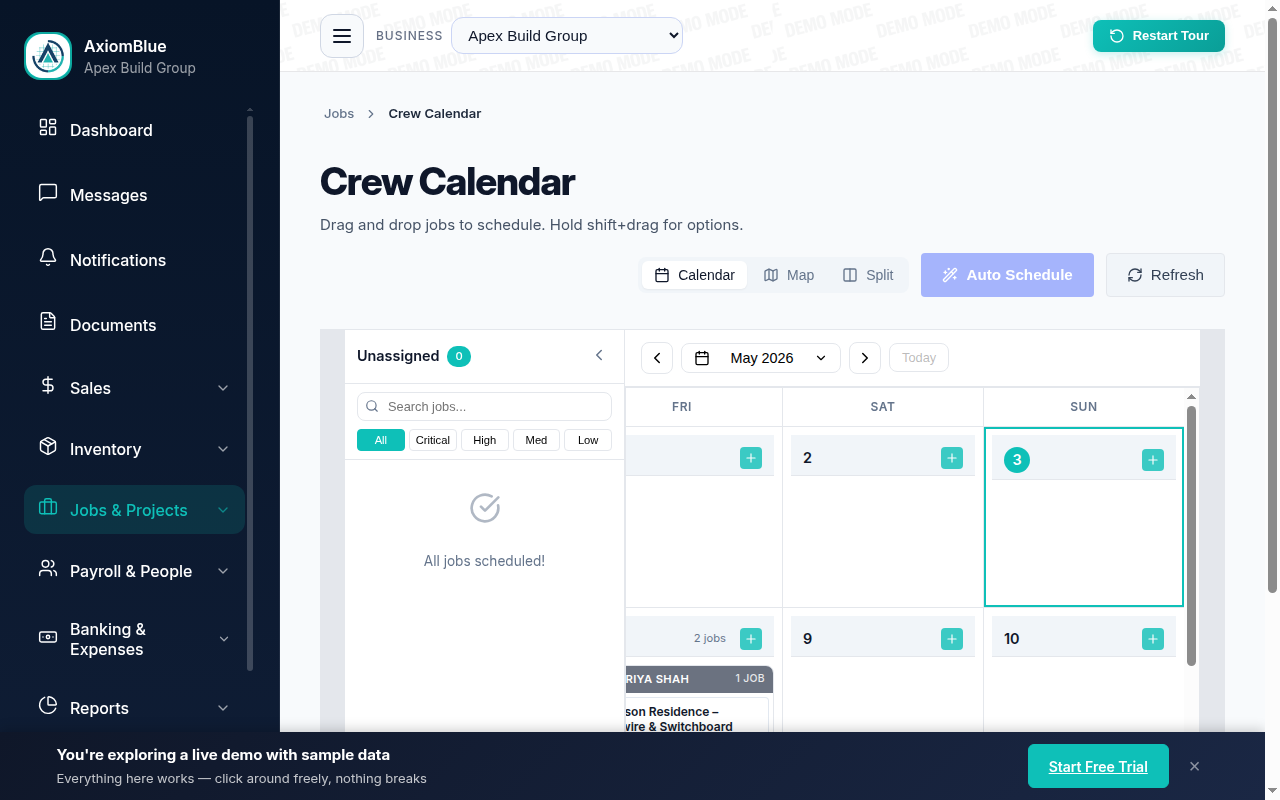
Pest control runs on cycles - the quarterly general treatment, the annual termite inspection, the monthly commercial visit - and every cycle you track by memory or spreadsheet is a renewal you can miss. AxiomBlue turns each treatment cycle into a recurring job series that regenerates itself on the calendar, texts the customer the evening before, and keeps the chemical notes and certificates where an auditor can find them.
Quick answerSet each treatment up once as a recurring job series and every future visit generates itself on the calendar - quarterly, annual, or monthly. AxiomBlue does this out of the box, adds an automatic SMS to the customer the evening before each treatment, and keeps photos, chemical notes, and certificates on every visit's job record. From $29 AUD per seat per month, free plan with no time limit.
A pest control business is really a portfolio of promises: this house gets treated every three months, that warehouse every month, that termite system inspected every year. The work is routine - the hard part is that hundreds of those promises all mature on different dates, and the ones that slip don't complain. They just quietly lapse, and the customer books someone else next spring. Recurring scheduling replaces the memory, the wall planner, and the "call back in October" spreadsheet with a calendar that renews the promise itself.
- Create the treatment once, set the cycle - the series regenerates every future visit
- Quarterly general treatments, annual termite inspections, monthly commercial contracts side by side
- Customers texted automatically the evening before each visit
- Chemical notes and treatment photos captured on each visit's job record, from the phone
- Compliance certificates attached to the exact job they belong to
| Key facts — recurring pest control scheduling in AxiomBlue | |
|---|---|
| Scheduling mechanism | Recurring job series — set the cycle once, every occurrence generates itself |
| Cycles supported | Weekly, monthly, quarterly, annual — whatever the treatment or contract requires |
| Customer reminder | Job Tomorrow Reminder automation — SMS the evening before each visit |
| Treatment records | Photos and chemical notes on each visit's own job record, captured from the phone |
| Compliance | Certificates and reports attached to the job; emailed to the client on request |
| Field access | Free native iPhone and Android apps, plus the full platform in any browser |
| Invoicing | Invoice from the job with GST applied; online payment link; two-way Xero sync, MYOB sync |
| Price | From $29 AUD per seat per month; SMS reminder automation on Professional ($59); free plan with no time limit |
How do you schedule recurring pest control treatments automatically?
You create the treatment once as a recurring job series and let the schedule regenerate every future visit. In AxiomBlue, that means building the job the way you normally would - customer, property, service, price - and setting a repeat cycle on it: every 13 weeks for the general pest treatment, every 12 months for the termite inspection, every month for the commercial contract. From then on the series produces each occurrence on the calendar by itself, as a full job ready to assign to a technician. Nobody re-enters anything, and no treatment depends on a person remembering that a particular house in a particular suburb is due in a particular week.
That last point is the entire value. A one-off trade - a plumber fixing a burst pipe - is done when the job is done. Pest control is the opposite: the business model is the repeat cycle, and revenue leaks exactly where cycles slip. A missed quarterly visit is not just one lost job; it is often the moment a customer drifts to whoever letterbox-dropped them last. When the schedule renews itself, the drift never gets its opening.
AxiomBlue is job management software built in Australia for trade and field-service businesses, so the recurring series is not a bolted-on booking tool - each generated visit is a normal job carrying everything a job carries: the assigned technician, the site details, the price, and (as covered below) the photos, chemical notes, and documents from every visit before it.
How do recurring job series handle different treatment cycles?
Each cycle is its own series, so a single property can carry several at once - and most do. A typical residential customer might have a quarterly general pest treatment and an annual termite inspection; a body corporate might add a monthly rodent-station check on top. In AxiomBlue each of those is a separate recurring series against the same customer, each regenerating on its own rhythm, all landing on the same calendar the office already plans from.
Rescheduling behaves the way you would hope: each generated occurrence is an ordinary job, so when a customer asks to move next Tuesday's treatment, you drag that one visit to a new slot and the series keeps producing future occurrences on the original cycle. One rearranged school-holiday week does not corrupt the whole year's pattern. And because it is a drag on a calendar rather than an edit to a formula, anyone in the office can do it without fear of breaking something.
The honest boundary is worth stating: a recurring series regenerates scheduled work - it is not a contract auto-renewal or a payment subscription. The series will keep generating visits until you stop it; whether the customer is still under contract, and what they pay, remain business decisions the software records rather than makes. For most pest control businesses that is exactly the right split: the software guarantees no cycle is forgotten, and a human decides when a cycle should end.
How does the evening-before SMS reminder run, step by step?
The reminder is a ready-made AxiomBlue automation template - Job Tomorrow Reminder - and it runs in three plain steps every single evening:
- Schedule — every evening, 6pm by default. The workflow runs on a clock, not on anyone's initiative. It fires whether the office had a quiet Tuesday or a flat-out one.
- Lookup — find tomorrow's jobs. A query pulls every job on tomorrow's calendar, including the recurring treatments the series generated months ago, with each job's customer and mobile number. If a visit was moved at 4pm, the 6pm run sees the new date.
- Action — text each customer. Every customer with a visit tomorrow gets a personalised SMS - their name, your business name, a heads-up that the technician is coming. Nothing for the customer to install, no account, no link.
For pest control the evening-before text does double duty. It prevents the locked-gate no-show, like any trade reminder - but it also gives the customer their preparation window: put the dog inside, clear the kitchen benches, tell the tenants. A treatment that goes ahead and goes smoothly is the difference between a contract that renews and one that gets "we'll think about it". The message wording is fully editable in the visual editor, so you can build those preparation instructions straight into the text. The template is part of the Professional plan; the full mechanics are covered in the SMS job reminders guide.
Where do treatment photos and chemical notes live?
On the job record for that specific visit - which is what makes a recurring series more than a calendar trick. While the technician is still on site, they use the free AxiomBlue iPhone or Android app to photograph the bait stations, the roof-void access, the termite activity they found, and to note what was applied: product, concentration, areas treated. Those photos and notes attach to that occurrence's job record, dated and attributed to the person who logged them.
Do that on every visit and the property's treatment history assembles itself. When a customer rings in month eight saying the ants are back, you are not relying on anyone's memory of what was sprayed in month two - you open the series, scroll to that visit, and the chemical note and photos are sitting there. The same history answers the harder questions: what was used near the chicken coop, which technician treated the roof void, what did the sub-floor look like last year versus this year.
One honest note on sharing: photos and documents live on the job record for your business. Showing them to a customer - attaching photos to an email, printing a report - is a deliberate act by you, not something the software broadcasts automatically. For pest control that is usually precisely what you want; chemical records are evidence first, marketing second.
How do you keep compliance documentation for commercial contracts?
Attach it to the job it belongs to. AxiomBlue's job records take document attachments as well as photos, so the treatment certificate, the safety data sheet for the product used, or the inspection report files against the exact visit it documents. When the restaurant client's food-safety auditor asks for evidence of the last twelve monthly visits, the answer is twelve dated job records, each with its own notes, photos, and paperwork - opened in seconds and emailed on request, rather than reconstructed from a glovebox folder and three people's phones.
Commercial pest control lives or dies on this. A café, a food manufacturer, or a strata manager is not just buying dead cockroaches - they are buying defensible documentation that treatments happened on schedule, with named products, by an identifiable technician. The recurring series provides the "on schedule" half automatically, because the visits generate themselves and the calendar shows exactly when each one ran. The job record provides the rest, because the evidence was captured at the moment of the work rather than written up from memory on Friday.
Each visit can also be invoiced straight from its job record - GST applied automatically, an online payment link on the invoice, and two-way Xero sync (MYOB sync is also available) so the accounts follow without double entry. For rounds-based businesses that want invoicing itself automated, the automatic invoice generation guide shows the template that raises the invoice the moment a job is marked complete.
Paper service book vs spreadsheet vs AxiomBlue
Three honest ways pest control businesses track treatment cycles today. The deciding row is the first one: any system where a person must notice a due date will eventually not notice one.
| Paper service book | Spreadsheet + phone calendar | AxiomBlue Self-renewing | |
|---|---|---|---|
| Next treatment gets scheduled | When someone flips to the right page | When someone scans the sheet for due dates | ✓ Automatically — the series regenerates it |
| Customer reminded | Only if the office rings around | Only if the office rings around | ✓ SMS the evening before, automatically |
| Chemical records | Handwritten, one flood away from gone | A notes column, if anyone fills it in | ✓ Notes + photos on each visit's job record, dated and attributed |
| Certificates for an audit | A folder in the ute, hopefully | A shared drive, loosely related to the jobs | ✓ Attached to the exact visit they document |
| Rescheduling one visit | Crossings-out | Edit the sheet and hope the calendar agrees | ✓ Drag it — the series keeps its cycle |
| Invoicing the visit | Written up later, from memory | Separate accounting software, retyped | ✓ From the job record, GST applied, Xero synced |
Can I change how the reminders and schedules work?
Yes - both halves are configurable without code. The recurring series' cycle, price, and assigned technician are ordinary job settings anyone in the office can edit, and moving or cancelling a single occurrence never disturbs the pattern. The SMS reminder opens in AxiomBlue's visual automation editor as nodes on a canvas: the schedule node sets the send time, and the SMS node holds the message text with variables for the customer's name and your business name - so a pest control business typically rewrites the default into its own preparation checklist ("please secure pets and clear kitchen benches"). A test mode lets you check the workflow before any real customer receives a text, and the execution history logs every run.
What does recurring pest control scheduling cost?
The recurring series, calendar, mobile apps, and photo and document capture are all included in AxiomBlue from $29 AUD per seat per month on the Basic plan. The automatic evening-before SMS reminder is an automation template, part of the Professional plan at $59 AUD per seat per month alongside 30+ other ready-made workflows and two-way Xero sync. Every plan starts with a free plan that has no time limit, no credit card required - long enough to load a real round of treatment cycles and watch a fortnight of them schedule and remind themselves.
Recurring Pest Control Scheduling — Common Questions
Set the treatment up once as a recurring job series in job management software, and every future visit generates itself on the calendar. In AxiomBlue you create the job, set the repeat interval - quarterly for a general pest treatment, annually for a termite inspection, monthly for a commercial contract - and the series regenerates each occurrence on schedule. Nobody re-enters the job, and no treatment cycle depends on someone remembering it.
Yes, automatically. AxiomBlue's Job Tomorrow Reminder automation runs every evening on a schedule, finds every job on tomorrow's calendar - including recurring treatments the series generated months earlier - and texts each customer an SMS reminder. The customer needs nothing installed; the reminder arrives as an ordinary text. The template is included on the Professional plan at $59 AUD per seat per month.
On the job record for that visit. Each occurrence in an AxiomBlue recurring series is a full job of its own, so your technician adds notes - product, concentration, areas treated - and photos from the free iPhone or Android app while still on site. Because every visit keeps its own record, the treatment history for a property is the job history: scroll back through the series and every chemical note is dated and attributed.
Yes. AxiomBlue attaches documents to the job record, so a treatment certificate, safety data sheet, or inspection report files against the exact visit it belongs to. When a commercial client or auditor asks for documentation, you open the job and email the attachment - no digging through a ute glovebox or a shared drive named 'Certificates final v2'.
You move that visit on the calendar and the series carries on. Each generated occurrence is an ordinary job, so dragging it to a new day affects only that visit - the schedule keeps producing future treatments on the original cycle. The evening-before SMS always reads from the live calendar, so a moved job means the reminder goes out for the new date, not the old one.
It is where recurring scheduling earns its keep. A commercial contract is a promise of frequency - monthly restaurant visits, quarterly warehouse baiting - and AxiomBlue turns that promise into jobs that generate themselves, each carrying its own photos, chemical notes, and attached documentation. When the client's food-safety auditor wants proof of the last twelve visits, the evidence is twelve dated job records, not a reconstruction.
Recurring job schedules, the calendar, and photo and document capture are all part of AxiomBlue from $29 AUD per seat per month on the Basic plan. The automatic evening-before SMS reminder is an automation template, included on the Professional plan at $59 AUD per seat per month. There is a free plan with no time limit, and no credit card is required to start.
Yes - AxiomBlue has free native apps for iPhone and Android covering the field workflow: today's schedule, job details, clock on and off with GPS, photos and documents to the job record, and on-site invoicing. The full platform also runs in any web browser, so the office and anyone who prefers not to install an app use the same always-current system.
Stop Tracking Treatment Cycles by Memory
Load one round of customers, set the cycles, and watch the next quarter schedule itself - reminders sent, chemical notes filed, certificates where the auditor expects them. Start free today.
No credit card required • Free plan, no time limit • Cancel anytime