
The starting point
The best lawn care software runs the round from the office so you do not have to. Each regular becomes a recurring series that generates its own visits. A rain day moves in one action, with a preview and an undo. Each visit can be charged automatically to the card or bank account the customer authorised. Axiom Blue does all three on its Professional plan, at $59 AUD for the first seat per month with no job caps, which matters in a trade that completes hundreds of jobs a month. The free plan covers the scheduling and invoicing to start.
Key facts
| The round | Each regular customer is a recurring series (weekly, fortnightly or monthly) that generates its own visits. Recurring series are on Professional. |
|---|---|
| A rain day | Reschedule an entire day to a chosen date or the next available one, keep original crews where possible, preview it, and undo it. |
| Outdoor work only | Mark jobs or whole series weather-sensitive and a rain-day move can shift just those, leaving indoor work in place. |
| Getting paid | Customers authorise a card or BECS direct debit once in the customer portal, and each visit’s invoice is charged automatically (Professional, with Stripe connected). |
| Fitting in a new customer | Auto-schedule proposes where new work goes; Dispatch Map ranks where a job fits each crew’s run. |
| Accounting | GST on every invoice, receivables, customer profitability, two-way Xero sync and MYOB sync. |
| Price | Free plan with no time limit, then $29 AUD for the first seat per month (Basic) or $59 (Professional). No job caps. |
| The crew’s side | The phone app for the run itself is covered in the lawn care apps guide. |
What is lawn care software?
Lawn care software is the office system for a mowing or grounds business: it holds the round, decides where each visit goes, moves the week when the weather turns, and turns completed visits into money. It is a different job from the app the crew carries, even when both come from the same product.
The distinction matters because the two fail differently. A crew app fails at the gate, when the site details are missing. Office software fails on a Sunday night, when the round, the reschedule and the invoicing all live in different places and someone has to join them up by hand.
Axiom Blue is both, sharing one record. This guide is about the office side. For what the crew opens at each stop, the apps guide walks a working day.
Read next Best lawn care business apps for Australian crews →
Why does a lawn round outgrow a calendar and a spreadsheet?
Because a round is not a list of appointments. It is a set of promises that repeat, and every one of them has to survive rain, holidays, a customer going away and a crew member calling in sick.
A calendar can hold next Tuesday. It cannot tell you that the Tuesday fortnightly for the Nguyens was skipped three weeks ago and never made up. A spreadsheet can record who was invoiced, but only after someone types it in. The gaps between those tools are where a lawn business loses money: a visit done and never billed, a customer charged for a mow that rained out, a round that slowly drifts because rebuilding it after every wet week is too much work.
Look for repeated missed visits, duplicated entry or extra time reconciling the round. Those are more useful signals for reviewing your system than a fixed customer count.
How should lawn care software handle a recurring round?
Each regular customer should be set up once, as a pattern, and every future visit should appear on its own.
In Axiom Blue that is a recurring job series, on the Professional plan. Set it to weekly, fortnightly or monthly, with the site address, the expected duration and the price, and the visits generate as individual jobs you can complete, vary and bill. Each one carries the site details forward, so the crew sees the gate code and the dog without anyone copying them onto next week’s job.
When a customer goes away for a month, pause the series rather than deleting visits one by one. When you change the arrangement, regenerate the upcoming visits and they are rebuilt to the new pattern, while completed and invoiced ones stay exactly as they were. A series can also be marked weather-sensitive, which every visit it generates inherits.
Price the series the way you sell the work. Most regular mowing is a flat rate, so a series can carry a fixed price that every visit it generates bills at, with no timesheet to reconcile. Work that genuinely varies, such as a garden tidy priced on the hours it takes, can stay on time and materials. Extra work on the day is recorded against that visit and lands on its invoice, so the hedge nobody quoted still gets paid for.
Read next Lawn care scheduling software: manage repeat visits →
What happens to the round on a rain day?
You move the whole day in one action, look at where it lands, and undo it if the forecast changes.
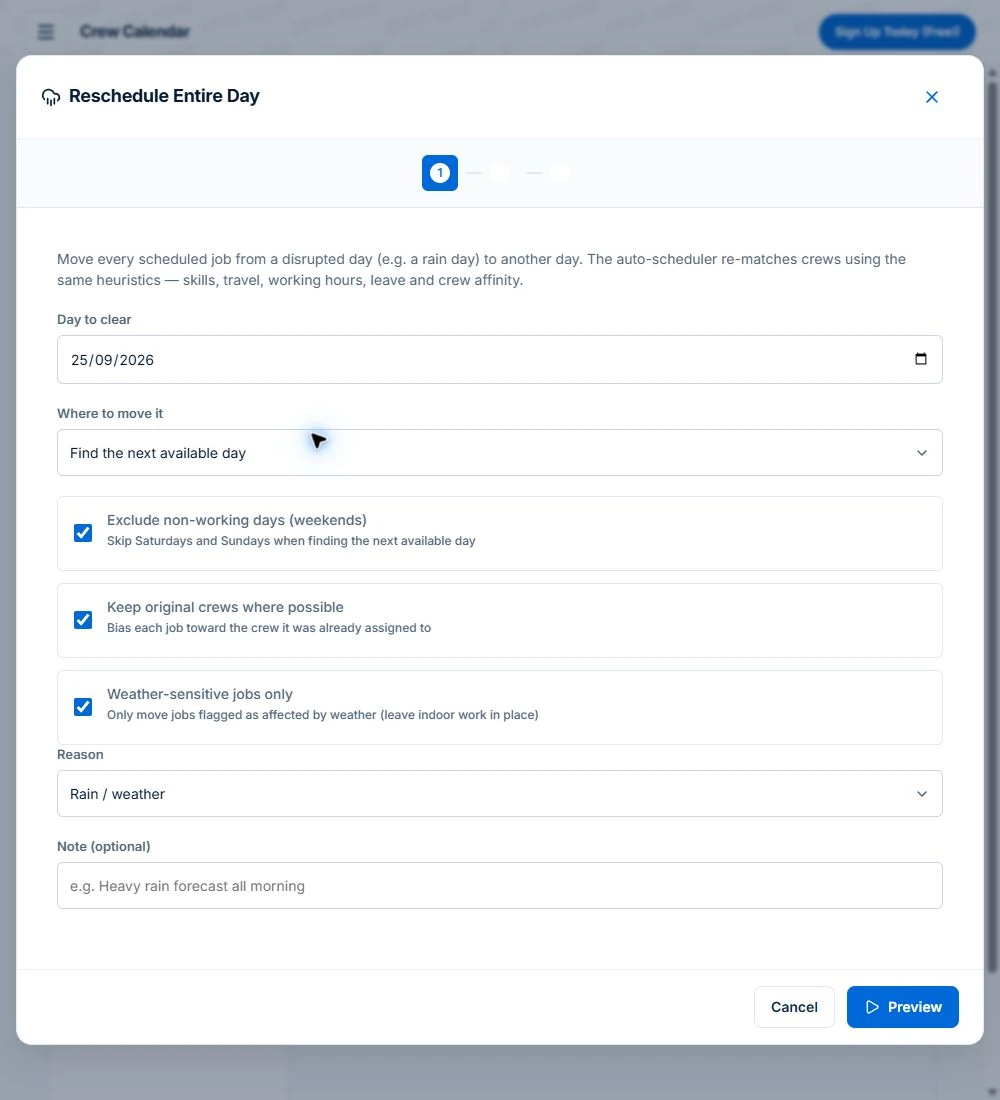
Axiom Blue’s Reschedule Entire Day takes the day to clear and moves its jobs either to a date you choose or to the next available day. It uses the same rules as the auto-scheduler, so it respects skills, working hours and leave, and it keeps each job with its original crew where possible so customers see the faces they expect. You see a preview before anything moves.
For a business that also does indoor or undercover work, there is a weather-sensitive filter. Mark the mowing and garden jobs, or the whole series, as weather-sensitive, and a rain-day move can shift only those, leaving the shed clean-out and the indoor plant service where they were. The undo matters more than it sounds: a bulk move you cannot reverse is a decision you have to be sure of at 6am.
The part that eats the morning is telling people. Every moved visit keeps its customer and site details, so the new date is on the record the office reads from, and you can send a customer a tracking link by SMS or email that shows when their job is now booked and how it is progressing. Customers with a portal login see the new date there too, without anyone ringing them.
Read next Recurring jobs versus recurring invoices: keep visits and billing aligned →
Can lawn care software bill each visit automatically?
On Professional, automatic series billing can collect an issued visit invoice through a customer-authorised Stripe payment method. Check authorisation, invoice accuracy and payment failures before relying on it.
In Axiom Blue you send a regular the authorisation from their series. They sign in to the customer portal and save a card or a BECS direct debit account through Stripe, with their consent recorded on the way. From then on, when a visit is completed and its invoice issues, it is charged automatically. There is a ten-minute pause first, so you can record cash taken on site or void an invoice raised by mistake before anything is charged.
If a charge fails, it is retried up to three times, three days apart, and both you and the customer are told each time. Review the invoice’s charge and retry history before taking another payment. Either of you can stop it at any time, and a saved card that is about to expire is flagged well in advance. The money goes straight to your own Stripe account, not through ours, and Stripe’s standard processing fees apply.
This needs Professional, your business connected to Stripe and a customer-authorised payment method. Check failed charges and payment exceptions; Stripe processing fees apply.
The customer side is deliberately simple. In the portal a regular sees their series, their invoices and a statement of what they owe, and they can switch automatic billing off themselves at any time. That matters for trust: people agree to direct debit much more readily when they can see every charge and stop it without having to ring you.
Read next Lawn-care invoicing: per visit, monthly billing and extra work →
How do you fit a new customer into the round?
You want the new regular on the day and the crew that already works nearby, not in the first empty slot.
Axiom Blue’s auto-scheduler proposes where new work goes, weighing travel from each crew’s home base, their existing bookings, working hours and leave, and shows the plan before anything moves. For a single new job, Dispatch Map ranks where it would fit into each crew’s run for the day, cheapest first.
Review a proposed route order and its available travel estimates against your booked visits. Any time difference belongs to that specific proposal and its assumptions; route planning does not shorten the mowing work itself.
Read next Job allocation software: preview crew assignments →
What does the office see at the end of the month?
What you are owed, what each customer is worth, and books that already match your accounting file.
Receivables show which invoices are still outstanding, and the ones on automatic billing mostly are not. The customer profitability report shows which regulars earn their place in the round and which ones take a long drive for a small lawn. GST is applied to every invoice, and invoices and payments sync two ways with Xero, and with MYOB, so nothing is typed twice.
Customers who sign in to the portal can open their own statement, which removes most of the “what do I owe you?” calls before they are made. That profitability report is the one most lawn businesses never run, because they cannot. It is how you find the three customers who should be repriced or let go, and the suburb worth building the round around.
What does lawn care software cost in Australia?
Compare the same team, busy-month workload and required features. Include user types, job limits, GST, optional SMS, payment fees and any quoted implementation or training costs.
AxiomBlue’s first seat is $29 AUD per month on Basic or $59 on Professional, excluding GST. Additional seats have graduated discounts: the second is 10% off, third 20%, fourth 30%, fifth 40%, and sixth onward 50% off the first-seat rate. Paid plans have no job caps or per-job fees. SMS credits and payment-provider fees are separate where used.
For five seats, the factors are 1 + 0.9 + 0.8 + 0.7 + 0.6 = 4. Monthly billing totals $116 on Basic or $236 on Professional, excluding GST. Annual first-seat prices are $240 and $490; the same five-seat ladder totals $960 or $1,960 per year. These are subscription examples, not a claim of feature parity with another vendor.
Free is a one-user core-workflow test with 10 jobs per week, 10 quotes and 10 invoices per month, 25 customers and 25 leads. Uploads start on Basic. Crews, skills, leave, recurring series, variations, weekly timesheets, reports and automations require Professional. Inspect those in the live demo or test them on the required plan.
| Calendar and spreadsheet | Generic scheduling app | Axiom Blue | |
|---|---|---|---|
| The round | Copied forward by hand | Repeating appointments | Recurring series, each visit its own job |
| A customer away for a month | Delete and re-add visits | Edit each one | Pause the series |
| A rain day | Rebuild the week | Drag every job | Move the day, preview, undo |
| Outdoor work only | Sort it by hand | Not distinguished | Weather-sensitive jobs move; indoor work stays |
| Getting paid | Invoice, then chase | Invoice, then chase | Card or BECS direct debit charged per visit |
| Accounting | Retyped | Usually an export | Two-way Xero sync and MYOB sync (Professional) |
| 600 visits a month, 3 people | Free, plus the admin | Often priced by job volume | $177 a month on Professional |
Read next Tradify vs Fergus vs ServiceM8 vs AroFlo vs Axiom Blue: an Australian job management comparison →
Sources: AxiomBlue plans and team pricing
Is Axiom Blue the best lawn care software in Australia?
AxiomBlue can suit a mowing or grounds business that needs recurring visits, changed-day planning and billing connected. On Professional, use recurring series, recorded crew skills and reviewed scheduling. Compare a normal round and a rain delay with the same work in shortlisted products before deciding.
The limits, stated plainly. Automatic billing needs your business connected to Stripe, and Stripe’s processing fees apply. Route optimisation is on Professional. Axiom Blue does not lodge your BAS, run payroll or STP, produce a P&L, or connect to a bank feed and reconcile your statements: it syncs with Xero and MYOB, and your accountant still does those.
Set up your round once, then watch a week run
Use Professional for recurring series, route optimisation and automatic series billing; Stripe setup and payment-provider fees apply.
Use a familiar working day and a change you actually need to handle. Check the recorded work, changed appointments and billing from the relevant roles. Compare what happened with what you intended before rolling it out.
Common questions
Questions people ask before they switch
What is the best lawn care software in Australia?
The best lawn care software runs the round from the office: recurring visits that generate themselves, a rain day moved in one action, and each visit billed automatically. Axiom Blue does all three, with each regular as a recurring series, a whole-day reschedule with preview and undo, and card or BECS direct debit charged per visit. Recurring series and automatic billing are on the Professional plan, $59 AUD for the first seat per month with no job caps.
Can lawn care software charge customers automatically after each mow?
Yes. In Axiom Blue a regular customer authorises a card or BECS direct debit once, through the customer portal, and each visit’s invoice is then charged automatically after a ten-minute pause that lets you record cash or void a mistake. Failed charges are retried up to three times, both sides are told, and an invoice cannot be charged twice. It requires your business to be connected to Stripe.
How do you reschedule a lawn round on a rain day?
Move the whole day at once. Axiom Blue’s Reschedule Entire Day moves a day’s jobs to a chosen date or the next available day, keeps each job with its original crew where possible, and shows a preview before anything changes. Mark outdoor jobs or whole series weather-sensitive and it can move only those, leaving indoor work in place. The move can be undone.
Is there free lawn care software?
Yes. Axiom Blue has a free plan with no time limit and no credit card: one user, up to 10 jobs a week, 10 quotes and 10 invoices a month, and up to 25 customers and 25 leads. It includes scheduling, quoting, invoicing and the iPhone and Android apps. Recurring series, for running a round of regulars, are on Professional at $59 for the first seat per month, excluding GST, with no job caps.
What does lawn mowing software cost in Australia?
AxiomBlue’s first seat is $29 AUD per month on Basic or $59 on Professional, excluding GST. Additional seats have graduated discounts: the second is 10% off, third 20%, fourth 30%, fifth 40%, and sixth onward 50% off the first-seat rate. Paid plans have no job caps or per-job fees. SMS credits and payment-provider fees are separate where used. For five seats, the factors are 1 + 0.9 + 0.8 + 0.7 + 0.6 = 4. Monthly billing totals $116 on Basic or $236 on Professional, excluding GST. Annual first-seat prices are $240 and $490; the same five-seat ladder totals $960 or $1,960 per year. These are subscription examples, not a claim of feature parity with another vendor.
Does lawn care software work with Xero?
Axiom Blue syncs two ways with Xero, and also syncs with MYOB, so invoices and payments reach your accounting file without being retyped, with GST applied on every invoice. It does not lodge BAS, run payroll or produce a P&L; your accounting system and accountant still handle those.
How do I set up recurring mowing visits?
Create a recurring job series for each regular customer, choosing weekly, fortnightly or monthly, with the site address, expected duration and price. In Axiom Blue, on the Professional plan, each visit then generates as its own job carrying the site details. Pause the series when a customer goes away, and regenerate upcoming visits when the arrangement changes; completed and invoiced visits are never touched.
What is the difference between lawn care software and a lawn care app?
Lawn care software is the office side: the round, the rescheduling, the billing and the reporting. A lawn care app is what the crew uses at each stop: the day’s run, site details, clocking on, photos and on-site invoicing. Axiom Blue is both on one record, with native iPhone and Android apps for the crew and the full platform in any browser.
Put it to work
Your practical checklist
- Use Professional for recurring series, route optimisation and automatic series billing; Stripe setup and payment-provider fees apply.
- Load your regulars as recurring series with frequency, site details and price.
- Mark mowing and garden work weather-sensitive, on the job or the whole series.
- Let a week generate, complete a few visits, and check the invoices need no correcting.
- Run Reschedule Entire Day with the weather filter, preview it, apply it and undo it.
- Connect Stripe and send one regular the automatic billing authorisation.
See the records in Axiom Blue
Try the workflow with a familiar job.
Features and usage limits vary by plan. Review the tools relevant to your process before choosing your setup.