
Set the service pattern
Define the regular work and review its series settings before relying on the generated visits.
Recurring jobs & services / AxiomBlue
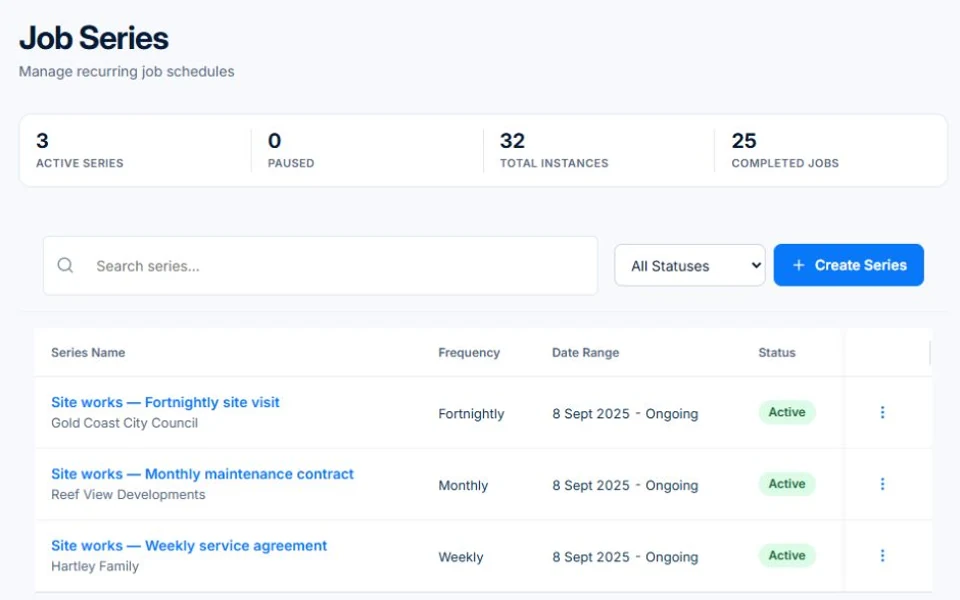
Use a recurring job series for regular service work, with individual visits you can schedule, complete and review. AxiomBlue recurring series require Professional. When a visit moves, is skipped or needs extra work, check that visit and the customer’s service agreement before billing. Repeating jobs and recurring invoice templates are separate workflows.
Keep the service pattern and the actual visits understandable when the round changes.
Plan fit: Recurring job series require Professional at $59 AUD for the first seat per month, excluding GST; additional seats receive graduated discounts. Free and Basic support individual jobs and scheduling; copying an individual job is separate from a recurring series. Recurring invoice templates and automated service reminders also require Professional. Compare plans →
The part of your day this changes
Set up regular service visits as a series, with individual jobs you can schedule, complete and bill.
Define the regular work and review its series settings before relying on the generated visits.
Review moved, skipped or changed work on the individual job. Keep instructions and any agreed extra with the visit.
Reconcile completed work with the service agreement before invoicing. A recurring date does not decide whether a skipped visit should be charged.
Picture it in your business / Example
Set up the regular service on Professional, then review a customer’s request to skip one visit. Confirm the next booking and the billing treatment from the agreement. Check what was completed before invoicing rather than treating the whole series as completed work.
A practical starting point
Confirm its scope, pattern, site instructions and billing arrangement.
Set up the recurring job series on Professional and review the upcoming visits.
Confirm moved or skipped visits and record approved extra work with the affected job.
Match completed work and exceptions to the customer’s agreement.
Know what’s included
Recurring job series require Professional at $59 AUD for the first seat per month, excluding GST; additional seats receive graduated discounts. Free and Basic support individual jobs and scheduling; copying an individual job is separate from a recurring series. Recurring invoice templates and automated service reminders also require Professional.
Compare plans, limits and pricing →Check the workflow in detail
Explore the detail
Availability varies with plan, permissions and enabled features. Check plan inclusions.
See how this fits: organise your work →Before you get started
Have a specific workflow in mind? Talk it through with us.
Professional supports recurring job series at $59 AUD for the first seat per month, excluding GST; additional seats receive graduated discounts. Free and Basic support individual job scheduling; copying a job is separate from setting up a recurring series.
A job series and a recurring invoice template are separate workflows. Both require Professional. Check the service agreement and completed visits before deciding how to bill.
Review the affected visit and confirm the next booking. Decide the charge from the agreement, keeping skipped and completed work distinct.
Automatic payment requires Professional, a configured Stripe payment setup and the customer’s authorisation. Check the supported payment method and fees; creating a job series alone does not authorise a charge.
Keep the work connected
Considering a switch?
Use a familiar job to compare the way you work today with the way Axiom Blue handles it.
Check the quote, schedule, job record and invoice. Look for the details your team needs.
Compare usage limits, paid seats and specialist features. See plans and pricing →
Try your own quote on the free plan. Before moving existing records, ask us about your data and setup needs.
Make the next step a small one
You know where the friction is in your business. Open the demo and see how AxiomBlue handles it. Then start with your own quote on the free plan.
Free plan has usage limits. No time limit. No credit card.
Try a quote like one you send every week. Check the detail your customer will see.
Explore a job, its crew, time and materials. Look for the information you usually chase.
Compare the features and limits you need. See plans and inclusions →