
The starting point
Choose a lawn care business app by testing one day of your round: find each job, record time, keep photos with the visit and send the invoice. Axiom Blue runs on iPhone, Android and the web. Basic is $29 AUD for the first seat monthly; photos start on Basic, recurring rounds require Professional at $59, and invoices need a connection. A limited free plan is available.
Key facts
| What the crew opens | Today’s run with job details and site instructions, on iPhone or Android, or in any browser without installing anything. |
|---|---|
| Clocking on | Clock on and off per job, across as many short visits as a day holds, with where it happened when the phone shares its location. |
| Proof the lawn was done | Photos and documents captured on site attach to that visit’s job record. Uploads start on the Basic plan. |
| Invoicing on the run | Create and send an invoice from a completed time-and-materials visit when connected. Every invoice has a no-login viewing link; online card payment requires Professional with Stripe connected. |
| The round itself | Weekly, fortnightly and monthly rounds run as recurring job series, each visit its own job you can complete and bill (Professional). |
| Price | Free plan with no time limit and no credit card, then $29 AUD for the first seat per month (Basic) or $59 (Professional). |
| Job limits | None on a paid plan. No job caps, no per-job fees, no setup fee, so a big spring does not change the bill. |
| Signal | Six months of jobs on the phone; visits, notes, photos and tasks work with no signal and send on reconnect. Invoices and payments need a connection. |
How should you compare lawn care business apps?
Compare the same run on every app, using your own sites and billing arrangement. A solo operator with a few visits has different needs from a crew running recurring maintenance. The table below compares ways of organising the work; it is not a ranking of vendors.
| Approach | When it can fit | What to test |
|---|---|---|
| Calendar plus invoicing app | A small round where you can check every visit yourself. | Can you match completed and skipped visits to invoices without relying on memory? |
| Dedicated lawn care app | A repeat mowing round where the property and next visit are the main records. | Check the visit pattern, site instructions, rain-day changes, photos and billing together. |
| Job management app | A mix of regular visits and one-off garden work, with time and materials to bill. | In Axiom Blue, test the job record and invoice; recurring series require Professional and photo uploads start on Basic. |
Read next Lawn care scheduling software: manage repeat visits → · Lawn-care invoicing: per visit, monthly billing and extra work →
What does a lawn care crew actually need an app to do?
Four things, all of them at a stop rather than at a desk: show the run and the site detail, record that the visit happened, prove it with a photo, and turn the visit into money. Everything else a lawn care app advertises is arrangement around those four.
The test is not whether an app can do them. Most can. The test is whether they happen in one place, without the crew retyping anything, on a phone with one bar of signal and a mower running two metres away.
- Today’s run, in order, with the site instructions attached to each stop.
- Clock on and off that works across a dozen short visits, not one long job.
- Photos that land against the visit, not in a camera roll.
- An invoice that can leave before the ute does.
6:40am: what the crew opens before they leave the yard
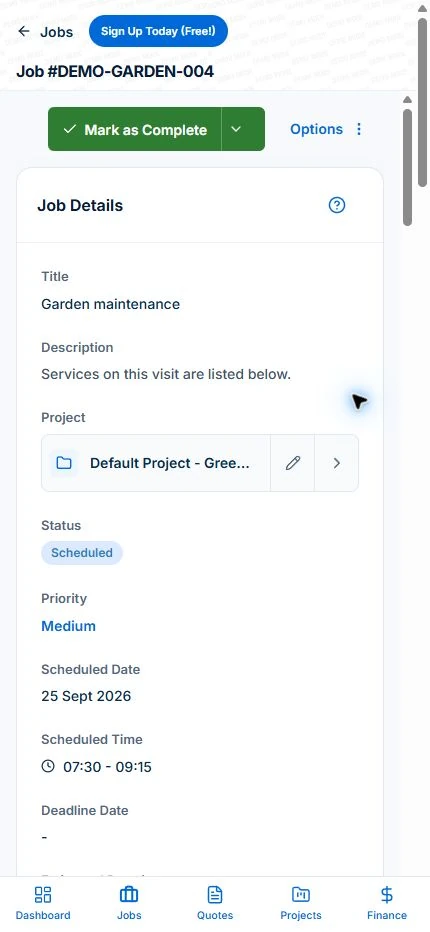
Start with today’s schedule and the instructions needed at each stop. The Axiom Blue native app shows the job address, description, tasks, notes and photos. Copy day-of-visit access instructions into the job description or tasks; the separate customer-site notes are shown in the web app, rather than as a site-notes field in the native app.
This is where a round either survives staff turnover or does not. If the site knowledge is in your head, the day you put a new person on that run is the day you spend on the phone. If it is on the customer and site record, they open it at the gate and get on with it.
The other thing that matters at 6:40am is that nobody is blocked on installing something. Axiom Blue ships native apps on the App Store and Google Play, the same app on iPhone and Android, and the whole platform also runs in a browser on a phone. A casual starting this morning can work from a link you text them.
8:15am: clocking on across twelve short jobs
Lawn care breaks most time tracking because the jobs are short and there are a lot of them. An app built around one eight-hour job will have the crew clocking on and off fourteen times a day through a form designed for something else.
In Axiom Blue, clocking on and off happens per job, so the visit carries its own start and finish and, when the phone shares its location, where each was recorded. What you get at the end of the week is hours against jobs rather than a single block of time you then have to divide up by memory.
That matters twice over. It tells you what a site actually takes, which is the only honest basis for repricing the ones that have crept from thirty minutes to fifty. And on Professional the approved weeks export as a CSV for your payroll system, so the run sheet and the pay run are describing the same day.
10:30am: proving the lawn was actually done
The photo is not for you. It is for the strata manager in six weeks who says the edges were not done on the 14th, and for the customer who was not home and wants to know what they paid for.
Photos taken in the app upload to that visit’s job record, filed by site and date without anyone naming or sending anything. Months later you open the visit and the evidence is there. A camera roll cannot do this: it cannot be searched by property, and it leaves with the phone when the person does.
For commercial grounds work this is often the contract rather than a nicety. Buildings and councils ask for evidence of service, and the business that produces it inside a minute keeps the run. One plan note: photo and document uploads start on the Basic plan at $29 for the first seat monthly, excluding GST. The free plan covers the schedule, the clock, quoting and invoicing, but not uploads.
1:00pm: the back block with no signal
Somewhere in the week there is an acreage block, a basement car park or a valley with nothing on it. This is where most crew apps fail, so be precise about what happens there.
Axiom Blue caches upcoming jobs in the native app, so the schedule and job instructions can open without signal. Put day-of-visit access details in the job description or tasks. Starting and completing visits, notes, photos and tasks queue as pending sync and send after the app reconnects; photo uploads require Basic or Professional. Closing the app preserves the pending work, but sending waits until the app is back online.
What does need signal is anything involving the customer and the money: the invoice and the payment. So the practical habit at a dead-spot block is to finish and record the visit there, and send its invoice from the next stop with reception. Ask every vendor exactly which actions work offline, and check their answer on your worst block rather than on their marketing page.
3:45pm: invoicing from the ute
The last job of the day is the one that decides your cash flow, because the gap between finishing work and asking for money is where lawn care businesses quietly lose weeks.
For a completed time-and-materials visit, preview the recorded billable labour and materials, create and approve the invoice, then email it when connected. GST follows your business registration and taxable lines. Every invoice has a PDF and a no-login viewing link; online card payment requires Professional with Stripe connected. For monthly billing, reconcile the completed and skipped visits against the actual agreement. Automatic series payments need a separate customer authorisation and setup; they are not implied by having a recurring schedule.
Extra work is the other half of this. The hedge nobody quoted, the green waste run, the storm cleanup: record it against the visit as it happens and it reaches the invoice. Remember it for Sunday and it usually does not.
Read next Lawn-care invoicing: per visit, monthly billing and extra work →
Friday: what the round looks like from the office
The crew app is half of it. The other half is the round itself, which is the actual asset in a lawn care business.
Recurring visits run as job series in Axiom Blue on the Professional plan: set the weekly, fortnightly or monthly pattern once and each visit arrives as its own job carrying the site details. You review the month ahead, see what lands on a public holiday, and move or skip a visit without breaking the pattern or losing the history. Dispatch Map puts the day’s stops on a map and, on Professional, proposes a better order for the run with the drive time it would save, which is where the wasted driving in a scattered round becomes visible. You review that proposal and apply it; nothing reorders the day behind you.
That office side deserves its own answer rather than a paragraph here, and the guides below cover it. This page is about the phone.
Read next Lawn care scheduling software: manage repeat visits → · Recurring jobs versus recurring invoices: keep visits and billing aligned →
What do lawn care apps cost in Australia?
Compare the same team, busy-month workload and required features. Include user types, job limits, GST, optional SMS, payment fees and any quoted implementation or training costs.
AxiomBlue’s first seat is $29 AUD per month on Basic or $59 on Professional, excluding GST. Additional seats have graduated discounts: the second is 10% off, third 20%, fourth 30%, fifth 40%, and sixth onward 50% off the first-seat rate. Paid plans have no job caps or per-job fees. SMS credits and payment-provider fees are separate where used.
For five seats, the factors are 1 + 0.9 + 0.8 + 0.7 + 0.6 = 4. Monthly billing totals $116 on Basic or $236 on Professional, excluding GST. Annual first-seat prices are $240 and $490; the same five-seat ladder totals $960 or $1,960 per year. These are subscription examples, not a claim of feature parity with another vendor.
Free is a one-user core-workflow test with 10 jobs per week, 10 quotes and 10 invoices per month, 25 customers and 25 leads. Uploads start on Basic. Crews, skills, leave, recurring series, variations, weekly timesheets, reports and automations require Professional. Inspect those in the live demo or test them on the required plan.
| At this point in the day | A stack of separate apps | Axiom Blue |
|---|---|---|
| Getting the run out | A shared calendar, plus a text with the gate code | Today’s schedule on the phone with site details attached |
| Clocking on at each stop | A timesheet app, or a guess on Friday | Clock on and off per job; location is recorded only when the phone shares it |
| Proving the visit | Photos in a camera roll or the group chat | Photos on that visit’s job record, searchable by site and date |
| Extra work on the day | Remembered, or not | Recorded against the visit and carried to the invoice |
| Billing the visit | Retyped into accounting software that night | Invoice from a completed visit when connected; online card payment requires Professional and Stripe |
| Running the round | A spreadsheet of who gets done when | Recurring job series, each visit its own job (Professional) |
| When the job count doubles | Per-job pricing moves you up a tier | No job caps, no per-job fees, no setup fee |
| Cost for three people | Price the required plans and user types on the same GST basis. | Three seats: $78.30 Basic or $159.30 Professional per month, ex GST. |
Read next Tradify vs Fergus vs ServiceM8 vs AroFlo vs Axiom Blue: an Australian job management comparison →
Sources: AxiomBlue plans and team pricing
Is Axiom Blue the best app for a lawn care business?
Axiom Blue is one option for an Australian mowing or grounds business that wants the visit, recorded time, photos and invoice connected. Test it against your own round before deciding. Basic at $29 AUD for the first seat monthly includes photo uploads; recurring series require Professional at $59. A busier month does not change the paid plan’s price unless you change the number of seats or plan.
The limits, so you meet them here and not in month two. Uploads start on Basic, so the free plan will not take your photos. Invoices and payments need signal. And it does not lodge your BAS, run payroll or STP, produce a P&L, or connect to a bank feed and reconcile your statements: it syncs both ways with Xero and with MYOB and exports timesheet hours to payroll, and your accountant still does the rest.
Put one run through it this week
Use Basic or above for photo evidence and team testing; recurring series and variation approvals require Professional.
Use a familiar working day and a change you actually need to handle. Check the recorded work, changed appointments and billing from the relevant roles. Compare what happened with what you intended before rolling it out.
Common questions
Questions people ask before they switch
What is the best app for a lawn care business?
The best fit depends on your round. Test each app on finding a job, recording time, storing a visit photo and sending an invoice. Axiom Blue supports those workflows on iPhone and Android and in the web app. Photo uploads start on Basic at $29 AUD for the first seat monthly; recurring series require Professional at $59. Invoices and payments need a connection.
Is there a free app for a lawn mowing business?
Yes. Axiom Blue has a free plan with no time limit and no credit card: one user, up to 10 jobs a week, 10 quotes and 10 invoices a month, and up to 25 customers. It covers the schedule, job details, time tracking (with where it was recorded, when the phone shares its location), quoting and invoicing on both the iPhone and Android apps. Uploads start on Basic, while recurring series require Professional at $29 for the first seat monthly, excluding GST.
What is the best scheduling app for a lawn care business?
For a repeat round, the scheduling question is really a recurring-visit question. On the Professional plan, Axiom Blue runs weekly, fortnightly and monthly rounds as recurring job series: set the pattern once and every visit arrives as its own job carrying the site details, ready to complete and bill. You can move or skip a visit without breaking the pattern, and Dispatch Map shows the day’s stops and, on Professional, proposes a better order for the run with the minutes it would save.
Do my mowing crew have to install an app?
No. Axiom Blue publishes native apps on the App Store and Google Play, and it is the same app on iPhone and Android, which matters when a crew is split across both. The full platform also runs in any web browser, including on a phone, so a casual who starts this morning can work from a link you text them without installing anything.
How do you prove a lawn was actually mowed?
Photograph it in the app, so the image attaches to that visit’s job record rather than sitting in someone’s camera roll. In Axiom Blue you can open the visit months later and the before and after photos, the notes and the recorded time are on it, filed by site and date. That is what settles a disputed invoice, and what commercial grounds contracts increasingly ask for.
Can you invoice from the ute?
Yes. With a connection, the Axiom Blue app lets you preview, create, approve and email an invoice from a completed time-and-materials visit. Every invoice has a PDF and a no-login viewing link. Online card payment requires Professional with Stripe connected; otherwise the invoice shows the payment instructions you set up, such as bank transfer or PayID.
Does a lawn care app work without signal?
Mostly, yes, and it is worth asking any product exactly which parts. Axiom Blue keeps six months of jobs on the phone, and starting and completing visits, notes, photos and tasks all work with no signal: they are marked pending, kept even if the app is closed, and sent once the app is back online. Invoices and payments need a connection, so send those from the next stop with reception.
What does lawn care software cost in Australia?
AxiomBlue’s first seat is $29 AUD per month on Basic or $59 on Professional, excluding GST. Additional seats have graduated discounts: the second is 10% off, third 20%, fourth 30%, fifth 40%, and sixth onward 50% off the first-seat rate. Paid plans have no job caps or per-job fees. SMS credits and payment-provider fees are separate where used. For five seats, the factors are 1 + 0.9 + 0.8 + 0.7 + 0.6 = 4. Monthly billing totals $116 on Basic or $236 on Professional, excluding GST. Annual first-seat prices are $240 and $490; the same five-seat ladder totals $960 or $1,960 per year. These are subscription examples, not a claim of feature parity with another vendor.
Put it to work
Your practical checklist
- Use Basic or above for photo evidence and team testing; recurring series and variation approvals require Professional.
- Load one day of your round with the site details you normally keep in your head.
- Clock on and off at every stop and check the hours from the office account.
- Photograph one lawn before and after, then find those photos by site next week.
- Record the extra work at the customer who always asks, and check it reaches the invoice.
- Invoice two customers from the ute before you drive away.
See the records in Axiom Blue
Try the workflow with a familiar job.
Features and usage limits vary by plan. Review the tools relevant to your process before choosing your setup.