
What to evaluate
Compare Tradify, Fergus, ServiceM8, AroFlo and AxiomBlue on the same jobs, devices, user roles and workload. Check current vendor plan inclusions and pricing, then test an ordinary job and an awkward change. A lower subscription total is useful only if the selected plan supports the work you need.
Choose the workflows before comparing the bill
Write down what the office and field team must do: quote, allocate work, record delivery, manage changes, invoice and hand records to accounting. Add requirements such as recurring visits, approval, offline use and payroll-hours export.
Test the same ordinary job and one awkward change in every shortlisted tool. A familiar calendar screen does not establish skill matching, and a feature listed on an upper plan does not establish access on the cheaper one.
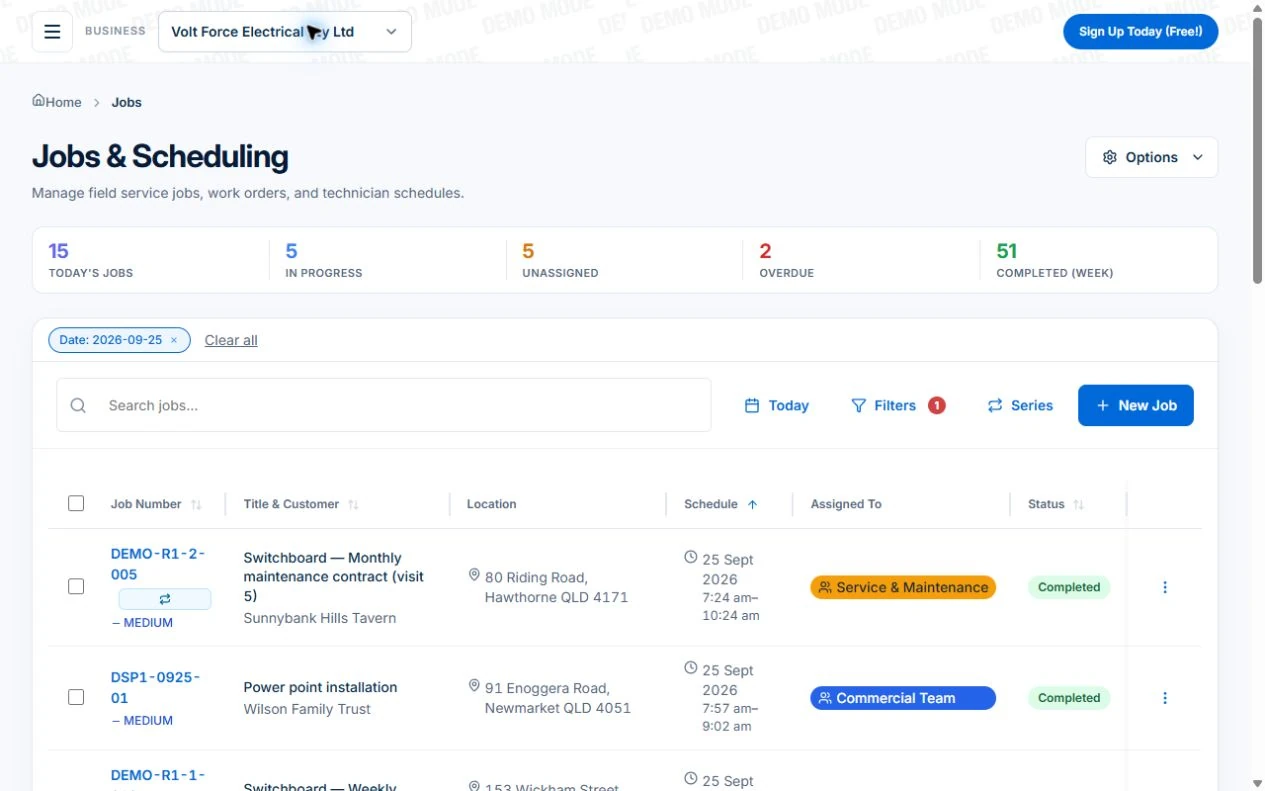
The sample electrical job list below is an Axiom Blue product example, not a comparison screen or evidence of the other vendors’ capabilities. Open a job to inspect scope, assignments and billing, then repeat your test in each shortlisted product.
For a broader requirements-led selection process, use the Australian job management software comparison guide to define office and field tasks, record evidence for each shortlisted option and check the cost of changing systems.
Compare the plans and user roles your team needs
Prices reviewed on 6 October 2026. Vendor pages and written quotes remain the authority when you buy. Put recurring subscription, optional usage and implementation costs on separate lines; standardise the GST basis.
| Product | What to price | Decision to check |
|---|---|---|
| Tradify | Australian plan and active users; ask about team pricing | Which plan includes your required timesheets, reminders and job costing? |
| Fergus | Full users, timesheet users and any contractor access | Does each role need full access, or is a cheaper user type suitable? |
| ServiceM8 | Plan features and monthly job allowance; paid plans include unlimited users | Can the required plan fit the busy month and each worker’s phone tasks? |
| AroFlo | Required package, users and quoted setup/training | What is the complete subscription and implementation quote? |
| AxiomBlue | Required Basic or Professional plan with graduated seats | Do you need Professional crews, recurring work, variations or automation? |
Sources: AxiomBlue plans and team pricing · Tradify Australian plans · Fergus Australian plans and user types · ServiceM8 Australian plans · ServiceM8 mobile platform information · AroFlo pricing
Cost the same five-person team
AxiomBlue’s first seat is $29 AUD per month on Basic or $59 on Professional, excluding GST. Additional seats have graduated discounts: the second is 10% off, third 20%, fourth 30%, fifth 40%, and sixth onward 50% off the first-seat rate. Paid plans have no job caps or per-job fees. SMS credits and payment-provider fees are separate where used.
For five seats, the factors are 1 + 0.9 + 0.8 + 0.7 + 0.6 = 4. Monthly billing totals $116 on Basic or $236 on Professional, excluding GST. Annual first-seat prices are $240 and $490; the same five-seat ladder totals $960 or $1,960 per year. These are subscription examples, not a claim of feature parity with another vendor.
For another vendor, choose the plan and role each person needs, then add optional costs on the same tax basis. ServiceM8’s unlimited paid users can matter to a larger team, while Fergus’s timesheet user type can matter where some workers need less access. Do not compare every competitor at a made-up category rate.
Sources: AxiomBlue plans and team pricing · Tradify Australian plans · Fergus Australian plans and user types · ServiceM8 Australian plans · ServiceM8 mobile platform information · AroFlo pricing
Check the mobile work on the phones you use
AxiomBlue offers iPhone, Android and web access. ServiceM8’s current official site also advertises Android availability; describing it as Apple-only is outdated. Test the exact field tasks on the actual devices rather than assuming platform availability establishes feature parity.
Use a low-signal site to check which actions are saved offline and how the records appear after reconnecting. Sending invoices and payments in AxiomBlue needs a connection; photo uploads start on Basic.
Check what AxiomBlue supports and which plan it needs
Core quoting, jobs, individual scheduling, time recording and invoicing are available on the limited Free plan and paid plans. Basic adds uploads and removes the Free usage caps.
Professional adds crews, skills, leave, recurring series, variations, weekly timesheets, reports and workflow automation. Check any accounting connection and online payment setup your process needs. AxiomBlue does not produce a profit and loss statement, run payroll or lodge BAS.
This is AxiomBlue’s own comparison. The useful test is the records and access your business needs; no universal winner or invented customer result is claimed.
Plan a changeover you can reconcile
List the customers, price book, open work, attachments and financial balances that need to move or remain accessible. Confirm export and import coverage before setting a changeover date.
Start a limited pilot on new work while reconciling the old records. Budget staff time, training, accounting handover and any paid help; a vendor’s lack of a setup fee does not make migration cost-free.
Run the relevant test on the relevant plan
Free is a one-user core-workflow test with 10 jobs per week, 10 quotes and 10 invoices per month, 25 customers and 25 leads. Uploads start on Basic. Crews, skills, leave, recurring series, variations, weekly timesheets, reports and automations require Professional. Inspect those in the live demo or test them on the required plan.
Check the office and field handover, a scope change and the final invoice. Use the required paid plan or demo for advanced features; then record what passed, what did not and the total cost before deciding.
Common questions
Questions about this comparison
What is the practical difference between Tradify and Fergus?
Compare the required plans and workflows. Tradify publishes per-user plan tiers and team-pricing options. Fergus offers full, timesheet and contractor user types. Price the actual roles and test the job handover rather than assuming equivalent access.
Is AxiomBlue cheaper for my team?
It depends on the required plan, roles and optional costs. Five AxiomBlue seats total $116 on Basic or $236 on Professional per month, excluding GST, with graduated discounts. Compare this with the other vendor’s correctly scoped plan and tax basis.
Can I test every AxiomBlue feature on Free?
Free is a one-user core-workflow test with 10 jobs per week, 10 quotes and 10 invoices per month, 25 customers and 25 leads. Uploads start on Basic. Crews, skills, leave, recurring series, variations, weekly timesheets, reports and automations require Professional. Inspect those in the live demo or test them on the required plan.
Does ServiceM8 support Android?
Its current official site advertises Android availability. Test the exact app and tasks your crew needs on its devices; do not assume identical capabilities from the platform label alone.
How should I compare switching costs?
Include staff time, data preparation, training, accounting handover and any quoted implementation help separately from the subscription. Reconcile a pilot before moving all work.
Put it to work
Your practical checklist
- List the required workflows and actual user roles.
- Price a busy month and the same GST basis from current vendor plans.
- Include optional charges and adoption costs.
- Test ordinary work and an awkward change on the required plan.
- Check device tasks and data handover before setting a changeover date.
See the records in Axiom Blue
Test the same job in each shortlisted product
Inspect this workflow in the public demo, or use Free for limited single-user core work. Uploads start on Basic; crew management, recurring series, variations, fixed-price claims, weekly timesheets and automation require Professional.
Product instructions
Disclosure: this comparison is published by Axiom Blue, which is one of the products compared. Competitor information describes how each vendor charges (by job, by seat or by onboarding) and is drawn from their own published Australian pricing, reviewed 22 September 2026. It is not a hands-on benchmark of competitor products, and vendor pricing and plans change. Confirm current details on each vendor’s own pricing page before you decide.