Hairdressing & Salons · Automation
How to Send Appointment Reminders to Hairdressing Clients Automatically
An empty chair is money you can never earn back - and for a mobile stylist, a forgotten home visit burns the drive time too. AxiomBlue texts every client the evening before their appointment, automatically, and chases up the rare no-show for rebooking. No ringing around, no forgotten list.
Quick answerTo send appointment reminders automatically, use software that reads tomorrow's bookings and texts each client the evening before. AxiomBlue does this with its Job Tomorrow Reminder template: every appointment is a job on the calendar, and each evening the workflow finds tomorrow's clients and sends each a personalised SMS. Automation is on the Professional plan at $59 AUD per seat per month, with a free plan that has no time limit.
Hairdressing runs on bookings made weeks ahead - a foils-and-cut booked in early July is easy to forget by the end of the month. Big salon chains solved this years ago with automatic reminders; small salons and mobile stylists usually still rely on someone finding a spare half hour to text tomorrow's list, which means the reminders stop the week you are busiest. AxiomBlue makes the reminder a scheduled workflow instead of a chore: it runs every evening whether the day was quiet or chaos.
- Runs every evening on a schedule - 6pm by default, editable
- Finds every appointment on tomorrow's calendar automatically
- Texts each client a personalised SMS - nothing for them to install
- Works identically for a salon chair or a mobile stylist's home-visit run
- A companion template follows up no-shows 1 hour after they are flagged
Appointment reminders for salons in AxiomBlue: the key facts
The short, checkable version. Everything in this table is expanded further down the page.
| Key fact | AxiomBlue |
|---|---|
| Template | Job Tomorrow Reminder — ready-made, switch on and go |
| Trigger | Daily schedule, 6pm by default (editable) |
| Who gets texted | Every client with an appointment on tomorrow's calendar |
| Channel | One-way SMS — clients ring or email to change, and install nothing |
| If a client no-shows | No-Show Job Follow-Up texts them 1 hour after it's flagged, and notes the record |
| Platform | Free native iPhone and Android apps, plus the full platform in any web browser |
| Invoicing & GST | On-site invoices with online payment link; GST automatic; Xero/MYOB sync |
| Price | From $29 AUD per seat per month; automation on Professional at $59; free plan with no time limit |
What does a no-show actually cost a hairdressing business?
A no-show costs a salon the whole slot, because chair time cannot be resold at ten minutes' notice. A missed 45-minute cut is 45 minutes of rent, wages, and lighting spent on an empty chair; a missed colour appointment can be two hours. Unlike a shop, a salon cannot make the time up later - the Saturday that was fully booked at 9am and had two gaps by noon is simply a smaller Saturday. Two or three no-shows a week is easily a full working day of revenue gone each fortnight.
For a mobile or home-visit stylist the maths is worse: the forgotten appointment burns the drive there and back as well as the slot, and the next client is across town, so the gap cannot be filled at all. Almost none of it is malice - clients booked weeks ago and simply forgot. Forgetting is the one cause a well-timed text actually fixes, which is why the dentists, physios, and big salon chains all send reminders. The only reason small salons often do not is that nobody has the time to do it by hand. That is the part AxiomBlue automates.
How does AxiomBlue send the reminders, step by step?
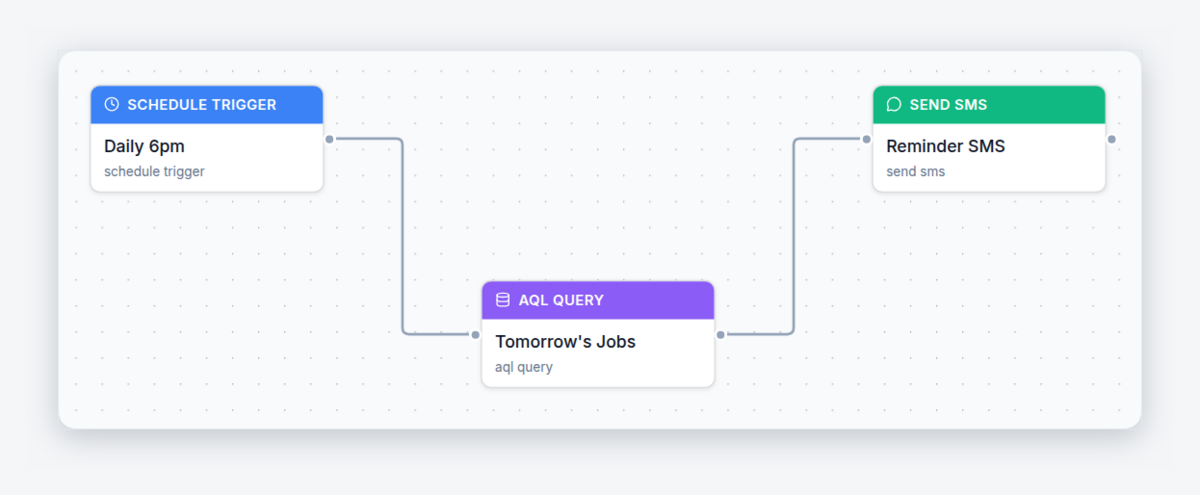
In AxiomBlue every appointment is a job on the calendar - a client, a time, a service - so the reminder workflow simply reads tomorrow's calendar and texts the list. Here is exactly what the Job Tomorrow Reminder template does, in plain words:
- Schedule — every evening at 6pm. The workflow runs on a clock, not on someone remembering. Every evening it wakes up on its own, busy day or not.
- Lookup — find tomorrow's appointments. A query pulls every appointment scheduled for tomorrow straight from the calendar, with each client's name and mobile number from their record. If you squeezed in a 4pm booking this afternoon, the 6pm run sees it - the reminders always match the real book.
- Action — text each client. Every client on the list gets a personalised SMS: their name, your salon's name, and a heads-up about tomorrow's appointment. Twelve appointments tomorrow means twelve texts tonight, sent in one run while you are sweeping up.
The client who forgot now remembers. The client who double-booked rings you tonight - and you offer the slot to the person on your cancellation list instead of discovering the problem at an empty chair. The same workflow powers reminders for trades and field services too; the general guide is at SMS job reminders that stop no-shows, and the academy has a full build-along tutorial: automatic SMS reminders to stop no-shows.
What should the reminder message say?
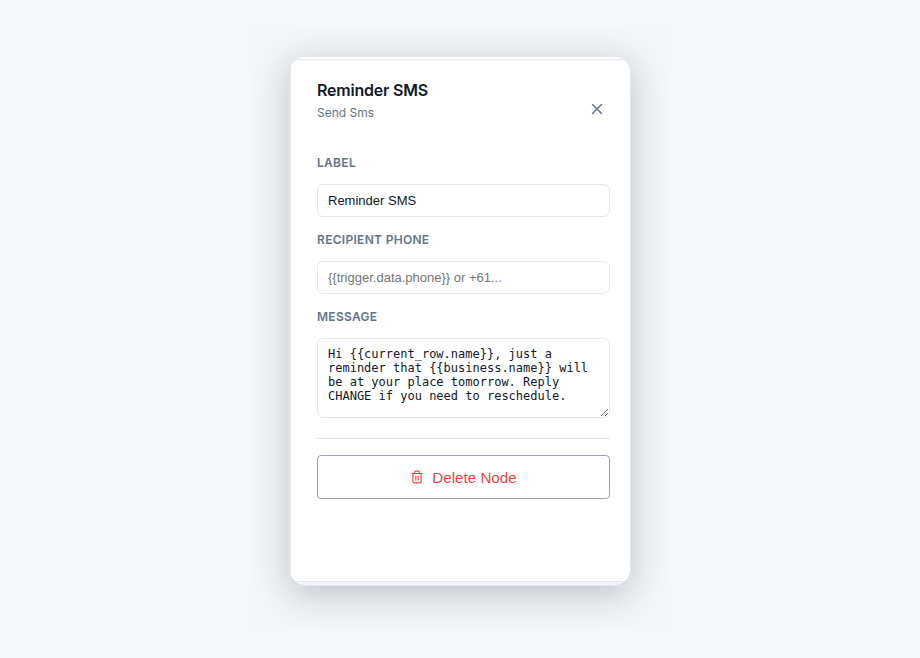
Three things: who the appointment is with, when it is, and how to reach you if the time no longer works. A good pattern: "Hi Emma, just a reminder about your appointment at Shear Bliss tomorrow. If the time no longer suits, give us a call on 0400 000 000." One glance and the client knows everything; one phone call and you know tonight instead of at 10am tomorrow.
The client's name and your business name fill in automatically from variables, so every text reads personally without anyone typing it. Keep it short - it is an SMS, not a newsletter - and always include the phone number. The easy way out is what turns a would-be no-show into a rebooking: given a painless way to say "tomorrow's no good any more", most clients take it, and a rebooked appointment is revenue delayed rather than an empty chair. Every word of the message is editable in AxiomBlue's visual editor, and a test mode lets you check it before any real client receives one.
Can clients confirm or reschedule by replying to the text?
No - AxiomBlue's reminders are one-way SMS, and there is no reply-to-confirm. A client who needs to change does what they already do today: rings the salon or sends an email. What changes is what happens next. You move the appointment once in AxiomBlue and the new time flows through everywhere - the calendar, the client's record, and tomorrow evening's reminder run - so the rescheduled visit gets its own reminder the night before it, automatically, with no re-entering anything.
In practice, one-way reminders do the heavy lifting anyway. The point of the text is not to collect confirmations; it is to put the appointment back in the client's head the night before, while there is still a whole evening to act. The forgetful majority just turn up. The handful who genuinely cannot make it now have your number in their hand at 6pm - and a phone call tonight beats a no-show tomorrow every single time.
What happens when a client still doesn't show?
A second template, No-Show Job Follow-Up, turns the miss into a rebooking instead of a shrug. When you flag the appointment as a no-show, the workflow waits 1 hour - grace for the client stuck in traffic or held up at school pickup - then texts them about getting the visit rebooked, and adds a note to the appointment record so the miss is documented rather than quietly forgotten by Friday.
That note matters more than it sounds. The no-show stops being an anecdote ("didn't Emma skip one a while back?") and becomes a fact on the client's history, sitting in front of whoever manages the book. Between the two templates the loop is closed at both ends: the evening text prevents most no-shows, and the follow-up recovers the ones that slip through. Nobody in the salon has to remember either half.
What else does AxiomBlue do for a salon or mobile stylist?
The reminders are one workflow inside a full client-and-appointment platform. Every client in AxiomBlue has a record with their complete visit history - what was done at each appointment, with notes and photos attached to the visit - so the colour conversation starts from what actually happened last time, not from memory. That history follows the client whether they see you in the chair or at their kitchen table.
Invoicing lives in the same place: raise the invoice on the spot when the appointment finishes, with GST handled automatically and an online payment link so the client can pay from their phone. Everything syncs to Xero or MYOB, and mobile stylists get free native iPhone and Android apps carrying the day's run, client records, photos, and on-site invoicing - with the full platform available in any web browser for the front desk. The reminder workflow itself is one of 30+ ready-made automation templates; the whole engine is covered at workflow automation software for Australian businesses.
Texting manually vs AxiomBlue vs a salon booking app
Three honest ways to run reminders, side by side. Dedicated salon apps are genuinely good at online self-booking - if that is your priority, they deserve a look. AxiomBlue's difference is that reminders, client history, invoicing, and payments live in one platform, and the book stays under your control.
| Texting the list manually | AxiomBlue | Salon-only booking app | |
|---|---|---|---|
| Reminders go out | When someone has time — skipped on busy days | Every evening at 6pm, automatically | Automatically, for bookings in that app |
| Who controls the book | You | You — clients ring or email to change, and you decide the slot | Often the client — self-booking fills slots you might have planned differently |
| No-show follow-up | Ad hoc, if anyone remembers | Automatic text 1 hour after flagging, miss noted on the client's record | Varies by app |
| Invoicing & payments | Separate system | Built in — GST automatic, online payment link, Xero/MYOB sync | Usually payments only — accounting lives elsewhere |
| Mobile / home visits | Your phone and your memory | Native iPhone/Android apps with the day's run, client history, on-site invoicing | Built for the salon counter, not the road |
What do automatic appointment reminders cost?
Automation - the evening reminder and the no-show follow-up included - is part of AxiomBlue's Professional plan at $59 AUD per seat per month; plans start at $29 AUD per seat per month for the core scheduling, client records, and invoicing. There is a free plan with no time limit and no credit card required, which is long enough to run a real fortnight of appointments with the reminders switched on. Price it against the chair: one saved 45-minute appointment a week covers the subscription, and most salons lose more than that to forgetfulness. For a mobile stylist, one saved cross-town drive does the same job.
Salon Appointment Reminders - Common Questions
Every appointment sits on the calendar, and each evening the software finds tomorrow's list and texts each client a personalised reminder. In AxiomBlue that is the Job Tomorrow Reminder template: appointments are jobs, the workflow runs on a daily schedule - 6pm by default - and every client with an appointment tomorrow gets an SMS with their name and your salon's name filled in automatically. Nobody in the salon has to remember to do it.
No - AxiomBlue's reminders are one-way SMS. There is no reply-to-confirm; a client who needs to change simply rings or emails you the way they already do. When you move the appointment in AxiomBlue, the change flows through everywhere at once - the calendar, the client's record, and the next evening's reminder run all see the new time. The reminder's job is to surface the appointment the night before, while there is still time to act.
Who the appointment is with, when it is, and how to reach you if the time no longer works. A good pattern: a greeting with the client's name, a reminder that their appointment at your salon is tomorrow, and your phone number for changes. AxiomBlue fills in the client's name and your business name automatically from variables, and every word of the message is editable in the visual editor - no code involved.
AxiomBlue's No-Show Job Follow-Up template handles it. When you flag the appointment as a no-show, the workflow waits 1 hour - grace for the client stuck in traffic - then texts them about rebooking and adds a note to the appointment record so the missed visit is documented. Instead of an empty chair that everyone forgets by Friday, you get a documented miss sitting in front of you, ready to be rebooked.
Yes - arguably better, because a mobile stylist loses drive time as well as the appointment when a client forgets. AxiomBlue has free native apps for iPhone and Android that carry the day's appointments, client records, photos, and on-site invoicing, and the full platform also runs in any web browser. The reminders themselves send from the platform on schedule regardless of where you are - you could be mid-blow-dry and tonight's texts still go out.
No. Reminders arrive as ordinary text messages to the mobile number on the client's record in AxiomBlue - nothing to download, no account, no link to click. That is why SMS is the right channel for appointment reminders: it reaches every client, including the ones who never open email, on the phone already in their hand.
Typically under 15 minutes. The Job Tomorrow Reminder template ships ready-made in AxiomBlue - you open it in the visual editor, put your salon's wording in the message, check the 6pm send time suits, and switch it on. There is a test mode so you can see exactly what a client would receive before any real client gets a text. No code, no developer, no integration project.
Automation, including SMS appointment reminders and the no-show follow-up, is included on AxiomBlue's Professional plan at $59 AUD per seat per month; plans start at $29 AUD per seat per month. There is a free plan with no time limit and no credit card required. Set that against one saved no-show a week - a 45-minute colour slot, or a mobile stylist's drive across town - and the reminders pay for themselves quickly.
Never Stare at an Empty Chair Again
Switch on the Job Tomorrow Reminder tonight and every client on tomorrow's book gets a text at 6pm - no ringing around, no forgotten list, no wasted slots. Start free today.
No credit card required • Free plan, no time limit • Cancel anytime