Crew Scheduling for Landscaping Businesses
Landscaping Scheduling App: All Crews, All Sites, One Calendar
Two crews. Thirty clients. Text messages stop cutting it. Double-bookings, missed maintenance visits, and crew driving past each other become weekly problems. AxiomBlue keeps every crew, every site, and every recurring visit in one calendar view.
Quick answerA landscaping scheduling app puts recurring maintenance visits, one-off projects, and every crew's daily run sheet on one shared calendar, visible from the field on a phone. In AxiomBlue, an accepted maintenance quote auto-creates the recurring jobs, crews see their sites each morning, and completed visits flow straight into invoices.
Landscaping scheduling has a complexity that most generic calendar apps can't handle: recurring maintenance visits that run automatically, multiple crews that need to be at different sites every day, and the need for field crew to see their schedule from their phones rather than waiting for a text message in the morning.
AxiomBlue connects quoting, scheduling, and invoicing in one platform. When a client accepts a maintenance quote, recurring jobs are created in the calendar automatically. You don't re-enter any information. Crew see their sites for the day on their phone before they leave. When they complete a job, the time and materials log feeds directly into the invoice.
- Recurring maintenance jobs auto-create in the calendar each period
- Drag-and-drop scheduling across multiple crews and sites
- Crew app: free native iPhone & Android apps, or any phone browser
- Real-time schedule changes visible on crew phones immediately
- Completed jobs flow straight to invoicing. No re-entry.
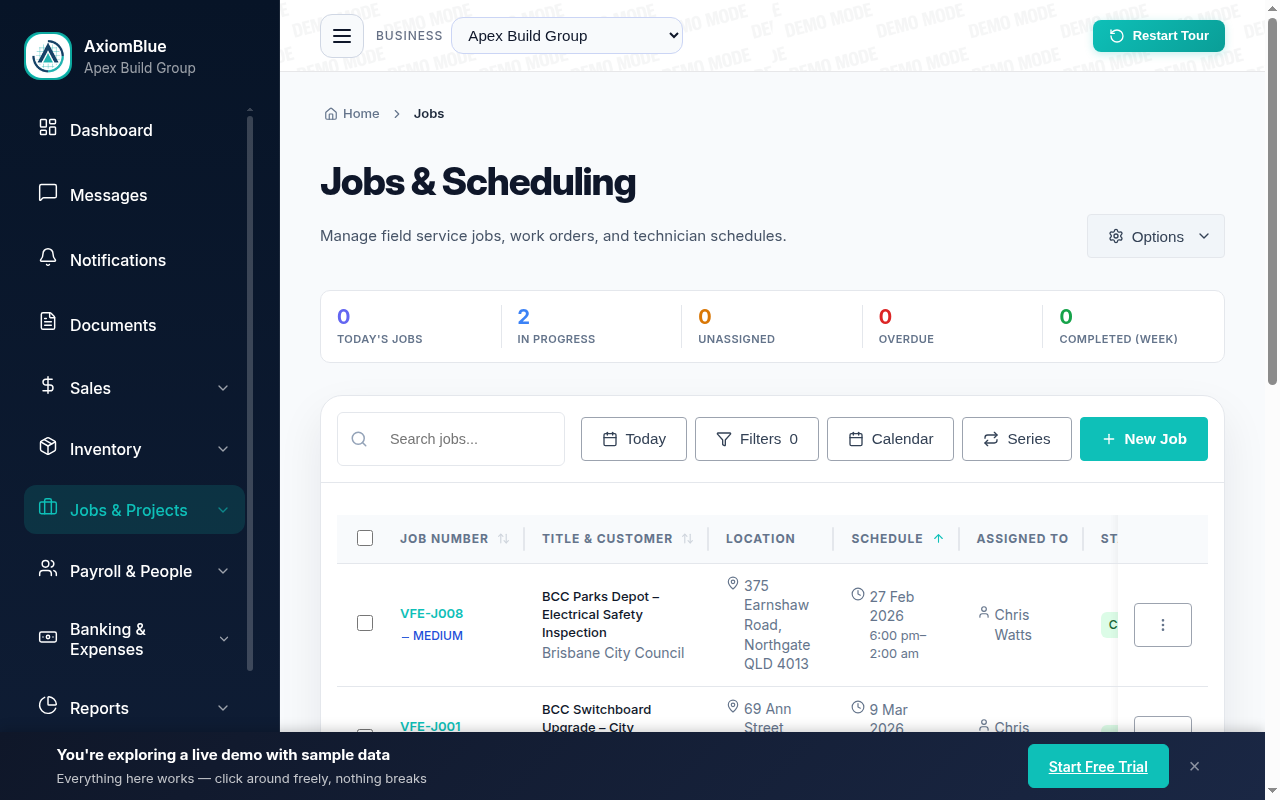
How does a landscaping scheduling app work?
Three connected workflows: setup, dispatch, and completion. All handled in one platform without manual steps between them.
Set Up Recurring Maintenance
Create a recurring job for each maintenance client: weekly mowing, fortnightly garden maintenance, monthly pruning. Set the frequency, assign the crew, and the jobs appear in the calendar automatically each period. No manual scheduling week-to-week. Add a new maintenance client and the same setup takes two minutes.
Dispatch and Route Planning
See all crews side-by-side in the calendar. Drag to optimise who goes where, keeping crews in the same geographic area to minimise drive time. When something changes (a client reschedules, a crew member is sick), reassign in seconds. Crew see the updated schedule on their phones immediately.
Crew Visibility from Mobile
Crew open the AxiomBlue app on their phone and see their jobs for the day: client name, address, and what's scheduled. They log time on arrival, record materials used, add photos, and mark the job complete when they leave. You see job status in real time without calling to check in. When the job closes, the invoice information is already captured.
Why spreadsheets and text messages stop working
Manual scheduling works at small scale. Past a certain point (two crews, thirty clients), the error rate climbs faster than the business. Missed visits, double-bookings, and crew confusion become routine instead of rare. AxiomBlue removes the manual steps.
| Whiteboard / spreadsheet / texts | AxiomBlue One scheduling system | |
|---|---|---|
| Recurring maintenance scheduling | Manual every week | ✓ Auto-creates each period once set up |
| Multiple crew visibility | Separate sheets or whiteboards | ✓ All crews in one calendar view |
| Crew access to schedule | Morning text message or call | ✓ Mobile app with daily schedule and job details |
| Same-day schedule changes | Phone calls, confusion | ✓ Drag to reassign, crew sees update instantly |
| Schedule to invoice connection | Manual re-entry | ✓ Completed job flows straight to invoice |
| Client communication | Manual calls before each visit | ✓ Automated reminders to clients |
The AxiomBlue scheduling features landscaping businesses use
Each feature is named below so you know exactly what you're getting, not just that "scheduling is supported".
Job Series: Recurring Maintenance Automation
Create a job series for each maintenance client: set the frequency (weekly, fortnightly, monthly), assign the crew, and AxiomBlue creates each job in the calendar automatically. You configure it once. New maintenance clients take two minutes to set up. The series keeps running until you change or cancel it. No weekly manual scheduling.
Auto-Schedule: Optimal Crew Assignment
When your route has 30 sites and 4 crew members, use auto-schedule. AxiomBlue analyses crew skills, current workload, working hours, and geographic proximity to each site, then suggests the optimal assignments. You review and confirm with one click. Particularly useful at the start of the week when the full week's jobs need to be distributed.
Map View: Geographic Route Planning
Switch to map view to see all scheduled jobs plotted geographically. Spot which crew members are working near each other. Consolidate routes to cut drive time between sites. When a call-out comes in, map view shows which crew member is already closest so you can dispatch them without disrupting the rest of the schedule.
Geofencing Check-In: Automatic Time Tracking
Geofencing checks crew in automatically when they arrive at the site and out when they leave. No manual time entry required. Timesheets are accurate without anyone having to tap a button mid-job. If a crew member forgets to check out, the system flags it. For large maintenance routes, geofencing eliminates the time-logging admin entirely.
Conflict Detection: No Double-Bookings
If you try to assign a crew member to an overlapping time slot, AxiomBlue flags the conflict before you confirm. The availability warning shows exactly which existing job overlaps so you can choose a different crew member or time. Conflict detection catches the error at the scheduling stage, before the crew member is committed to two sites at once.
Real-Time Crew Updates
When you make a schedule change (a job is reassigned, rescheduled, or a new urgent job added), the crew's schedule updates in real time on their phones. No need to call each person individually. The crew app (free native iPhone and Android apps, or any phone browser) always shows the current plan, so field staff have it in their pocket.
What happens when a maintenance job is marked complete?
The scheduling and invoicing connection is where the real time saving lives. A crew member opens AxiomBlue on their phone, marks the maintenance visit complete, logs the time spent and any materials used. That information is saved against the job record in real time. See it from your desktop the moment it's entered.
Set up an automation in AxiomBlue's automation canvas that fires on the "job completed" event trigger. The automation sends the customer an email ("We've completed your garden maintenance today. See you next [frequency].") and, if you've set it up, creates the invoice automatically and emails it with a payment link. The customer gets a professional message and an invoice without you lifting a finger. For a business running 40 maintenance clients a week, that's 40 invoices and 40 customer messages handled automatically.
For recurring maintenance clients on a monthly billing cycle, use a recurring invoice template. AxiomBlue generates the invoice at the end of each billing period and sends it automatically. Between the job series handling the scheduling and the recurring invoice template handling the billing, a fully set-up maintenance client runs on autopilot: visits create themselves, crew see them on the app, and invoices go out without manual steps.
Common Questions: Landscaping Scheduling App
Yes. Recurring maintenance jobs are set up once and auto-create in the calendar each period: weekly, fortnightly, monthly, or any custom frequency. Once a maintenance client is set up, their visits appear automatically without manual scheduling. Crew see the visits on their phone the day they're due.
Crew open AxiomBlue on their phone - the free native iPhone or Android app, or any smartphone browser, so no install is ever forced. Each morning they see their jobs for the day: client name, site address, and what work is scheduled. They check job notes, log time, record materials, and mark the job complete when done. You see the same information in real time from your desktop.
Yes. AxiomBlue's calendar lets you drag jobs to different crew or different time slots in seconds. If a crew member calls in sick or a job runs long, you can reassign from the desktop without calling everyone. Crew see the updated schedule on their phone immediately. No confusion about who's going where.
AxiomBlue lets you view jobs by location so you can arrange the day's schedule to minimise drive time. When setting up recurring maintenance routes, you can sequence clients geographically to keep crews in one area rather than criss-crossing the city. The more efficiently crews are routed, the more visits they can complete in a day.
AxiomBlue's scheduling calendar shows all crews side by side. See which crew is at which site, whether any crew has gaps, and whether any sites are unassigned. Filter by crew, by site, or by date. Reassigning a site from one crew to another is a drag-and-drop action. The whole picture is visible without phone calls or spreadsheets.
Yes. When a job is marked complete in the field, AxiomBlue automatically generates the invoice from the completed work: time logged, materials recorded, job details pulled through. For recurring maintenance clients, invoices generate automatically at the end of each billing period. No manual invoice creation required.
All Your Crews. All Your Sites. One Calendar.
Stop managing landscaping schedules across text messages, spreadsheets, and memory. AxiomBlue keeps every crew, every site, and every recurring visit in one place. It connects directly to invoicing too.
No credit card required • Free plan, no time limit • Cancel anytime