
The starting point
Landscaping CRM software should connect the client, each property and its quotes, jobs and invoices. Axiom Blue supports multiple sites per customer. Site notes appear in the web app; put day-of-visit instructions in the job description or tasks for the native app. A limited free plan is available; Basic is $29 AUD for the first seat monthly, excluding GST, and recurring series require Professional at $59.
Key facts
| One client, many properties | Each customer can have any number of sites, each with its own name, contact person, phone, email, address and site notes. Every plan. |
|---|---|
| Before the crew arrives | Site notes for access, parking, gate codes and hazards show on every job at that site in the web app. On the phone, the crew sees the job address, a map link, the description, tasks and notes. |
| Service history | The customer record lists every job, invoice and note, and a Reports tab shows aged balance, payment behaviour, open invoices and unbilled work. |
| Enquiry to paid | Lead capture forms, leads, quotes at a site, jobs, and the invoice built from the job, on every plan. Sales pipeline and automated follow-up on Professional. |
| Maintenance rounds | Recurring job series for each site, with every visit its own job (Professional). |
| Price | Free plan with no time limit; Basic $29 and Professional $59 AUD for the first seat per month, excluding GST. No job caps and no setup fee. |
| Records you must keep anyway | NSW: pesticide use recorded within 48 hours and kept for 3 years (NSW EPA). Victoria: chemical use records kept for 2 years. |
What should a landscaping CRM actually do?
A landscaping CRM should connect the paying customer, the property where work happens and the records of each visit. In Axiom Blue, keep the client as the customer and each property as a site, then create quotes and jobs for the correct site. Check the billing contact separately from the person opening the gate, and put visit instructions where the assigned crew can read them.
Judge any client management software against six jobs:
- Know who is who: the person who asks for work, the person who approves it, the person on site and the person who pays are often four different people.
- Treat every property as its own place, with its own access, hazards and history, even when one client owns five of them.
- Put the site notes in front of whoever is doing the job, not in the head of the person who usually does it.
- Keep the service history: what was done, when, by whom, with photos, and what was requested but not yet quoted.
- Carry an enquiry through to a quote, a job and an invoice without typing it again.
- Show what each client owes and how they pay, before you agree to the next job.
Why do landscapers outgrow a spreadsheet and a phone full of contacts?
Because the business starts running on properties the owner has never visited. The first crew knows the side gate sticks and the client hates the blower before 8am. The second crew finds out the hard way.
It gets worse with commercial and strata work. In a NSW strata scheme, the owners corporation or the strata committee approves the quote and the supplier, a strata manager may do the hiring, and a gardener is engaged only to carry out maintenance. The person who lets you in is not the person who approved the work, and neither of them pays the invoice. A contact list cannot hold that. A record that separates the client from the site can.
business.gov.au makes the same point more generally: a CRM keeps a history of your interactions, so a customer who rings about last month’s visit is talking to a business that remembers it, not to whoever answered the phone.
Sources: NSW Government: Strata repairs and maintenance · business.gov.au: Manage customer relationships
How does Axiom Blue organise clients and properties?
Around the customer, with each property as a site underneath it.
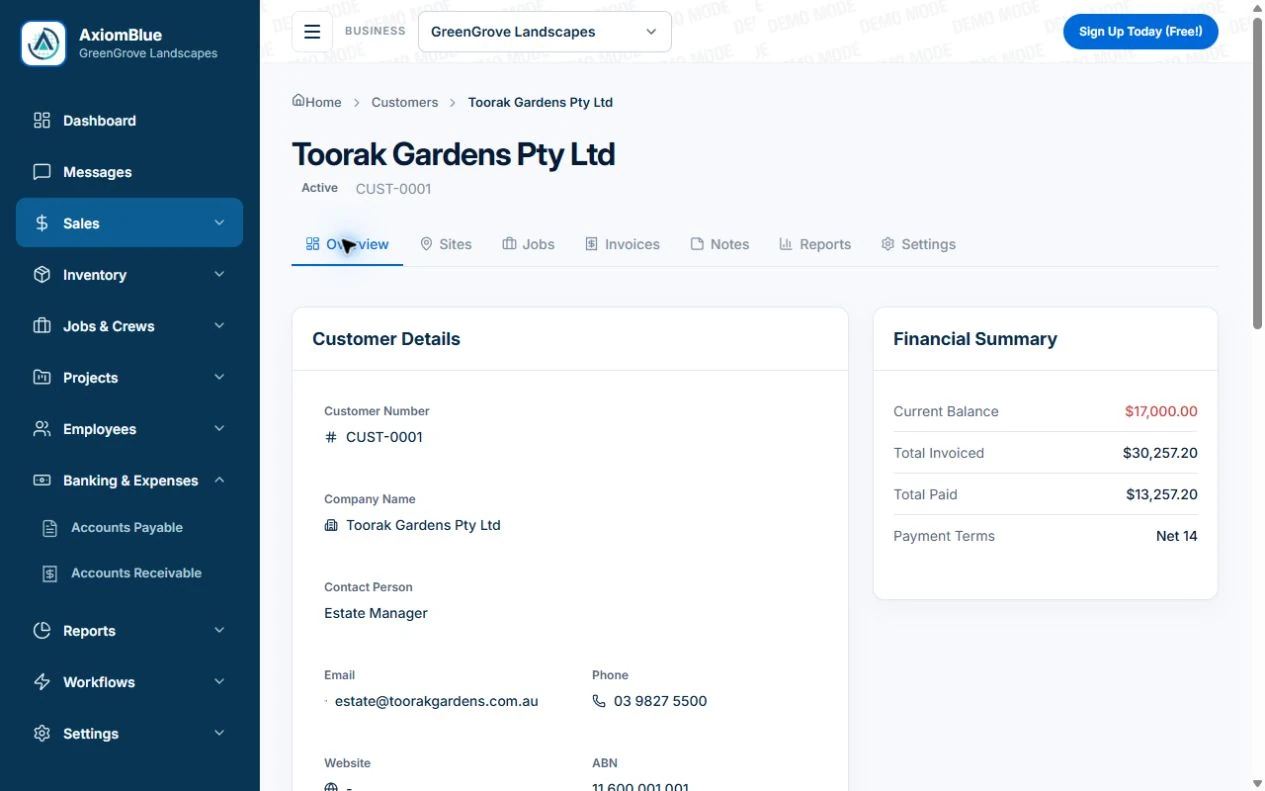
Every customer has a record with their contact person, phone, email, ABN, payment terms and postal address, and tabs for Sites, Jobs, Invoices, Notes and Reports. The customer’s own address is their primary site automatically. Add any number of further sites: a second home, each property a property manager looks after, each building on a council contract. Each site has its own name, contact person, phone, email and address, and its own site notes, which is where access, parking, gate codes and hazards belong.
Quotes and jobs are created at a site, so the crew is sent to the right property and the invoice names it. A job keeps the site address even after it is closed, so the history stays accurate if a site changes later. On Professional, a recurring maintenance round is set up for a site, and every visit is its own job carrying that site.
The Notes tab is a running team log on the customer: the phone call about the hedge, the complaint about the mower noise, the promise to quote the retaining wall. The Reports tab shows what the customer owes, how long it has been owed, their payment behaviour, invoiced against received over twelve months, open invoices and any completed work not yet invoiced, with a statement you can send. If your clients are in a spreadsheet today, import them from a CSV file rather than typing them in.
What it does not do, so you know now: a customer record has one contact person, with separate contacts held on each site rather than on the customer; there are no tags on customers; and emails are logged on each lead, quote and invoice rather than in a single communication history on the customer.
Read next How to start a landscaping business in Australia →
What does the crew need to know before they arrive?
Everything they would otherwise discover too late. Write site notes for someone who has never been there: where to park, which gate and how it opens, where the tap is, the dog, the bed that is excluded, the septic tank under the lawn, the power line over the back fence.
Some of that is safety, not courtesy. Safe Work Australia warns that soft ground, underground services, tanks, drains and pipes can collapse under the weight of equipment, and that information about underground services should be made available to the workers doing the job. Before You Dig Australia enquiries are free and should be lodged at least one business day before digging; in NSW, using the referral service before excavating near gas and electricity networks is a legal requirement. Put the plan reference in the site notes so the next crew does not dig blind either.
In Axiom Blue, site notes appear on every job at that site in the web app, which runs in any browser, including on a phone. The mobile app shows the crew the job itself: the address with a map link, a call button for the customer, the job description, the task checklist, notes, photos and signatures. So put the instructions the crew needs on the day in the job description and tasks as well, and on a recurring round set them once on the series so every visit carries them.
Be deliberate about sensitive details. Anyone who can view a customer or a job can read its site notes, so keep alarm codes and key safe codes in whatever secure process you already use rather than in notes. What you can limit is who sees which jobs: the Field Worker role sees only the jobs assigned to them, and staff without financial permissions do not see job prices and costs.
Sources: Safe Work Australia: Excavation work · Before You Dig Australia: For homeowners and contractors
What does a landscaping workflow look like, from enquiry to payment?
One record, carried forward at each step, so nothing is typed twice and nothing is lost between the phone call and the invoice.
- Enquiry: a lead capture form on your website or a hosted link creates a lead with the client’s details and request. Every plan.
- Quote: write the quote for the lead, at the site where the work will be done. On Professional, a follow-up reminder goes out if the client has not answered in three days, and a warning before the quote expires.
- Accepted: converting the lead makes them a customer, carries their address across and moves their quotes with them. The accepted quote becomes a job at the same site.
- Scheduled: the job goes on the crew calendar. On Professional, the client can get an SMS the day before, and another when the crew is on the way.
- Done: the crew clocks on and off, logs materials, adds photos (Basic and above) and completes the job on the phone.
- Invoiced: the invoice is built from the job’s time, materials and approved extras, sent with a PDF and a no-login payment page, and shows on the customer’s Reports tab until it is paid.
Read next Is a landscaping business profitable? Where the margin goes, and how to keep it →
Which records do landscapers have to keep anyway?
More than most people expect, and a CRM tied to the job is the easiest place to keep them.
Chemicals are the big one. In NSW, anyone who uses pesticides for commercial purposes, which the EPA lists as including landscape gardeners, must record the use within 48 hours and keep the record for 3 years: the full product name, the date, the area treated, the rate and quantity, who applied it, and the weather. In Victoria, agricultural chemical use records must be made within 48 hours and kept for two years. In Axiom Blue, log the product and quantity as a material on that visit’s job and record the area, rate and weather in the job notes, so the record sits against the site and date it belongs to. Check your state’s rules for any extra details.
Customer information carries obligations too. Most small businesses with a turnover of $3 million or less are exempt from the Privacy Act, but not all, and the exemption is under review, so treat client details as though the rules apply: collect what you need, and keep it in one secure system rather than across phones and spreadsheets. If you send marketing emails or texts, such as a spring newsletter or a special offer, the Spam Act requires the recipient’s consent, which you must be able to prove, and a working unsubscribe in every message.
Sources: NSW EPA: Compulsory record keeping for pesticide users · Agriculture Victoria: Agricultural chemical use records · OAIC: Small business and the Privacy Act · ACMA: Avoid sending spam
What does landscaping CRM software cost?
Axiom Blue is free to start, with no time limit and no credit card: one user, up to 25 customers and 25 leads, 10 jobs a week and 10 quotes a month, with customer sites, lead capture forms and quoting included. Basic is $29 AUD for the first seat per month, excluding GST and adds photo and document uploads and SMS. Professional is $59 and adds recurring maintenance rounds, the sales pipeline, automated reminders and follow-up, and two-way Xero sync. There are no job caps and no setup fee on the paid plans.
The honest comparison is not the monthly price. It is what the gap between your tools costs you each week: the crew that drove to the wrong property, the quote that was never followed up, the extra pruning that was never invoiced. Load three clients with their sites, send one crew to a property they have never visited, and see what they needed to ask.
Make it useful today
Print or keep a working copy.
Each resource includes a blank worksheet and an illustrative example. Open it to print, or download an HTML copy to keep. No signup needed.
Common questions
Questions people ask before they switch
What is the best CRM for a landscaping business?
The best CRM for a landscaping business is one that keeps each client, each property and every visit on the same record, so quotes, jobs, site notes, photos and invoices point to the same place. Sales-only CRMs keep the contact and lose the property. Axiom Blue is built around customers and their sites, with quoting, scheduling and invoicing on the same record, free to start and then $29 AUD for the first seat per month, excluding GST.
Can I manage several properties for one client?
Yes. In Axiom Blue, a customer can have any number of sites, each with its own name, contact person, phone, email, address and site notes. Quotes and jobs are created at a site, so a property manager with ten properties is one customer with ten sites, and every job and invoice names the right one.
Does it work for strata and property managers?
Yes. Record the managing agent or owners corporation as the customer who is invoiced, and each building or property as a site with its own on-site contact and access notes. In NSW, the owners corporation or strata committee approves the quote and supplier, so keep that approval on the quote before the work starts.
Can my crew see the site notes on their phone?
In the web app, which runs in any phone browser, site notes show on every job at that site. The Axiom Blue mobile app shows the job address with a map link, the job description, tasks, notes, photos and a call button, but not the site notes, so put the day-of-visit instructions in the job description or tasks as well.
Does a landscaping business need to keep pesticide records?
In NSW, yes: commercial pesticide users, including landscape gardeners, must record each use within 48 hours and keep the record for 3 years, including product, date, area, rate and quantity, applicator and weather. Victoria requires chemical use records within 48 hours, kept for two years. Recording the product as a material on the visit’s job keeps the record with the site and date.
How much does landscaping CRM software cost in Australia?
Axiom Blue has a free plan with no time limit, then costs $29 AUD for the first seat per month, excluding GST on Basic and $59 on Professional, with no job caps and no setup fee. Professional adds recurring maintenance rounds, the sales pipeline and automated reminders.
Put it to work
Your practical checklist
- Load three clients, with each of their properties as a separate site.
- Write site notes for someone who has never been there: access, parking, hazards and exclusions.
- Create the next quote at the right site, and convert it to a job when it is accepted.
- Put the day-of-visit instructions in the job description or tasks, so the crew sees them on the phone.
- Log chemicals as materials on the job, with area, rate and weather in the notes.
See the records in Axiom Blue
Try the workflow with a familiar job.
Features and usage limits vary by plan. Review the tools relevant to your process before choosing your setup.
Product instructions
Published by Axiom Blue, which is the product described. Regulatory information comes from the NSW EPA, Agriculture Victoria, the OAIC, the ACMA, Before You Dig Australia, Safe Work Australia and NSW Government as cited, checked 25 September 2026. It is general information, not legal advice.