Handyman • High Job Volume
How to Manage Twenty Small Jobs a Week Without Dropping One
A handyman business doesn't fail on the big jobs — it fails on the eleventh small one, the flyscreen quote that never went out, the Tuesday booking that lived only in your head. AxiomBlue gives every job a record, every day a plan, and every finished job an invoice before you leave the driveway.
Quick answerYou manage twenty small jobs a week by giving every one a record with a status the moment it arrives, so nothing lives in your head. AxiomBlue, Australian job management software, does exactly that — plus drag-and-drop day planning, a price book for fast quotes, and on-site invoicing with a payment link — from $29 AUD per seat per month with a free plan that has no time limit.
Twenty small jobs is a different problem to two big ones. Each job is simple; the volume is not. The enquiries arrive through texts, calls and neighbours-over-the-fence, the details live in three places, and the business runs on one person's memory — which works right up until the week it doesn't. The job you forgot is the reputation you lost, and in a trade built on word of mouth, that's the expensive kind of loss.
- Every enquiry becomes a job with a status — the list is complete, always
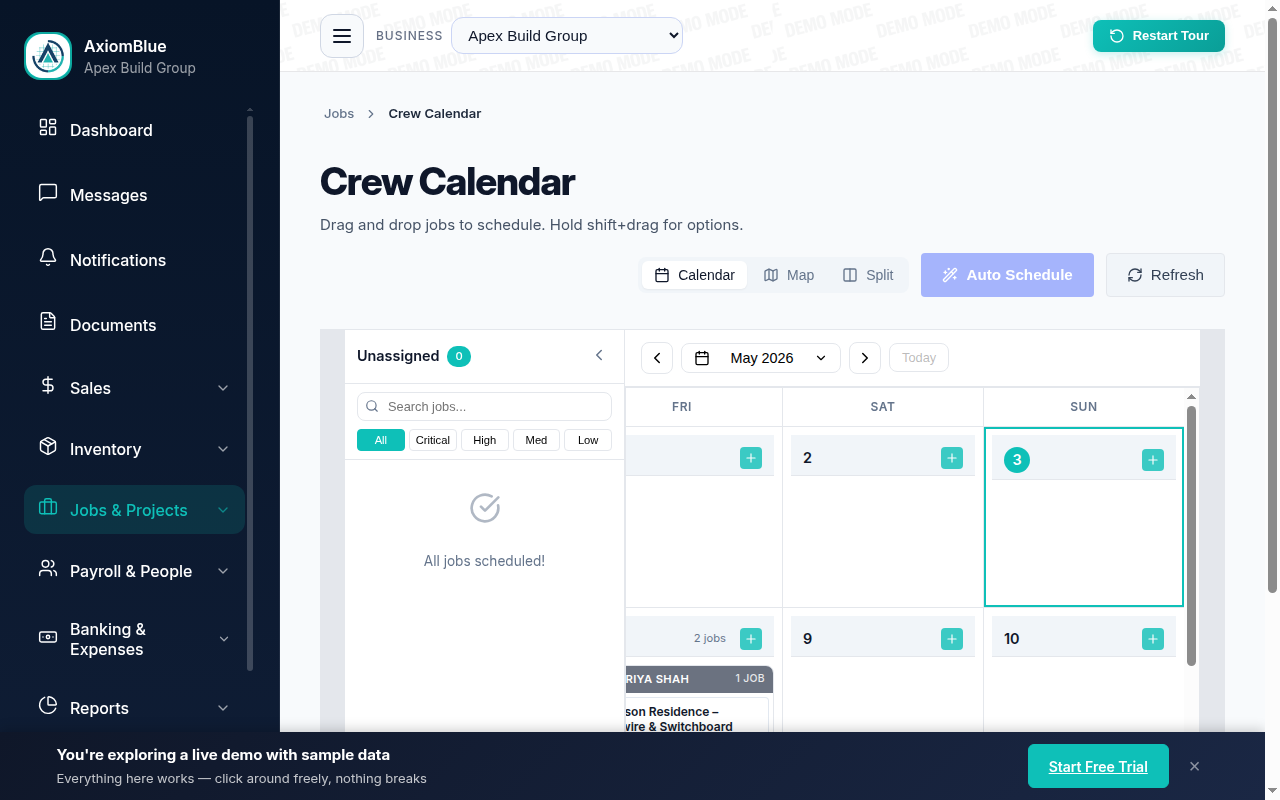
- Plan the day by dragging jobs onto the calendar
- The day's run on your phone — free iPhone and Android apps, or any browser
- Price book: tap-to-quote the flyscreen, the door adjust, the TV mount
- Invoice on site with GST and a payment link before you leave
| Key facts — running high job volume with AxiomBlue | |
|---|---|
| Every enquiry | Becomes a job record with a status — nothing lives in your head |
| Day planning | Drag-and-drop calendar; reorder a day in seconds |
| On the road | Free native iPhone & Android apps + the full platform in any browser |
| Quoting | Searchable price book — standard tasks priced once, quoted in taps |
| Invoicing | On site, GST automatic, online payment link on the invoice |
| Getting paid | Invoice Overdue Payment Chaser automation (Professional, $59) |
| Accounting | Two-way Xero sync; MYOB sync |
| Price | From $29 AUD per seat per month; free plan with no time limit, no credit card |
How do you manage twenty small jobs a week without dropping one?
By making sure no job ever exists only in your head. The moment an enquiry arrives — a text about a sticking door, a call about a flyscreen, a neighbour's gate latch — it becomes a job record in AxiomBlue with a status: enquiry, quoted, scheduled, in progress, done, invoiced. Once every job has a record and a status, the open-jobs list is the complete, trustworthy answer to the only question that matters at volume: what do I owe people right now?
That single habit changes the failure maths. A solo operator's memory can genuinely hold a handful of jobs; at twenty a week, plus the ones quoted-but-not-booked and the ones done-but-not-invoiced, the real number in flight is closer to forty — and memory silently drops the quiet ones. A status list drops nothing. The job that hasn't been quoted shows as un-quoted; the job finished last Thursday and never billed shows as un-invoiced. The system's job is to be nagged by nothing and to forget nothing, which frees your attention for the part that actually needs a tradesperson.
Everything else on this page — the drag-and-drop day plan, the price book, invoicing from the driveway — hangs off that foundation. Capture first, then the volume becomes logistics instead of anxiety.
Why do small jobs get dropped in the first place?
Because small jobs arrive casually and casual things don't get systems. A $3,000 renovation gets a quote document and a diary entry; a $180 door adjustment gets a mental note at a traffic light. The irony is that the handyman trade is made of the second kind — so the standard tooling instinct, "it's too small to write down", guarantees a steady leak of exactly the work the business runs on.
The leak has three holes. Enquiries evaporate: the missed call never rung back, the text buried under Tuesday. Bookings collide or vanish: two jobs promised for the same morning, or a promised week that was never anchored to a date. And finished work goes unbilled: the twenty-minute fix you'll "invoice tonight", three weeks ago. Each hole loses either revenue or reputation — and in a word-of-mouth trade they're the same thing, because the customer whose job you forgot tells the story more often than the ten whose jobs went fine.
None of these are effort problems, so none of them are fixed by trying harder. They're capture problems, scheduling problems, and billing-latency problems — and the next three sections take them in that order.
How do you plan a day of five small jobs?
By dragging them onto it. AxiomBlue's scheduling calendar shows your jobs and your days side by side: unscheduled work sits ready to place, and planning tomorrow is dragging five jobs into an order that makes geographic sense — the two northside jobs together, the flyscreen pickup on the way. When a customer reschedules or a job runs long, you drag, and the plan is current again. No re-writing a paper list, no orphaned diary entries.
Then the plan travels with you. The day's run shows on your phone through AxiomBlue's free native iPhone and Android apps — today's jobs in order, each with the address, the customer's number, the notes and photos on the job record — and the full platform also runs in any web browser, so the same schedule is on the office desktop or a borrowed laptop with zero setup. Finish a job, mark it done from the ute, and the record keeps itself honest without an end-of-day admin session.
At twenty jobs a week, this is where hours come back. The mental route-planning, the "what was next again?", the evening spent reconstructing the day — all of it collapses into a list you drag once and then simply follow.
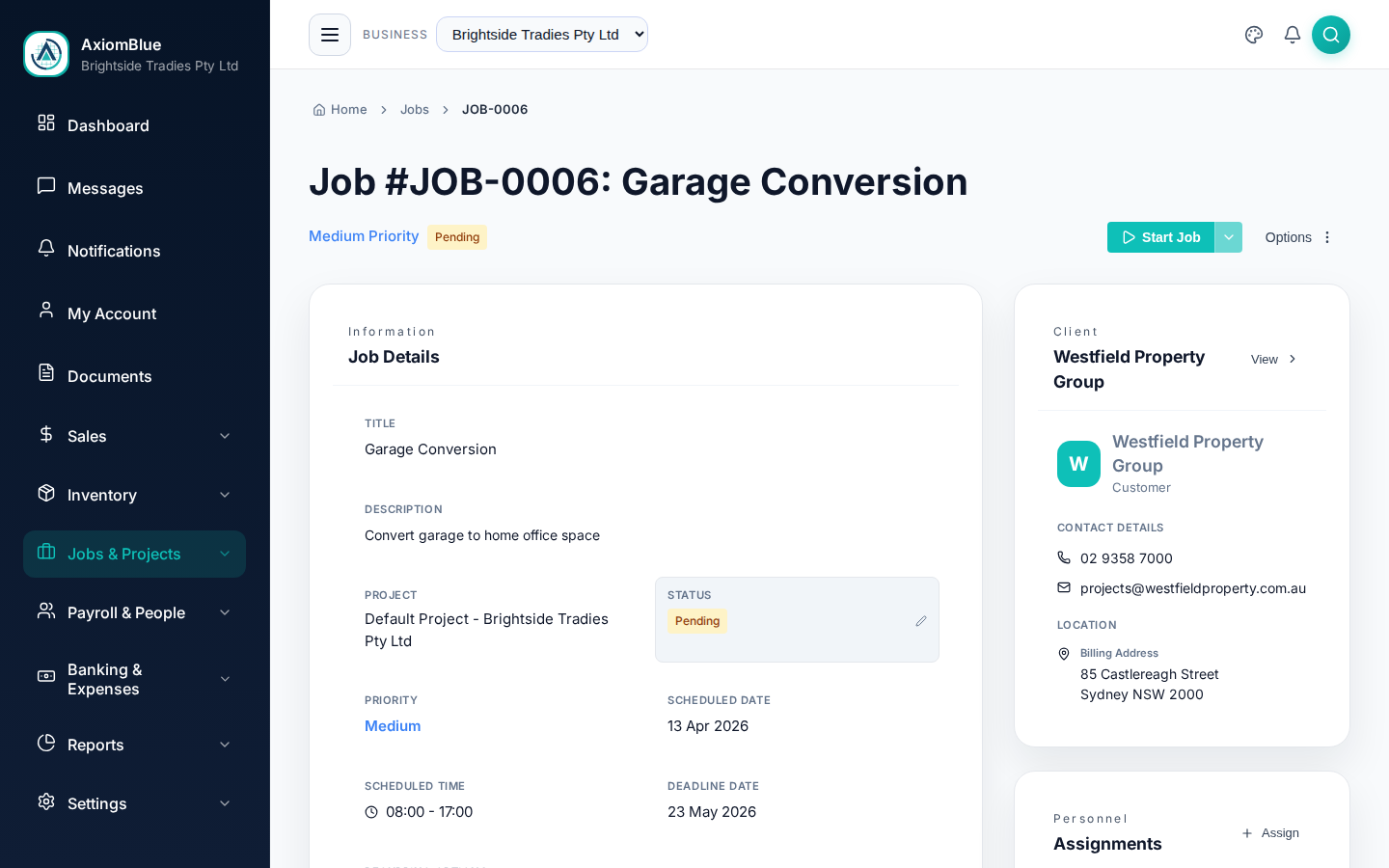
From enquiry to paid, step by step
The whole high-volume workflow is four moves per job, and three of them take under a minute:
1. Capture the enquiry
The text, the call, the fence conversation — each becomes a job record with the customer and the ask, entered from the phone in the moment. From here, it cannot be forgotten.
2. Quote from the price book
Tap in the standard items — flyscreen, door adjust, TV mount — and send the quote. Repeatable tasks are priced once and reused; customers can accept online.
3. Drag it onto a day
Accepted work gets dragged onto the calendar. The day's run appears on your phone in order, and any change is one more drag.
4. Invoice before you leave
Mark the job done, build the invoice from its line items, and send it on site — GST handled, payment link included, Xero or MYOB updated.
Notice what's absent: the evening admin pile. When capture, quoting, scheduling and invoicing each happen at the moment they're cheapest — on site, in seconds — the after-hours catch-up that burns most solo operators simply has nothing left in it.
How do you quote repeatable tasks fast?
You price each one once, in a searchable price book, and never price it again. Most handyman work repeats: the flyscreen repair, the door that doesn't close, the TV mount, the leaking tap washer, the gate hinge. In AxiomBlue each of those lives as a price book item with your rate and your description already written — so quoting a job is searching, tapping the items in, and sending. A quote that used to wait for the evening goes out from the driveway while the customer is still keen.
Speed is the visible win; consistency is the quieter one. When the price comes from the book, the flyscreen costs the same in March as it did in January and the same for the new customer as the old one — no more drifting rates invented under pressure, no more accidentally quoting below cost because you were tired. And when your costs change, you change the book once, and every future quote follows. The same line items flow onto the invoice later, so what was quoted is what gets billed, automatically.
There's also a sales effect that surprises people: fast quotes win small jobs. On a $200 task, the customer usually says yes to whoever answers first with a number. A price book turns "I'll get back to you tonight" into a quote in their inbox before you've left the kerb — and AxiomBlue's quotes can be accepted online, so yes is one tap for them too.
Can you invoice before leaving the driveway — and what about the slow payers?
Yes: in AxiomBlue the invoice is built from the job's line items on your phone, GST is applied automatically, and it sends with an online payment link before you've started the ute. On-site invoicing matters most precisely at high volume — twenty small invoices "done tonight" is how businesses end up with a month of unbilled work — and it converts fastest at the moment of finished work, when the customer is standing next to the job feeling well served. The invoice syncs to Xero or MYOB, so the books keep themselves.
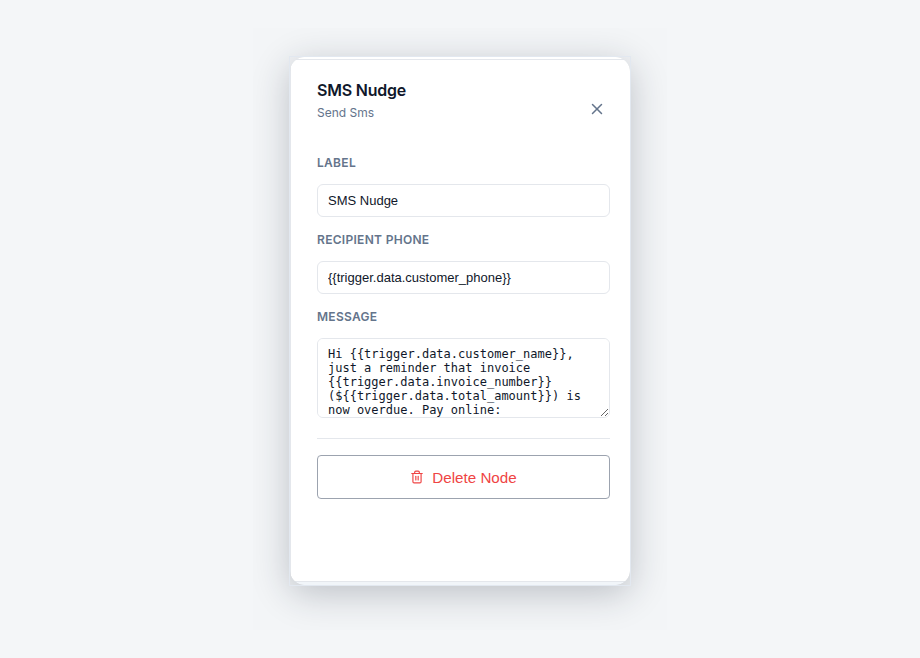
For the invoices that still go quiet, AxiomBlue's Invoice Overdue Payment Chaser automation does the chasing you never get around to. When an invoice goes overdue it emails and texts the customer, waits three days, checks whether the invoice is still overdue, and if so alerts you and tags the invoice so the stragglers are visible in one filtered list. The polite reminder you'd send if you had time gets sent every time, with wording you wrote once — and you only hear about the cases that actually need a human. Automation templates are part of the Professional plan at $59 AUD per seat per month; the full walkthrough lives in the on-site invoicing guide.
How does this compare with memory, a notebook, or a calendar app?
The fair comparison is with what most solo operators actually use: memory plus a notebook, or a generic phone calendar. Both can hold a quiet week. The comparison is about the loud ones — and about everything a booking tool doesn't do after the booking:
| Memory + notebook | Generic calendar app | AxiomBlue Built for jobs | |
|---|---|---|---|
| Enquiries captured | Until the busy week | Only if typed in as events | ✓ Every enquiry is a job with a status |
| Knows what's un-quoted / un-invoiced | No | No | ✓ Statuses surface the gaps |
| Day planning | Re-written by hand | Events, no job context | ✓ Drag-and-drop with the full job attached |
| Quoting | Invented on the spot | Not a thing it does | ✓ Price book, tap-to-quote, online acceptance |
| Invoicing | Tonight, hopefully | Not a thing it does | ✓ On site, GST + payment link, Xero/MYOB |
| Chasing overdue payment | When it hurts enough | No | ✓ Automated chaser (Professional) |
What does it cost to run a high-volume handyman business on AxiomBlue?
$29 AUD per seat per month on the Basic plan covers the whole core of this page: jobs and statuses, the drag-and-drop calendar, the price book, quoting with online acceptance, on-site invoicing with GST and payment links, the free iPhone and Android apps, and Xero/MYOB sync. For a solo operator that's one seat — less than the margin on a single flyscreen job. The Professional plan at $59 adds the automation library, including the overdue invoice chaser, when you're ready for the software to do the chasing too.
There is a free plan with no time limit and no credit card required — and at twenty jobs a week you will know inside a fortnight. Run them through the system and the question answers itself.
Managing Small Jobs — Common Questions
Give every job a home the moment it arrives. In AxiomBlue, each enquiry becomes a job record with a status, so nothing lives in your head or a text thread - the open list is the complete list. Days are planned by dragging jobs onto a calendar, the day's run shows on your phone, and each job carries its own quote, photos, notes and invoice.
Yes. AxiomBlue has free native iPhone and Android apps that cover the field workflow - today's schedule, job details, photos to the job record, quotes and on-site invoicing - and the full platform also runs in any web browser, including on a phone. Nobody is forced to install anything, and the office and the ute always see the same jobs.
Price them once, then reuse them forever. AxiomBlue's searchable price book holds your standard items - the flyscreen repair, the door adjustment, the TV mount - with your price and description already written. Quoting a job becomes tapping the line items in, and the same items flow straight onto the invoice, so pricing stays consistent across every job and every month.
Yes. AxiomBlue supports on-site invoicing from the phone: build the invoice from the job's line items, with GST handled automatically, and send it with an online payment link before you leave the driveway. The invoice syncs with Xero or MYOB, and the job that just finished is billed while the customer still remembers how good the work was.
Yes. The Invoice Overdue Payment Chaser automation template fires when an invoice goes overdue, sends the customer an email and an SMS, waits three days, checks whether the invoice is still overdue, and if so alerts you and tags the invoice. Automation templates are part of AxiomBlue's Professional plan at $59 AUD per seat per month.
AxiomBlue starts at $29 AUD per seat per month on the Basic plan, which includes jobs, scheduling, the price book, quoting, on-site invoicing and the mobile apps. The Professional plan at $59 AUD per seat per month adds the automation library, including the overdue invoice chaser. There is a free plan with no time limit, and no credit card is required to start.
Yes. GST is applied automatically on AxiomBlue quotes and invoices, and the platform has two-way Xero sync plus MYOB sync, so what you invoice from the ute lands in your accounting file without re-keying. Job profitability and accounts receivable live alongside the jobs themselves.
Keep Every Job. Drop None.
Put this week's twenty jobs into AxiomBlue and feel what it's like when nothing is riding on your memory. The free plan has no time limit — as many weeks of jobs as it takes to prove it.
No credit card required • Free plan, no time limit • Cancel anytime