
The starting point
Agree the service and price basis first: one initial clean, one repeat visit or a stated contract period. Build and review a quote for that basis, then send the checked proposal. An accepted quote does not book future visits or authorise recurring charges.
Build a cleaning proposal in AxiomBlue
Open Sales → Quotes → New Quote with permission to view and create quotes. Choose Customer or Lead. For an existing customer, check the selected Site; a lead quote has no customer-site picker. Use Quote Title to identify the service and location, such as Initial office deep clean — example site.
In Introduction, state the areas, tasks, condition assumptions and exclusions. Use Add Section for groups such as work areas, amenities and initial-clean extras. Add Line Item supplies Description, Quantity, Unit Price, Discount and Tax. Review the Summary, billing method and Terms & Conditions, then save the draft. Inspect the saved proposal before sending. If you generate a share link, review it before distributing it: generating the link marks the quote as Sent, and opening it records a view.
Core quoting is available on every plan. Free permits one user and 10 quotes per calendar month, counted in the business timezone; team access and uploads require a paid plan. Professional is required for recurring job series and approved variations. Check the permissions for editing, sending and converting before handing the proposal to another person.
- Identify the customer or lead and the actual cleaning location.
- Write the included areas, tasks, condition assumptions and exclusions in the customer-facing scope.
- Enter reviewed quantities and selling prices; label whether each amount covers one visit or an agreed period.
- Save and inspect the proposal before distributing it. Keep internal costing notes out of the customer-facing wording.
Inspect the site before choosing the quantities
Two offices of the same floor area can require different work. Record washrooms, kitchens, floor surfaces, occupancy, condition, access hours and who supplies consumables. Identify tasks that happen every visit and those performed less often. Confirm what the customer means by a completed clean.
Estimate the labour and supplies for that scope, including setup, travel and checking the work. Review employment costs, equipment, overheads and capacity separately when deciding a viable selling price. A customer hourly price is not an employee wage or an internal labour-cost rate.
The quote editor multiplies the quantities and prices you enter. Estimate cleaning hours from the assessed tasks and your own work records, then check the price against a complete cost budget. The cleaning time and viable selling price remain your decisions.
Keep the initial clean and repeat service distinct
An initial clean may include accumulated soil, extra preparation or areas excluded from the regular service. Describe that work as a one-off proposal. Prepare the repeat service as a separate quote with its own scope and price basis, so a customer does not mistake a combined total for the price of every visit.
For a per-visit offer, state the expected visit pattern and the amount for each agreed visit. For a monthly agreement, state the contract period and what is included rather than assuming that four visits always equal a month. Explain how extra work, changed frequency and an inaccessible site will be reviewed before a charge is agreed.
Add Section organises the document. A section does not make a line optional, create a recurring service or give two different meanings to the quote’s total. Use separate proposals when the customer needs to approve distinct offers.
Worked example: two proposals for the same office
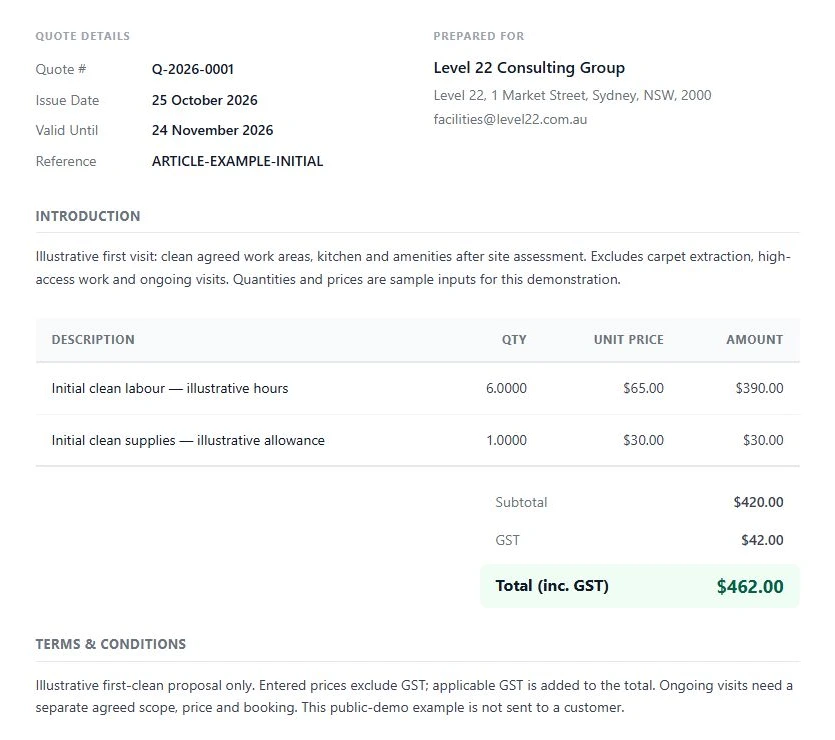
Illustrative assumptions only: the initial clean uses six estimated labour hours at a customer selling price of $65 per hour, plus a $30 supplies allowance. The repeat visit uses three estimated hours at the same selling price, plus $15 of supplies. These sample inputs were entered into two separate quotes in the public cleaning demo. They are not customer results, recommended prices, employment rates or a statement of profit. All example amounts are before GST.
The initial quote is 6 × $65 + $30 = $420 before GST. The separate repeat-visit quote is 3 × $65 + $15 = $210 before GST. Apply the correct tax treatment for the actual business and document; these calculations do not establish its GST registration or obligations. With the demonstration’s 10% GST treatment, the initial quote shows $42 GST and $462 total; the repeat quote shows $21 GST and $231 total. Check the tax treatment in Options rather than assuming the entered prices include tax.
| Proposal | Labour assumption | Supplies allowance | Total before GST |
|---|---|---|---|
| One initial clean | 6 hours × $65 = $390 | $30 | $420 |
| One agreed repeat visit | 3 hours × $65 = $195 | $15 | $210 |
- Name the first quote Initial clean and include only its one-off scope.
- Name the second quote Repeat visit and define its visit scope, expected pattern and exceptions.
- Read each proposal independently. Each total must describe the work that accepting that proposal would cover.
- Review a separate internal cost calculation before relying on either selling price.
Review the customer document before asking for acceptance
Check customer, site, scope, quantities, exclusions, price basis, dates and terms in the customer document. Resolve ambiguous wording before sending. A field labelled Notes is for the team; Introduction and Terms & Conditions are customer-facing. Do not rely on an internal note to communicate an exclusion.
Use the saved quote’s sending or sharing workflow with the required permission. Review the recipient and any share-link restrictions. The customer can open a shared quote without a login, but the link’s settings and the content you expose still need checking. A saved draft, a sent proposal and an accepted offer are different states.
Australian Government guidance explains what to include in a written quote. Use it alongside your actual business terms; a clear software document does not decide a contractual dispute.
Carry accepted scope into the visit process
After acceptance, convert the relevant quote to a job through the permitted workflow and inspect the customer, site, scope and billing method on the resulting record. Confirm access and a workable appointment separately. Acceptance alone does not schedule the clean.
For ongoing work on Professional, set up and review the recurring job series against the agreed service. A repeat date does not authorise a payment. Keep skipped visits, extras and previous invoices visible when deciding what to bill. Use Professional variations for separately approved scope changes rather than silently changing the accepted price.
After the first completed visit, compare received time and supplies with the estimate. Discuss any revised ongoing scope or price with the customer before relying on it. Do not automatically charge more because the recorded hours exceeded your original allowance.
Read next Cleaning scheduling software: manage repeat visits → · Cleaning invoicing: reconcile visits, skipped cleans and agreed extras → · Cleaning client work reports: review the month in AxiomBlue →
Put it to work
Your practical checklist
- Agree the site, included tasks, exclusions and finish standard.
- Review actual cost assumptions before choosing selling prices.
- Separate one-off and recurring offers when their scope or price basis differs.
- Inspect each customer proposal and quote total before distributing it.
- Confirm scheduling, ongoing service and billing separately after acceptance.
See the records in Axiom Blue
Review one first-clean and one repeat-visit proposal.
Core quoting is available on every plan within its limits. Use your own assessed work and reviewed selling prices. Recurring job series and approved variations require Professional.
Product instructions
Prepared by AxiomBlue using current product instructions and public demo records captured on 26 October 2026. Example hours, prices and tax treatment are illustrative inputs, not customer results or recommended rates.