
Key facts
| Recurring job series | Professional; individual job scheduling is available on Free and Basic. |
|---|---|
| Visit photos | Basic or Professional. |
| Native app handover | Put visit instructions in the job description or tasks; the separate customer-site notes field is shown in the web app. |
Set up and hand over a cleaning series in AxiomBlue
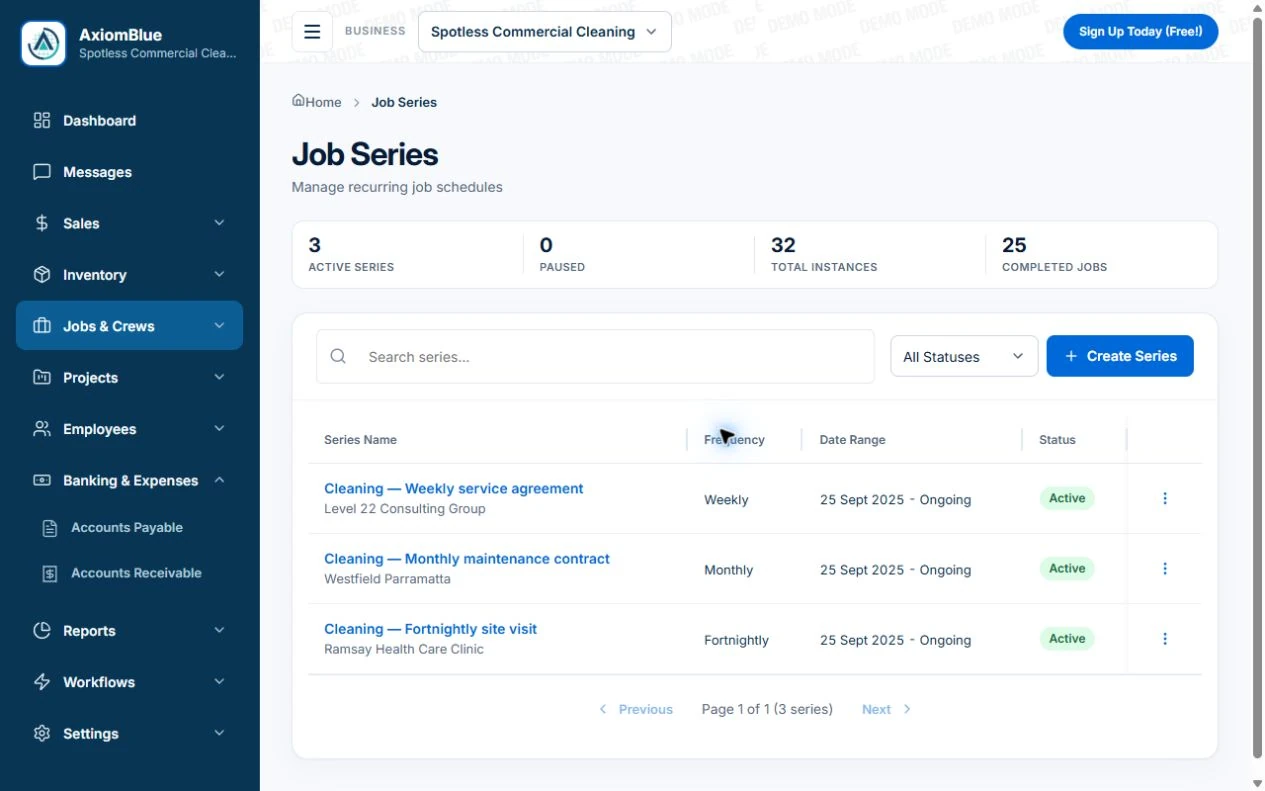
- Create the customer and site, then the Job Series with frequency and agreed cleaning scope. On a generated job, write the areas, tasks and exclusions in Description or Tasks; the native app does not expose the separate site-notes field.
- Open the job from the replacement cleaner’s account and check the instructions. Record the occupied room as unresolved work, complete only the tasks performed and add completion notes. Basic or Professional supports job photo uploads when relevant.
- Review the individual visit in the office before billing. Check skipped work and approved extra cleaning against the agreement, then inspect the invoice draft or configured series billing. A replacement assignment or repeating date must not silently create a second charge.
Test three changes to a regular cleaning round
Use a real site with an agreed service pattern. A repeating date alone does not show whether the handover and invoice will work when the round changes.
| Test | What should remain clear |
|---|---|
| Another cleaner covers the visit | The job description, tasks and necessary access instructions are available to the assigned person. Limit sensitive details to people who need them. |
| The customer skips a clean | The affected visit and next booking are understood; check the agreement before deciding whether to charge. |
| An extra task is requested | Record the changed scope and approval, then check its time and billing separately from the routine clean. |
Read next Recurring jobs versus recurring invoices: keep visits and billing aligned → · Best cleaning business apps in Australia →
Define what the regular visit includes
Keep the agreed service and site details clear enough for someone who has not been there before. Decide which information belongs in the customer record and which belongs to a specific visit. Avoid copying private or sensitive access details into places that more users can see than necessary.
On Axiom Blue Professional, use a recurring job series for the service pattern, then review individual visits as the schedule changes. Keep a cancellation or one-off extra understandable when the office reviews the work and the customer’s billing agreement.
Test the team handover
Choose a familiar job and assign it to a different person in the demo. Check what they can see about the site, the requested work and the customer contact. Then check what the office can see after the visit.
Axiom Blue provides crew scheduling and job records; Basic adds job photo and document uploads. Decide what evidence your business wants captured and check permissions. Do not assume that uploading a photo automatically confirms every quality requirement.
Keep extra work and missed visits visible
A customer may ask for a different room, an additional task or a one-off end-of-lease clean. Record the scope and agreed price in the appropriate quote or job rather than expecting a routine note to explain the charge later.
If a visit is changed, make sure the person preparing the invoice knows what actually happened. Billing should follow reviewed delivery and the customer agreement, not simply the original calendar pattern.
Compare software using one customer’s full month
Test several regular visits, a crew change and one extra job for the same customer. Review the invoices and outstanding balance. This is more revealing than comparing a list of “best apps” without trying the work.
The Axiom Blue customer portal gives clients a place to find shared quotes, invoices and relevant job information. Inspect that experience as well as the staff view, and calculate the plan cost for the people who need access.
Use a visit checklist to make the handover concrete
The printable cleaning checklist includes a blank visit record and an illustrative completed handover. Adapt the agreed areas, exclusions and evidence needed to the actual service, then record exceptions and who owns the next action.
A checklist is a prompt to record what happened. Do not tick work that was skipped or treat an unresolved customer request as approved extra work. Keep the job reference visible so the office can connect the visit to billing.
Make it useful today
Print or keep a working copy.
Each resource includes a blank worksheet and an illustrative example. Open it to print, or download an HTML copy to keep. No signup needed.
Common questions
Questions people ask before they switch
Which Axiom Blue plan supports recurring cleaning visits?
Recurring job series require Professional at $59 AUD for the first seat monthly, excluding GST. Basic is $29 and supports individual job scheduling and photo uploads. Free has one-user and usage limits.
What happens when a clean is skipped?
Review the individual visit and confirm the next booking with the customer and team. Decide billing from the service agreement; a skipped visit should not silently become a completed or billable clean.
Can a replacement cleaner see the instructions on a phone?
The native app shows job details, descriptions and tasks. Put the instructions needed for that visit there, with access limited appropriately. The separate customer-site notes field is available in the web app rather than as a native site-notes field.
Put it to work
Your practical checklist
- Review a month of repeat visits for one customer.
- Reassign a job and check the next person’s information.
- Record a changed visit and an extra clean.
- Inspect the invoice and customer portal experience.
- Check paid seats and job-upload requirements.
See the records in Axiom Blue
Try the workflow with a familiar job.
Features and usage limits vary by plan. Review the tools relevant to your process before choosing your setup.