
The starting point
Keep customer contact details separate from the instructions for each site. Connect the agreed service, relevant notes and visit history so another crew can continue the work.
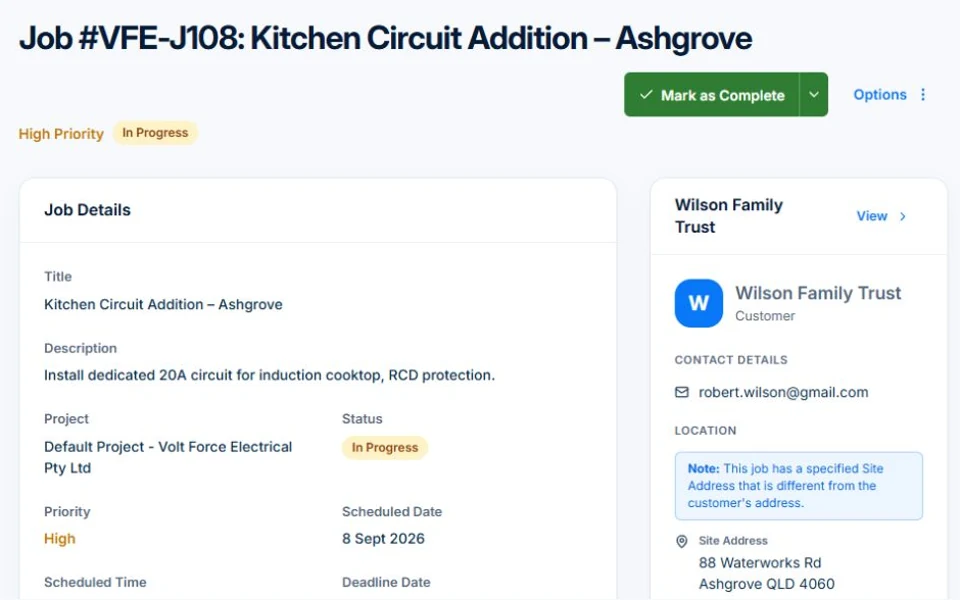
Separate the customer from the place you work
One customer may manage several properties. Record who requests and approves work, who receives invoices and which contact deals with access on the day. Then identify the specific site on each job.
Use consistent site names and addresses. “The back property” may be familiar to one person but confusing to everyone else. The invoice and the crew’s job record should point to the same place.
Write instructions that survive a crew change
Describe the regular scope, the parts of the property included and the relevant access arrangements. Add a short note about anything a new crew would otherwise discover too late, such as a restricted parking area or a section excluded from the service.
Keep sensitive access details limited to the people who need them. An internal site instruction should not be assumed to appear on customer paperwork. Check the permissions and the actual document before sharing.
- Customer and site reference
- Day-of-visit contact and agreed access process
- Regular service and exclusions
- Relevant equipment or material requirements
- What changed since the previous visit
Use the next visit to test the record
Illustrative handover: the regular crew is away, so another team takes the job at the customer’s second property. They find the site address, scope and a note that the rear garden was excluded from this visit. After finishing, they add a photo and record a request for extra pruning.
The office now has a clear next action: quote the pruning. Without that distinction, a request could be mistaken for approved work or disappear before the next visit. The downloadable record gives you a blank and filled example to adapt.
Keep the current instruction easy to find
A long history is helpful only if the current instruction is clear. Review old notes when scope or contacts change. Mark the new arrangement and keep the previous visit record as history rather than letting conflicting instructions accumulate.
In Axiom Blue, connect customer records with site and job details, then use relevant notes, photos and custom fields for your process. Check where a field is available and who can see it. Use recurring work for the visit pattern, while keeping each visit’s outcome on its own record.
Make it useful today
Print or keep a working copy.
Each resource includes a blank worksheet and an illustrative example. Open it to print, or download an HTML copy to keep. No signup needed.
Put it to work
Your practical checklist
- Identify the customer and the exact site.
- Confirm who approves work and who handles access.
- Write the regular scope and exclusions.
- Test the handover with someone unfamiliar with the site.
- Review old instructions after a change.
See the records in Axiom Blue
Try the workflow with a familiar job.
Features and usage limits vary by plan. Review the tools relevant to your process before choosing your setup.