
Plan repairs beside an installation in AxiomBlue
- Open the electrical jobs in AxiomBlue and fill Site Address, Estimated Duration and Description. On Professional, set Required Skills and the installation’s crew requirements; verify authorisations and material readiness separately.
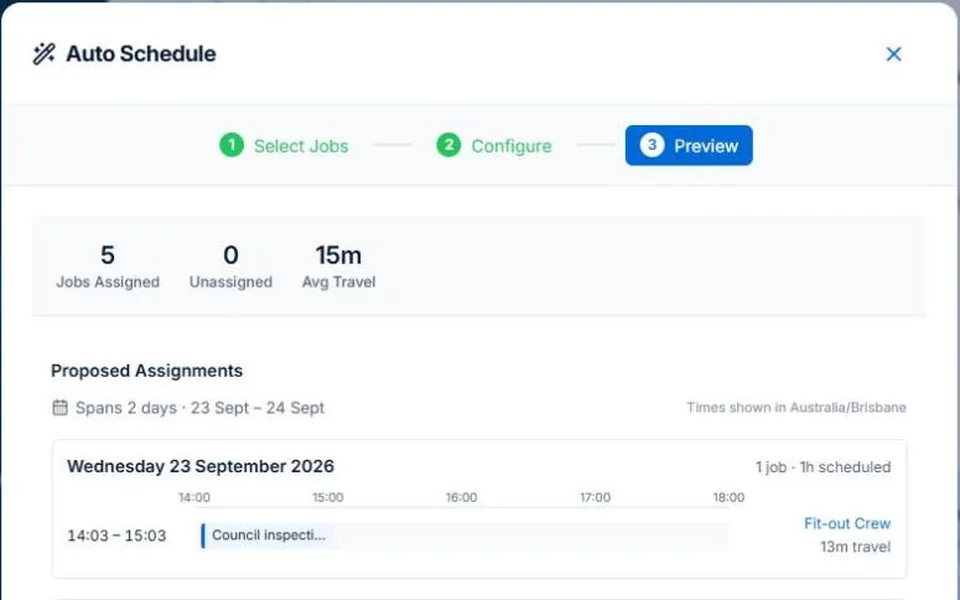
- Select the unassigned repair in Auto Schedule and preview it around the booked installation. Inspect the proposed person, travel and unplaced work without removing someone the installation needs.
- Apply the checked assignment, confirm access with the customer and put outstanding testing or return work in Description/Tasks after the visit. A booked repair is not a completed inspection.
Describe what must be ready before the electrician arrives
Give each job its agreed scope, location, expected duration and relevant skill requirements. Confirm access, materials and any coordinated interruption arrangements. The calendar cannot infer whether a customer has approved access or the required equipment is on hand.
Plan the interruption around the job that cannot move easily
Illustrative day: a two-person installation is already booked and a repair enquiry arrives nearby. Check who can do the repair without taking a required person from the installation. Treat the new enquiry as work to assess, not a confirmed slot until the assignment and customer arrangement are checked.
Review the proposal before committing the day
AxiomBlue’s assisted scheduling uses recorded duration, bookings, working hours and travel to propose assignments. Professional adds crew skills and approved leave. Inspect the people, times, warnings and work not placed before applying; keep inputs current. Job readiness and customer arrangements still need your review. Individual scheduling is available on Free within limits and on Basic.
Hand over the changed day and retain the unfinished work
After reviewing a change, confirm revised arrangements with the customer and affected people. Put the current instructions in the job description or tasks. At the end of the visit, record what was done and any work requiring a return. Marking the first visit complete must not hide an outstanding inspection or repair.
Common questions
Questions about this process
Does skill matching verify an electrician’s licence?
No. It compares recorded job requirements and crew skills. Check authorisations and keep those records current through your own process.
Put it to work
Your practical checklist
- Record duration, location and required skills.
- Confirm access and materials separately.
- Protect the suitable people needed for the installation.
- Review travel, warnings and unplaced repairs.
- Confirm the day and retain return-work instructions.
See the records in Axiom Blue
Try the workflow with a familiar job.
Features and usage limits vary by plan. Review the tools relevant to your process before choosing your setup.