
Plan the next ready building stage in AxiomBlue
- On AxiomBlue Professional, organise the project’s tickets and phases for the bathroom stages. Put fixture-delivery and preceding-work checks in the relevant work description and name who will confirm them.
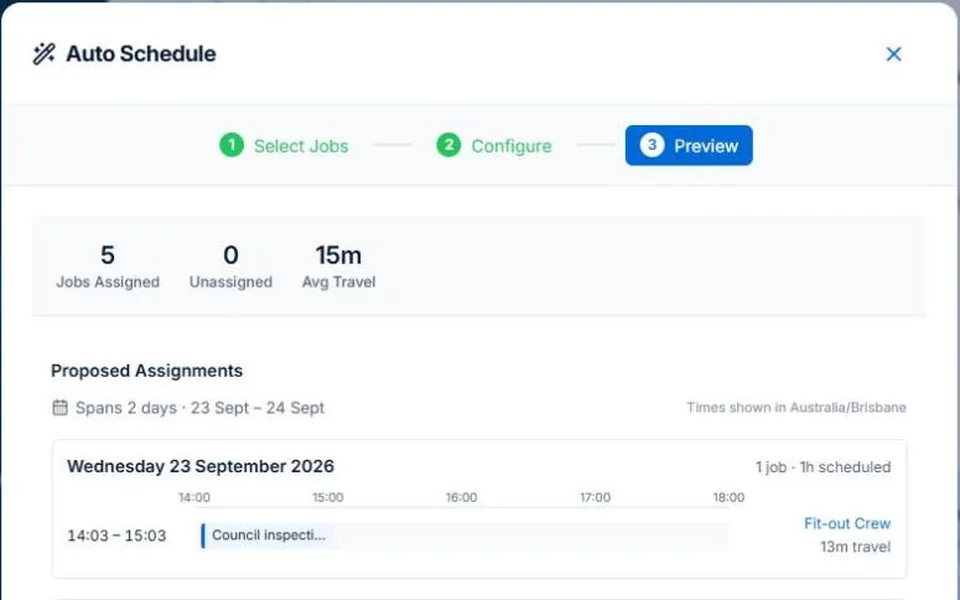
- Open the associated site job and set its Estimated Duration, address and requirements. Use Calendar & Schedule/Auto Schedule for the daily assignment, then compare the proposal with the project and confirmed subcontractor arrangement.
- Record the delivery delay in the project/job and inspect the next handover before revising dates. Apply only checked daily assignments; record approved scope changes in Variations separately from a delivery delay or progress claim.
Name the readiness test for each stage
Write down what must be finished, delivered or approved before the next trade starts. Assign someone to check it. A task marked on a project chart is not proof that the preceding work has passed inspection or that a material delivery is confirmed.
Plan an affected handover before shifting the whole project
Illustrative case: a bathroom fit-off is delayed by a fixture delivery. Review the work that remains possible and who is actually needed. Confirm the subcontractor’s availability and the client effect. Retain the reason for the change so an updated date is not mistaken for a new agreement about scope or price.
Use project planning and daily scheduling for their different decisions
AxiomBlue Professional provides project tasks and phases alongside crew planning. Assisted job scheduling proposes assignments using the recorded constraints; inspect warnings and unplaced work before applying. Do not assume the project chart automatically guarantees resources, material readiness or every dependent date. Test the relationship with your own staged job.
Close the day with a usable next-stage record
Record completed work, unresolved issues and the next owner. Check approved changes separately from delivery delay and progress billing. Put the instructions required by tomorrow’s team in the current job tasks or description. Confirm attendance and customer arrangements through the appropriate communication process.
Common questions
Questions about this process
Does a task date confirm subcontractor attendance?
No. Confirm the subcontractor arrangement separately and check readiness. A project task records the plan; it does not establish every person’s agreement to attend.
Put it to work
Your practical checklist
- Write prerequisites and a readiness owner for each stage.
- Confirm materials and subcontractor arrangements.
- Review the practical effect of the changed handover.
- Inspect daily assignments separately from project dates.
- Record unresolved work before the next stage or claim.
See the records in Axiom Blue
Try the workflow with a familiar job.
Features and usage limits vary by plan. Review the tools relevant to your process before choosing your setup.