Scheduling & Dispatch
Tradie Scheduling Software for Crews, Call-Outs & Multi-Site Work
AxiomBlue is scheduling software that replaces the whiteboard and group chat with one visual calendar. Assign jobs to crews, dispatch urgent call-outs in seconds, and keep every field worker in sync - across as many crews and sites as you run.
Quick answerTradie scheduling software replaces the whiteboard with a drag-and-drop calendar where every crew has a colour-coded lane. You assign a job in seconds, the tradie's phone updates instantly, and urgent call-outs are dispatched without a phone call. AxiomBlue includes this scheduling alongside quoting, job management, and invoicing for Australian businesses.
When the schedule lives on a whiteboard, only the office knows the plan - and it is wrong by 9am. AxiomBlue puts the whole week on a shared calendar your office and crews see in real time, so a reschedule, a call-out, or a sick day takes seconds to absorb instead of a round of phone calls.
- Visual drag-and-drop calendar - assign jobs to crews and technicians in seconds
- Scheduling software for multiple crews, each in its own colour-coded lane
- Dispatch urgent call-outs to the nearest available team member on the spot
- Field staff see today's jobs and site addresses on their phone - nothing to install
- Works as a team assignment system tied straight to job records and time tracking
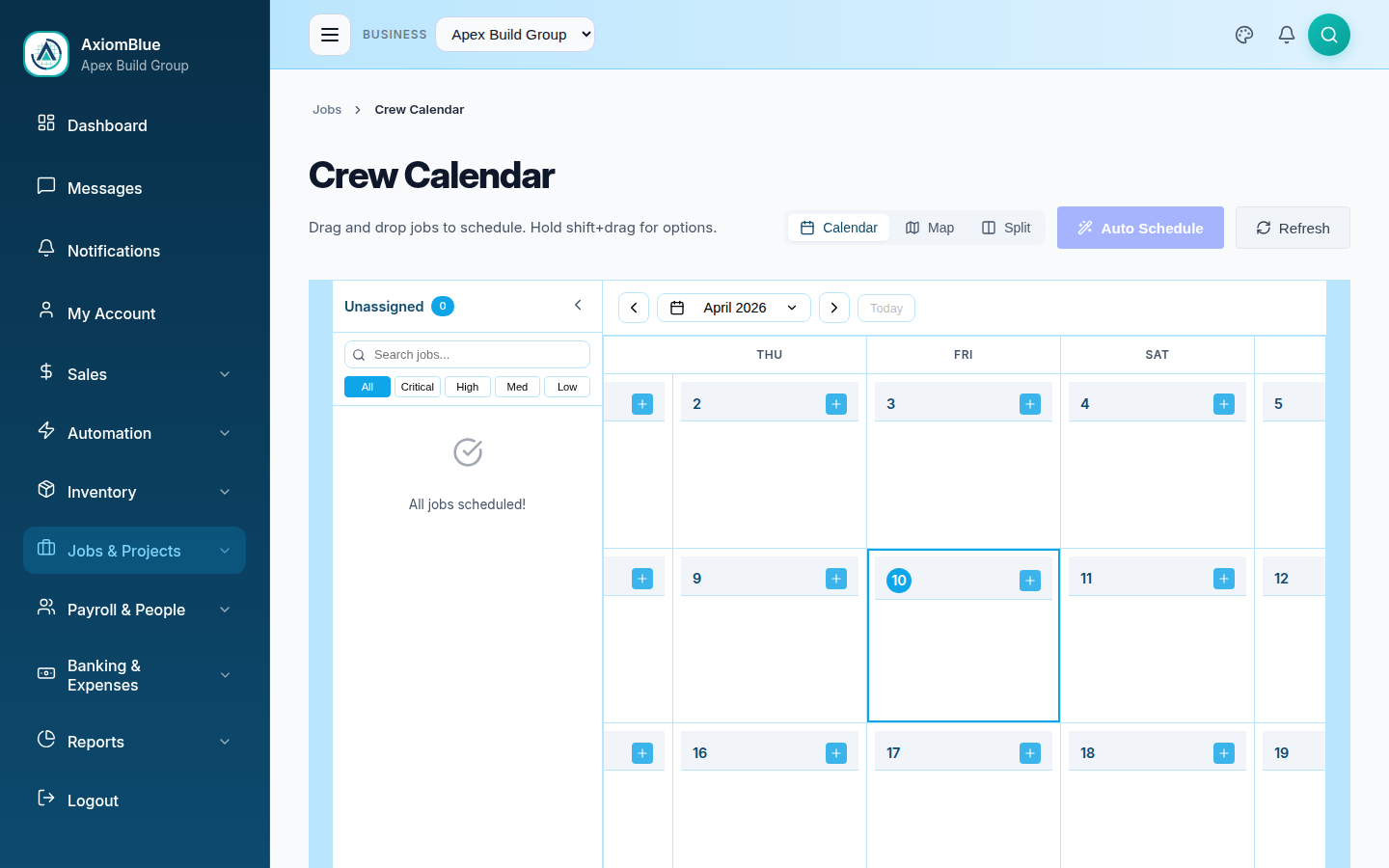
How does scheduling software work for a business?
A good scheduling tool turns three messy questions - who is free, who is closest, and who has the right skills - into a single drag-and-drop decision. In AxiomBlue, every job that needs scheduling appears in an unassigned queue. You drag it onto a crew's lane on the calendar, the job is booked, and the assigned team member is notified on their phone. That is the whole loop, whether you run one crew or fifteen.
Visual Calendar
See the day, week, or month at a glance. Drag jobs between crews and time slots - the calendar is the schedule, not a copy of it.
Multi-Crew Lanes
Every crew and technician gets a colour-coded lane, so scheduling software for multiple crews never turns into a guessing game about who is doing what.
Instant Notifications
Assign or move a job and the team member is notified immediately. No "did you get my text?" - the schedule on their phone is always current.
What can you do with AxiomBlue as a job scheduling system?
AxiomBlue is more than a calendar - it is a complete scheduling and job assignment platform. Because scheduling sits on the same data as your jobs, quotes, and invoices, an assignment is never just a calendar entry; it carries the full job with it.
Crew & Technician Assignment
Assign individual team members, whole crews, or subcontractors to jobs. Each assignment links to the job record so the field has scope, site, and contact details on hand.
Call-Out Dispatch
When an emergency job lands, create it, drag it to the nearest free crew, and dispatch. The team member is notified and on the way without a phone call.
Workload Balancing
See which crews are stacked and which have capacity. Even out the week before overtime and missed appointments pile up.
Site & Job Context
Every scheduled job carries its site address, customer, tasks, and notes - so crews arrive prepared, not chasing the office for details.
Schedule Into Time Tracking
A scheduled job flows straight into time tracking. Crews check in on site with GPS, so planned work becomes accurate, billable hours.
Mobile Schedule for Crews
Field staff open their schedule in any phone browser - today's jobs, addresses, and details. Reschedules update live; nothing to install.
How do you schedule multiple crews without the chaos?
Running multiple crews is where whiteboards and group chats fall apart. One crew finishes early, another is stuck on a site, an emergency call-out comes in - and suddenly the plan only exists in someone's head. AxiomBlue keeps the plan in one place everyone can see. Each crew has its own lane, jobs move with a drag, and the moment something changes, every affected team member's phone updates. The office stops being a switchboard, and the field stops waiting on calls.
Because AxiomBlue also works as a team assignment system, scheduling is never disconnected from the work itself. Assign a team member and they get the whole job - scope, site, customer, tasks. When they finish, their time is already against the right job, ready to invoice. It is the difference between a booking tool and a scheduling platform that actually runs your operation.
Is AxiomBlue a job scheduling app, or full software?
Both, really. There is no separate app to download - AxiomBlue runs in the browser on a phone, tablet, or desktop, so your crew get a mobile scheduling experience without an install, and your office gets full scheduling software on the big screen. It is one system: a job scheduling app for the field and complete scheduling, job management, and invoicing software for the office. That is what makes it a planning platform rather than just another calendar - the schedule, the jobs, and the billing all share the same data.
Scheduling Software - Common Questions
Job scheduling software is a system for assigning jobs to the right crew at the right time and keeping field staff in sync. It replaces the whiteboard and group chat with a visual calendar where you can see who is booked, who is free, and where every job sits. AxiomBlue is job scheduling software built for Australian businesses and field service teams.
Yes. AxiomBlue is scheduling software for multiple crews. Each crew and technician has their own colour-coded lane on the calendar, so you can see every crew's day at a glance, balance workload across teams, and avoid double-booking. Subcontractors can be scheduled alongside your own staff.
Yes. AxiomBlue works as a team assignment system - you assign individual team members or whole crews to jobs, and each assignment flows straight to the job record and to that person's mobile schedule. Field staff get a push notification the moment they are assigned or a job changes.
Yes. AxiomBlue runs in any mobile browser, so crews see today's jobs, site addresses, and job details on their phone with nothing to install. When you reschedule or dispatch a call-out, their schedule updates instantly and they are notified.
Yes. When an urgent call-out comes in, you can create the job, drag it onto the nearest available crew, and dispatch it in seconds. The assigned team member is notified immediately and the job appears in their schedule with the site address and details.
AxiomBlue starts at $29 per seat per month and includes scheduling, job management, quoting, and invoicing in one platform. Every plan comes with a 14-day free trial and no credit card is required to start. See the pricing page for plan details.
Put Your Crews on One Calendar
Stop running the schedule off a whiteboard and a group chat. Assign jobs, dispatch call-outs, and keep every crew in sync - start your free trial today.
No credit card required • 14-day free trial • Cancel anytime