
Use the report as a shortlist, then check the jobs
Open Reports → Recurring Services Health, or select it through Change Report. Review Lapsed rows first, then Drifting rows. Check the named customer and series against Job Series and the individual jobs, record why the gap exists, and agree any next visit before changing the schedule. The report needs Professional and appropriate access; it does not book, message or invoice the customer for you.
Turn the recurring-service report into a checked action list
Open Reports and choose Recurring Services Health, or use Change Report from another report. It requires Professional and the relevant access. You also need permission to inspect the underlying jobs; changing them or their schedule requires the applicable edit permission.
The report lists active series across the business. Keep the customer and Series name together when checking Cadence, Last Visit, Days Since, Avg Gap and Status. It is a current overview without a selectable reporting period, not a calendar of every upcoming visit.
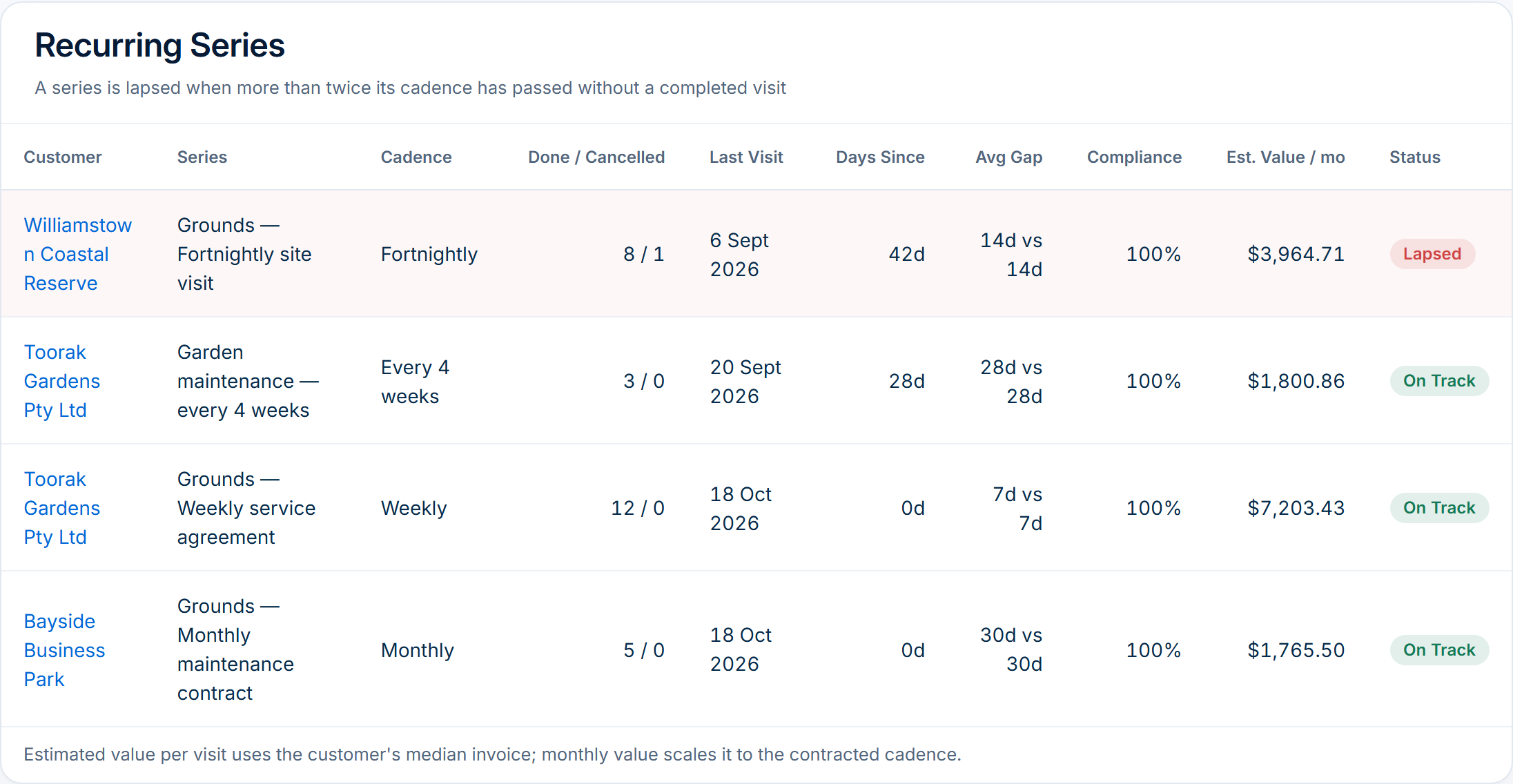
- Start with Lapsed rows, then review Drifting rows. Keep the customer, series name, displayed last visit and reason for review in your working notes. Use the customer link to open its record; the series name itself is not a link.
- Find the matching Job Series and individual jobs. Check the service agreement, planned dates, actual outcomes and upcoming bookings before creating another visit. A future job can already exist even when this report flags the series.
- Check record quality before calling it missed work. Last Visit uses the scheduled date of jobs currently marked Completed; jobs now marked Invoiced are not included in that history. A new series with no completed history is also flagged Lapsed. Inspect job notes, status and billing before drawing a conclusion.
- Record the cause and owner: a delivery gap to resolve, an agreed seasonal pause, work awaiting correct recording, or a new service not yet started. Keep the agreed next action and review date with the job or series reference.
- Arrange recovery work through the normal job and scheduling process after checking access, capacity and the customer’s agreement. Confirm any customer communication and review billing separately. Reopen the report after records change; never mark unperformed work complete just to clear a flag.
Sources: AxiomBlue recurring Job Series instructions · AxiomBlue reports and access
Read recent gaps and historical cadence separately
Lapsed means the report has no qualifying completed visit, or Days Since is greater than twice the nominal cadence. For a fortnightly pattern the threshold is more than 28 days. That is a software review rule, not the customer’s service deadline: an agreed missed appointment may need attention much earlier.
Compliance compares the nominal cadence with the average gap between qualifying visits, capped at 100%. A non-lapsed series below 80% is shown as Drifting; other non-lapsed rows show On Track. This percentage measures recorded spacing, not work quality or regulatory compliance.
A historically regular series can have 100% Compliance and still be Lapsed after a recent gap. Conversely, a recently attended series can be Drifting because older intervals were long. Read the fields together rather than choosing whichever label looks reassuring.
The summary’s On Cadence count includes all non-lapsed series, including Drifting rows. Read the individual Status column to understand the mix. Monthly patterns use a nominal 30 days per month for this calculation, so check calendar dates and the actual agreement separately.
Worked example: one flag, three possible actions
Illustrative example, separate from the demo figures: a fortnightly grounds service shows Last Visit 35 days ago and a 14-day cadence. Since 35 is greater than 2 × 14 = 28, the report flags it Lapsed. That calculation identifies the row to investigate; it does not establish what happened at the property.
The scheduler opens the customer’s matching series and jobs. Check for a visit already booked, an agreed hold, and delivered work recorded elsewhere before arranging another attendance. Keep the job reference and the person responsible for the next action.
- No visit delivered and no later booking; agreement still active: Contact the customer, agree a recovery plan, then create or schedule the required work once.
- Customer agreed to a seasonal pause: Review the series setup and future jobs against that agreement; keep the reason and restart review date.
- A visit was delivered and its job is now Invoiced: Recognise the report’s status limitation; inspect the actual delivery and billing records, without rebooking or rebilling it.
Read next Recurring jobs versus recurring invoices: keep visits and billing aligned → · Lawn care scheduling software: manage repeat visits → · Cleaning scheduling software: manage repeat visits →
Treat Monthly Value at Risk as an estimate, not a loss
AxiomBlue estimates a series’ monthly value from the customer’s median issued-invoice total, scaled to its nominal cadence. The summary adds the estimates for Lapsed series. This is a prioritisation signal from historical documents; it is not a calculation of contracted revenue that has been lost.
Illustrative arithmetic only: a customer median invoice of $140 and a weekly cadence produce $140 × 30 ÷ 7 = $600 estimated per month. Those assumed figures do not establish the current price, number of missed visits, recoverable amount, profit or cash.
Customer invoices can include other work, several visits or different billing arrangements. The same customer may have several series using that customer-wide median, so their estimates can overlap. Check the agreement and relevant invoices before using a monetary figure in a customer conversation or business forecast.
A dash means the report lacks the value input; it does not mean the work has no value. Keep actual completed work, issued invoices, outstanding balances and received payments as separate checks. No invoice or payment is created by reviewing this report.
Read next Recurring jobs versus recurring invoices: keep visits and billing aligned →
Keep the next review useful
Use a regular review point that suits your service agreements, and investigate an urgent missed appointment when it occurs rather than waiting for the report’s two-cadence threshold. Check records alongside the calendar before allocating recovery work.
Finish with a small action list: customer and series, evidence checked, cause, owner, next action and review date. Use existing job notes for the relevant work; a separate working list can track the review without pretending that the report contains an action-management column.
After the agreed action, inspect the actual visit and the customer handover. The useful result is a checked service record and a deliberate next step, not a greener dashboard or a promised revenue recovery.
Common questions
Questions about recurring-service health
Does Lapsed prove that we missed a visit?
No. It can reflect a genuine delivery gap, a new series without qualifying history, an intentional pause or records outside the report’s Completed-status history. Check the series, jobs and customer agreement before rebooking.
Why can Compliance be 100% when a series is Lapsed?
Compliance describes average spacing between qualifying historical visits. Lapsed checks the recent gap or absence of completed history. A previously regular series can have a recent gap, so both values can appear together.
Will this report reschedule or invoice the customer?
No. It provides a review shortlist. Arrange any work through the normal job and scheduling process after checking existing bookings and the agreement. Review messages and billing separately.
Put it to work
Your practical checklist
- Open the Professional report with the appropriate permissions.
- Identify customer and series together.
- Compare status, recent gap and historical spacing.
- Inspect actual jobs, upcoming bookings and the service agreement.
- Record a cause, owner and agreed next step.
- Check delivery and billing separately after the action.
See the records in Axiom Blue
Inspect the recurring-service report
Try this review with labelled sample data in the public demo. Recurring job series and reports require Professional and appropriate access. The report helps identify records to investigate; it does not confirm the service agreement, create recovery work or collect money.
Product instructions
Published by Axiom Blue. Product controls and calculations checked against the released implementation and public demo on 18 October 2026. Screenshots show sample data; worked scenarios are illustrative and do not represent customer outcomes.