STOP SCHEDULING FROM MEMORY
Lawn Care Schedule Template: Build One That Actually Works
How to plan recurring client schedules, route your day efficiently, manage rain delay rescheduling, and handle multiple crews, and why the best schedule template is one that runs itself.
Quick answerA working lawn care schedule records each client's day, visit frequency, estimated duration, assigned crew, and access notes, then groups jobs by suburb to minimise travel. A spreadsheet template handles this up to about eight clients; beyond that, scheduling software like AxiomBlue generates recurring visits automatically and reshuffles rain-delayed jobs with drag-and-drop.
Every lawn care business needs a schedule. The question is whether yours lives in a spreadsheet that is always slightly out of date, in your head where it competes with everything else, or in software that generates, updates, and shares it automatically.
This guide walks through how to build a lawn care schedule that actually holds up: setting up recurring clients correctly, planning routes by day of week, building in seasonal flexibility, handling the inevitable rain delay, and managing multiple crews without confusion. Along the way, we will show you exactly how AxiomBlue replaces the schedule template entirely, because once a client is set up in the system, the schedule writes itself.
- Structure recurring client schedules by frequency and day of week
- Route daily jobs to minimise travel time between sites
- Adjust visit frequency seasonally without losing client history
- Handle rain delays and rescheduling without rebuilding the week
- Assign jobs to multiple crews from a single shared calendar
- Give crew their daily route on their mobile without a morning call
How do you structure a lawn care schedule?
A good lawn care schedule is not just a list of jobs. It is a system for assigning the right work to the right crew on the right day, with enough flexibility to survive rain delays, public holidays, and the client who calls on a Tuesday to change their day to Thursday.
Set Each Client's Recurring Schedule Once
For every recurring client, record: preferred day of week, visit frequency, estimated duration, and any access notes (gate codes, dog on the property, park in driveway). In AxiomBlue, this is entered once per client. The system generates every future visit automatically, whether weekly, fortnightly, monthly, or a custom interval, and adds it to the calendar without any manual re-entry.
Group Clients by Day and Location
Assign clients to days based on their suburb, not just their preferred day. A client in Kew and a client in Hawthorn on the same day makes route sense. A client in Kew and a client in Werribee on the same day does not. Build your recurring schedule around efficient clusters, and add new clients to whichever day already covers their area.
Adjust for Seasonal Frequency Changes
Most residential lawns need weekly mowing in spring and summer, and can drop to fortnightly in autumn and winter. Update a client's frequency in AxiomBlue at the start of each season and all future jobs update automatically. Clients who pause service entirely over winter can have their recurring schedule suspended and reactivated without losing any history or notes.
Reschedule Rain Days Without Rebuilding the Week
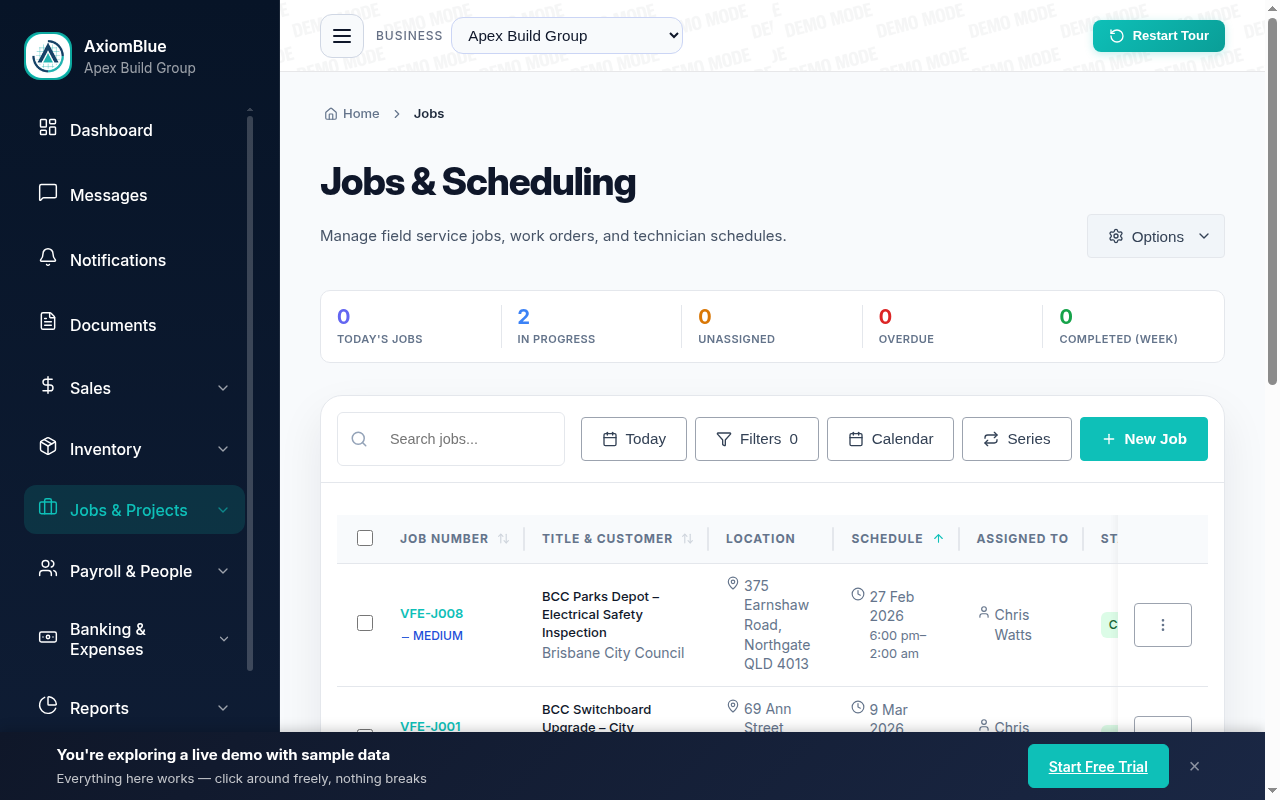
When rain forces a day off, you have two options: push the full day's jobs to the next available slot, or spread them across existing days in the current week. AxiomBlue's drag-and-drop calendar makes both fast. Move jobs individually or in bulk; crew see their updated schedule on their mobile immediately without needing a phone call or text.
Assign Jobs to Multiple Crews Clearly
Each job in AxiomBlue is assigned to a specific crew member. On the calendar, you see all crews side by side. Each crew member sees only their own jobs on their mobile, so there is no confusion about who is doing what. When you need to move a job between crew members, drag and drop it; the updated assignment appears on their device immediately.
Use the Forward View to Fill Gaps
One of the biggest advantages of scheduling software over a template is being able to see weeks ahead. AxiomBlue shows your full recurring schedule on the calendar indefinitely, so you can see which days are underbooked two weeks out and actively fill them, rather than discovering a slow week on Sunday night and scrambling to fill it Monday morning.
Schedule Template vs. Automated Scheduling Software
A spreadsheet or paper template will get you started. Here is where it falls apart as your client list grows, and what automated scheduling software does differently.
| Spreadsheet / Paper Template | AxiomBlue Automated Scheduling Replaces the template | |
|---|---|---|
| Recurring visit entry | Manually entered each week, and easy to forget or miscopy | ✓ Set once per client; all future visits generated automatically |
| Rain delay rescheduling | Manually shifting every affected job takes 20–30 minutes | ✓ Drag and drop jobs to a new day; crew sees the update instantly on mobile |
| Multi-crew visibility | Separate schedules per crew make it easy to overlap or miss jobs | ✓ All crews on one calendar; each crew member sees only their own jobs on mobile |
| Seasonal frequency changes | Manually update every client's row for the new season | ✓ Change one client's frequency; all future jobs update automatically |
| Forward visibility | Only as far ahead as you have manually entered | ✓ Full recurring schedule visible weeks and months ahead, so you spot gaps early |
| Connection to invoicing | None; billing is a separate manual process | ✓ Completed jobs trigger invoicing automatically, with no separate billing step |
What AxiomBlue Does for Lawn Care Scheduling
AxiomBlue replaces the lawn care schedule template with an automated scheduling engine that generates jobs, dispatches crew, and connects directly to invoicing. Here is what that looks like in practice.
Recurring Job Generation
Set each client's visit frequency once. AxiomBlue generates every future job on the calendar automatically: weekly, fortnightly, monthly, or custom intervals. When you change a frequency, all future jobs update. When a client pauses, their recurring schedule suspends cleanly and reactivates on request.
Drag-and-Drop Calendar
Move jobs between days and times by dragging them on the calendar. Reassign from one crew member to another the same way. When rain forces a day off, shift the whole day's jobs to a new slot in seconds rather than rebuilding the schedule from scratch. Changes appear on crew mobiles immediately.
Crew Route on Mobile
Each crew member opens AxiomBlue in their mobile browser and sees their full day's route: client addresses, access notes, photos from the last visit, and estimated job duration. No group chat, no morning phone call. Check-in at the job start and check-out on completion gives you visibility without micromanagement.
Multi-Crew Calendar View
See all crew members' schedules side by side on a single calendar. Spot imbalances, such as one crew overloaded on Wednesday while another has an easy day, and redistribute jobs with a drag. Every crew member always knows their full schedule without you having to send it to them.
Client Notes and Job History
Every client record in AxiomBlue stores access notes, preferred scheduling details, photos from previous visits, and a full job history. Crew can see what was done last visit before they arrive. You can see which clients have had service issues or complaints without digging through text messages.
Direct Link to Invoicing
A completed job in the schedule triggers invoicing, not just a tick on a calendar. AxiomBlue can generate and send an invoice the moment a crew member marks a job done, with no separate billing step. Your schedule and your billing are in sync by design, not by effort.
Why do lawn care schedule templates go out of date?
The fundamental problem with any scheduling template, whether it lives in Excel, Google Sheets, or a printed sheet on the dashboard, is that it describes the schedule as of the moment you wrote it. The moment a client changes their day, a rain event shifts a full day's jobs, or a new client needs to be inserted into the route, the template is out of date. Keeping it current becomes a job in itself, and it is a job that does not earn you anything.
AxiomBlue's scheduling engine works the other way around. Each client's recurring schedule is a set of rules (visit on Wednesday, fortnightly, assigned to Jamie) and the software generates all the actual jobs from those rules. When a client changes their day from Wednesday to Thursday, you change the rule once and all future jobs move. When rain hits on a Tuesday, you drag the affected jobs to Wednesday on the calendar and every crew member's mobile updates immediately. The schedule is always current because it generates itself from the underlying client data.
For businesses running two or more crews, this difference is enormous. Coordinating multiple crew members on a shared paper schedule is an exercise in managed chaos. In AxiomBlue, you assign each job to a crew member and they see only their own schedule on their phone: no confusion, no overlap, no "I thought you were doing that one". The schedule works as a dispatch tool, not just a planning document. Start your 14-day free trial and see how fast your recurring schedule sets itself up.
Lawn Care Scheduling: Frequently Asked Questions
A useful lawn care schedule template should capture: client name and address, scheduled day of week, visit frequency (weekly, fortnightly, monthly), estimated job duration, assigned crew member, and access notes or gate codes. In practice, a template is a good starting point but software handles this far better. AxiomBlue stores all of this per client and generates future jobs automatically without re-entry each week.
When rain forces a day off, you have two options: push the full day's jobs to the next available slot, or spread them across the rest of the week by fitting one or two extras into each existing day. AxiomBlue's drag-and-drop calendar makes both approaches fast: you can shift an entire rain day to the following day in under a minute and crew will see the updated schedule on their mobile immediately without needing a phone call.
The key is a shared scheduling system where jobs are assigned to specific crew members rather than communicated via group chat. In AxiomBlue, each job is assigned to a crew member. They see only their assigned jobs on their mobile. You see all crews on your calendar at once. There is no overlap, no double-booking, and no one turning up to a job that has already been done.
Spring and summer typically require weekly visits for most residential clients; autumn and winter can often drop back to fortnightly. In AxiomBlue, you can adjust a client's visit frequency at any time and all future jobs update automatically. For clients who pause during winter, you can suspend their recurring schedule and reactivate it in spring without losing any of their client information or visit history.
A spreadsheet works for five to eight clients. Beyond that, the maintenance burden of keeping it current (adding new clients, handling cancellations, rescheduling rain delays, tracking which invoices have been sent) absorbs time that should be spent on the work. AxiomBlue generates the recurring schedule automatically and connects it to invoicing, so the schedule is always current without manual upkeep.
For recurring clients, schedule indefinitely and let the software generate future visits as far ahead as your system allows. For one-off jobs, two to four weeks ahead is typical. The advantage of automated recurring scheduling in AxiomBlue is that your calendar always shows the full picture, not just this week. You can spot underbooked days weeks ahead and fill them before they cost you revenue.
Ready to Replace Your Schedule Template with One That Runs Itself?
AxiomBlue generates every recurring job automatically, dispatches crew via mobile, and triggers invoicing on completion, so your schedule is always current without any manual upkeep. 14-day free trial, no credit card required.
No credit card required • 14-day free trial • Cancel anytime