
The starting point
Before invoicing, reconcile the job with the agreed scope, recorded work and prior charges. Then inspect the customer-facing invoice and track its balance after sending.
Decide whether the job is ready to bill
Completion on site and readiness for billing are different decisions. A job may need supporting paperwork, approval of an extra or a review of the final material quantity. Make those outstanding items visible before telling the office it is ready.
For a job that needs another visit, decide whether your agreement calls for a progress invoice or a final invoice later. The person preparing the bill should not have to infer this from an unfinished note.
Review the items that change the amount
Check the customer and billing address, the quote or contract, recorded labour and materials, and any approved additions. Review deposits, previous invoices or claims so the same work is not charged twice.
For fixed-price work, use the agreed amount and approved changes as the starting point. For time and materials, check the quantities and billing rules. The job record supports the review; it does not replace your agreement with the customer.
- Agreed scope and price
- Recorded time and materials relevant to the bill
- Approved variations
- Previous invoices, claims and payments
- Supporting documents the customer needs
Preview the invoice as the customer will see it
Read the description without relying on internal shorthand. A customer should be able to connect the invoice to the work they requested. Check the due date, payment instructions and any tax information with your normal accounting process.
On-site invoicing should fit the connection, device and permissions available to the person doing it. Test the actual workflow before promising that every invoice will be sent from the driveway.
Sending is the start of payment follow-up
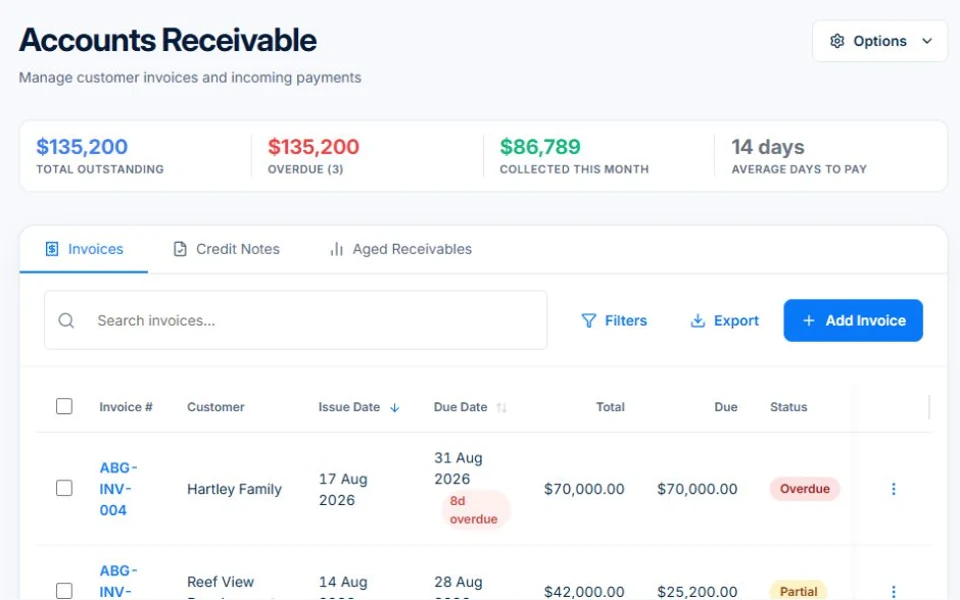
After sending, keep the outstanding balance visible. Record payments and review any adjustments before following up. A customer portal can give the customer another place to find the invoice and related information.
Axiom Blue supports job-to-invoice workflows and accounts receivable. Connected online payments require Professional and a supported provider; provider fees and account setup need to be checked separately. Do not treat an invoice being sent as a payment being received.
Put it to work
Your practical checklist
- Open a completed sample job and review the work.
- Check an approved extra and any prior billing.
- Preview the invoice document.
- Inspect how a payment changes the balance.
- Check the customer’s view of the paperwork.
See the records in Axiom Blue
Try the workflow with a familiar job.
Features and usage limits vary by plan. Review the tools relevant to your process before choosing your setup.